

Yoink 2.0 for iOS Brings iCloud Sync, Handoff Support, Siri Shortcuts, and More - MacRumorsOpen MenuShow RoundupsShow Forums menuVisit ForumsOpen Sidebar
Skip to Content

Yoink 2.0 for iOS Brings iCloud Sync, Handoff Support, Siri Shortcuts, and More

by

Eternal Storms Software today released Yoink 2.0 for iOS and Yoink 3.5 for Mac, two major upgrades to the popular drag and drop-improving "shelf" app.

For those unfamiliar, Yoink acts like a convenient shelf for users to drag in files and other content, do something else (switch apps, tabs, and so on) and then easily access those items again by dragging them out of Yoink.
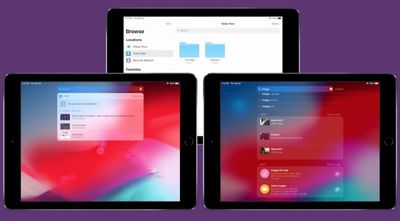
yoink 2
Version 2.0 of Yoink for iOS brings iCloud sync support, so items stored in Yoink are available across iOS devices logged into the same Apple account. Each device has its own "shelf" in iCloud, so all items are grouped for easy discoverability.

The different shelves are accessible through both the Yoink app and also in its extensions, users can access all items via the Today Widget, the keyboard, the file provider, and Spotlight search.

Yoink 2.0 for iOS also brings support for Handoff across iPhones, iPads and Macs, so items selected on one device can be handed off to another and those files are transferred right away.

Elsewhere, Yoink now also includes support for Siri Shortcuts. Using Siri, users can store clipboard contents or download the link to the clipboard in Yoink, without having to switch to or activate Yoink itself.

Items can also be copied from Yoink using Siri (the most recently added image, PDF, text or link, for example), while Yoink can be opened using the virtual assistant to show a specified, synced device's items.

In addition, Yoink for iOS has expanded support for keyboard commands, an optional Dark Mode interface, and optional smaller icons for showing more items stored in the Yoink "shelf" at once.

Meanwhile over on Yoink for Mac, the new version 3.5 update adds Handoff support between Macs and iOS devices, a clipboard history Today Widget that keeps track of your clipboard's contents, and full compatibility with macOS Mojave (including Dark Mode) as well as a Finder Quick Action.

Yoink for iPad and iPhone is available on the App Store for the introductory price of $3.99. After the introductory week has passed, the price will change to $5.99.

Yoink for Mac is available on the Mac App Store for the introductory price of $4.99. After the introductory week has passed, the price will change to $7.99. A free, 15-day trial is also available on the website – the app requires at least OS X Lion 10.7.3, although macOS High Sierra 10.13 or later is recommended.


Tag: Yoink

Top Rated Comments

101 months ago
I fail to recognize the difference between this app vs the Files app? It appears Files already does what this app does. Could someone enlighten me?
Not sure about the iOS version, but the Mac version is basically a little temporary "shelf" that appears on the edge of your screen and lets you put any file or draggable object there. The shelf stays put while you switch apps -- and persists between multiple desktops, full-screen apps, etc -- and then you can drag things back out of it to wherever you're dragging them to. Once things are dragged out, the shelf disappears. I find it indispensible for multiple desktops.

Actually, this video explains it better than I can: https://eternalstorms.at/yoink/mac/
Score: 2 Votes (Like | Disagree)
Jessica Lares Avatar
101 months ago
I fail to recognize the difference between this app vs the Files app? It appears Files already does what this app does. Could someone enlighten me?
It's meant for you to save something temporarily, use it, and then have it automatically go away.
Score: 2 Votes (Like | Disagree)
Abstract Avatar
101 months ago
It’s sort of like the feature that was in Pathfinder 10-12 years ago, except accessible throughout OSX? That’s pretty cool.
Score: 1 Votes (Like | Disagree)
101 months ago
I fail to recognize the difference between this app vs the Files app? It appears Files already does what this app does. Could someone enlighten me?
Score: 1 Votes (Like | Disagree)

Popular Stories

iCloud iPhone 17 Pro

iPhone Users Who Pay for iCloud Storage Get Two New Perks on iOS 27

Thursday July 2, 2026 6:10 am PDT by
If you pay for certain iCloud+ storage plans beyond the 5GB that Apple offers for free, you will receive two more perks on iOS 27 at no additional cost. A summary of the two new iCloud+ perks on iOS 27:Increased daily usage limits for some new Apple Intelligence features, including image generation in the revamped Image Playground app. HomeKit Secure Video cameras receive generated video...
Apple Event Logo

Apple Just Released a New Product

Thursday July 2, 2026 8:04 am PDT by
Apple's first product release of summer 2026 occurred this week, but do not get too excited, as it is merely the Beats Solo Buds in a new color. Beats Solo Buds are now offered in orange through Best Buy in the U.S., with availability set to expand to 7-Eleven stores in Japan on July 4. Apple already offered orange Solo Buds in India for free with the purchase of an iPhone 15 or iPhone 15 ...
iPhone 4 on Black Feature

Apple Facing One of Its Worst Leaks Since the iPhone 4

Thursday July 2, 2026 9:53 am PDT by
Apple supplier Tata Electronics recently suffered a cyberattack that resulted in thousands of confidential files being published on the dark web, and this reportedly included some photos and documents related to the upcoming iPhone 18 Pro. We have elected not to share any of the leaked photos in this story due to the illegal nature in which they were obtained, but they can easily be found...















