

Apple Plans to Expand Uses of Haptic Touch on iPhone XR Over Time - MacRumorsOpen MenuShow RoundupsShow Forums menuVisit ForumsOpen Sidebar
Skip to Content

Apple Plans to Expand Uses of Haptic Touch on iPhone XR Over Time

By now, you've probably heard that the iPhone XR features a new technology called Haptic Touch instead of the usual 3D Touch.

haptic touch
Haptic Touch is simply a marketing name for a long press combined with haptic feedback from the Taptic Engine. The feature is a substitute for 3D Touch, which Apple wasn't able to include on the iPhone XR in order to achieve a nearly edge-to-edge LCD screen, a remarkable engineering feat.

The biggest downfall with Haptic Touch is that it currently works in only a few places, such as the flashlight and camera shortcuts on the lock screen, and in Control Center to pop open additional toggles and menus. Fortunately, that won't be the case forever, according to The Verge's Nilay Patel.

From Patel's iPhone XR review, emphasis ours:

Haptic Touch does not have equivalents to everything 3D Touch can do, however — I missed previewing links in Safari and Twitter quite a bit. Apple told me it's working to bring it to more places in iOS over time, but that it's going slow to make sure the implementation is right.

Apple did not provide a timeframe, but it's safe to assume that additional Haptic Touch gestures will be added in future software updates.

It'll be interesting to see where Apple expands Haptic Touch across iOS, as the feature can only be implemented for actions that don't already rely on a long press. For example, long-pressing on an app icon on the home screen enables "wiggle mode," allowing apps to be deleted or rearranged on the home screen.

For that reason, Haptic Touch does not work with Quick Actions when you long press on an app icon on the iPhone XR home screen. Haptic Touch also doesn't support Peek and Pop for previewing content such as links and messages.
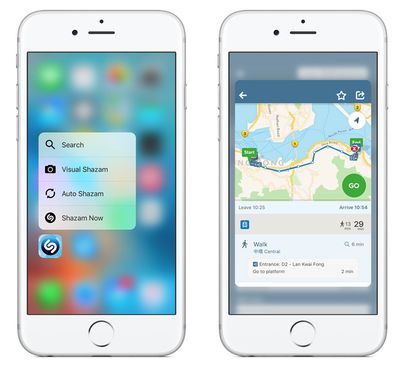
peek pop

3D Touch: Quick Actions on left, Peek and Pop on right

Apple already works around the lack of 3D Touch for keyboard trackpad mode. In iOS 12, users can simply tap and hold the space bar to enter the trackpad mode, which allows for easier movement of the cursor within text fields. This user interface change was more than likely inspired by the iPhone XR.

A few months ago, Barclays analysts said it is "widely understood" among Apple's supply chain partners that all 2019 iPhones will lack 3D Touch. If accurate, Apple's plans to expand Haptic Touch may go beyond software. For now, the pressure-sensitive feature lives on with the iPhone XS and iPhone XS Max.


Related Forum: iPhone

Popular Stories

iCloud iPhone 17 Pro

iPhone Users Who Pay for iCloud Storage Get Two New Perks on iOS 27

Thursday July 2, 2026 6:10 am PDT by
If you pay for certain iCloud+ storage plans beyond the 5GB that Apple offers for free, you will receive two more perks on iOS 27 at no additional cost. A summary of the two new iCloud+ perks on iOS 27:Increased daily usage limits for some new Apple Intelligence features, including image generation in the revamped Image Playground app. HomeKit Secure Video cameras receive generated video...
iPhone 4 on Black Feature

Apple Facing One of Its Worst Leaks Since the iPhone 4

Thursday July 2, 2026 9:53 am PDT by
Apple supplier Tata Electronics recently suffered a cyberattack that resulted in thousands of confidential files being published on the dark web, and this reportedly included some photos and documents related to the upcoming iPhone 18 Pro. We have elected not to share any of the leaked photos in this story due to the illegal nature in which they were obtained, but they can easily be found...
American Express Gold Apple Pay Feature

American Express Announces New Apple Pay Feature

Tuesday June 30, 2026 10:27 am PDT by
American Express today announced that you can now redeem Membership Rewards points when checking out with Apple Pay on the web and in apps on the iPhone and iPad. When checking out with Apple Pay on iOS 18 or iPadOS 18 or later, tap on your eligible American Express card (Platinum, Gold, Green, and others) and select the Membership Rewards points option. You can use points to cover all or...

Top Rated Comments

100 months ago
Not liking this. 3D Touch is my most favorite feature on iPhone. Can't fathom it's disappearance.
Score: 30 Votes (Like | Disagree)
100 months ago
3D Touch could have been "long press" since day 1. Wasted engineering effort, like the compact Mac Pro.
Score: 21 Votes (Like | Disagree)
Shadow Jolteon Avatar
100 months ago
Not liking this. 3D Touch is my most favorite feature on iPhone. Can't fathom it's disappearance.
Same here. Both me and my husband use it all the time and love it. The lack of it was the one thing that made me go back and forth on whether or not to get an iPhone Xr. (Though, we ended up preordering ours a couple days ago.)

I didn't realize that the long press solution wasn't replacing the functionality of 3D Touch/Force Touch all around. A long press isn't as convenient or quick, but I was willing to compromise if I could still use the preview features, which I use all the time. I'm really hoping they add at least the Peek and Pop feature for devices without it really soon.
Score: 14 Votes (Like | Disagree)
100 months ago
3D Touch could have been "long press" since day 1. Wasted engineering effort, like the cMP.
That’s horrendously false. I am not tied to the amount of time a tap and hold takes with 3D Touch. Over time, that’s a lot of
3D Touch could have been "long press" since day 1. Wasted engineering effort, like the cMP.
I’m amazed at how many people don’t understand what 3D Touch is. You should work with them, and merge your $1T Tap-and-Hold company with Apple’s.
Score: 9 Votes (Like | Disagree)
100 months ago
How about they focus on getting Touch ID and the headphone jack re-introduced instead???
Score: 9 Votes (Like | Disagree)
100 months ago
3D Touch was useless from the beginning. And it makes the devices thicker and more expensive for Apple.
Long press and hold is the solution, works great on the spacebar for moving the cursor in iOS 12.
Score: 9 Votes (Like | Disagree)















