watchOS 5.1 Update Bricking Some Apple Watches [Update: Apple Temporarily Pulls watchOS 5.1] - MacRumorsOpen MenuShow RoundupsShow Forums menuVisit ForumsOpen Sidebar
Skip to Content

watchOS 5.1 Update Bricking Some Apple Watches [Update: Apple Temporarily Pulls watchOS 5.1]

It appears the watchOS 5.1 update that was released this morning is causing problems for some Apple Watch owners. Multiple MacRumors readers have had issues installing the new software and are reporting that the update has bricked their devices.

Customers who are affected are seeing their Apple Watches stuck at the Apple logo loading screen after initiating the watchOS 5.1 update.
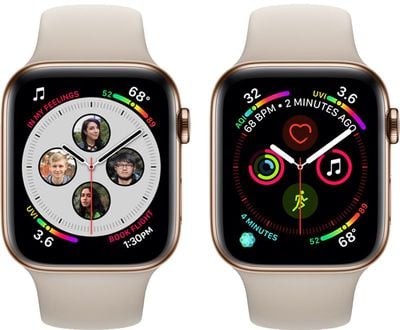
applewatchseries4watchfaces
Some customers who contacted Apple were initially told that the update could take a few hours, but multiple people have seen no progress after three or more hours. From MacRumors reader Bazooka-joe:

So my series 4 sssb has been stuck on installing 5.1 For an hour and a half now with nothing showing on the watch except the bright white Apple icon. Spoken to Apple Support who said that they are getting calls from other people experiencing the same issue and they have advised me to leave it for 2 to 3 hours. WTF Why would an update that supposed to take 10 minutes to install take 2 to 3 hours

It appears affected users have the Apple Watch Series 4, which is the newest Apple Watch that was released in September.

Some MacRumors readers have said that Apple is going to be shipping out replacement watches for those who have been affected.

Not all customers who have an Apple Watch Series 4 have had problems installing the watchOS 5.1 update, but as a cautionary measure, it's worthwhile to hold off downloading and installing the software until Apple pushes a fix. Apple has not pulled the watchOS 5.1 update as of yet.

Update: Apple has temporarily pulled the watchOS 5.1 update.

Related Roundup: Apple Watch 12
Buyer's Guide: Apple Watch (Buy Now)
Related Forum: Apple Watch

Popular Stories

apple watch series 3 design

Apple Offers Steps to Fix Daylight Saving Time Bug on Apple Watch

Sunday November 1, 2026 3:34 am PST by
Apple has published a support document describing what to do if your Apple Watch continues to show time that's off by one hour after daylight savings time changes. "This incorrect time appears only on the Always On display when your wrist is down," says Apple. "When you activate the display by tapping it or raising your wrist, the time changes to the correct hour." To fix the issue, Apple says ...
siri recap live rewind

watchOS 27.3 Brings Live Rewind and Siri Recap to Apple Watch

Tuesday November 3, 2026 10:35 am PST by
With the first beta of watchOS 27.3, Apple is introducing new Audio Intelligence features it previewed for the Apple Watch Series 12 and Ultra 4 earlier this year. Powered by the S11 chip, Audio Intelligence includes Live Rewind, Siri Recap, Sound Recognition, and Shazam Music Recognition. Sound Recognition and Shazam are already on the watch, but Live Rewind and Siri Recap are now available ...
apple watch series 3 design

Apple Watch Users in Europe Report Daylight Saving Glitch

Monday October 26, 2026 5:26 am PDT by
Some Apple Watch users running watchOS 27 are reporting a daylight saving glitch after clocks went back in the UK and Europe on Sunday. In a MacRumors forums thread, five users – several in the UK and central Europe – say their watch shows the correct time when activated, but the Always-On display keeps showing summer time, leaving it an hour fast. The problem has also been reported in...

Top Rated Comments

zorinlynx Avatar
105 months ago
Can anyone explain why Apple didn't implement a DFU restore procedure for the watches? It shouldn't be possible for these devices to brick.

They should have implemented plugging the charger puck into a computer and using iTunes to restore it, just like you can an iOS device.
Score: 14 Votes (Like | Disagree)
105 months ago
Weird. This was by far the fastest and smoothest Apple Watch update I've ever seen. Took all of 10 minutes tops from start to finish on my Series 4. Nothing like the sometimes 1-2 hours I've seen in the past on my previous S0 & S1 watches.
Score: 13 Votes (Like | Disagree)
Bazooka-joe Avatar
105 months ago
I often say this each time an update comes out: WAIT A FEW HOURS. But there is always some jerkoff in the comments who thinks they know better and says that there is nothing to be worried about. Just wait a few hours! Patience.
But if we all take your advice then no one will know if there is a problem
Score: 10 Votes (Like | Disagree)
105 months ago
Tim would like to thank you for paying $400 dollars to be a beta tester.
Score: 9 Votes (Like | Disagree)
CMoore515 Avatar
105 months ago
All good on my Series 4. Took about 15 minutes.
Score: 7 Votes (Like | Disagree)
lexlevi Avatar
105 months ago
I am one of the unlucky ones as well. My main concern with how long it will take to fix it is screen burn-in from the Apple logo. After trying multiple button combinations, I found one that works to power the watch off:

1. Hold the Digital Crown and the side button together until it powers off.
2. As soon as it goes to black, and before the Apple logo comes back, continue holding the side button, but let go of the Digital Crown.
3. When the Apple logo does appear, hold the crown down once again.
4. As soon as it’s back to black, let go of both buttons.

When I spoke to support, they made it seem that this would be a software only fix and not a swap. So it’s best to follow these steps, preserve the display and not risk a burned in logo.


Looks like I'm one of the unlucky ones. Mine is bricked too! Such BS. As soon as I couldn't get past the Apple logo I came here and saw the article. Wish I had known ahead of time - would've saved myself the headache. Went through the normal channels - online chat, spoke on phone and the person I spoke to was acting as if this the 1st time hearing of the issue. Said I'd need to make an Apple Genius Bar appointment to have them look at it. Really? You know what the issue is! Why he couldn't just start the replacement process now is beyond me. So the earliest appointment I could get (that is conducive to my work/life schedule) isn't until Saturday. Such a waste. I'll walk in there, they'll test it and then tell me it needs to be replaced. Which means I'll have to wait another week or so until I get a working watch again.


[doublepost=1540952576][/doublepost]Does anyone know if there is a way to power my paperweight down? Or will it stay on the apple logo screen until the battery dies?
Score: 6 Votes (Like | Disagree)
Latest Stories
Apple Store Subscription Sign-Up Controversy Exposed
5 hours ago
Siri AI Rumored to Become 'More Like an Agent' as Early as Next Year
15 hours ago
Apple Taking New Approach to Developing iOS 28 and macOS 28
17 hours ago
Early Apple Black Friday Deals on Apple Watch, MacBook Air, and More
2 days ago
'Backglow' Lets You Customize New MacBook Pro's Glowing Apple Logo
2 days ago
Top Stories: Apple Product Launches, iOS 27.3 Beta, and More
2 days ago
More Fun iPhone Duo Apps: 30 New Picks to Try
2 days ago
Hands-On With Apple's New OLED Touchscreen MacBook Pro
2 days ago
Apple Store With All-New Design Opening Soon in Southern California
2 days ago
Control the Glowing Apple Logo on Your New MacBook Pro
3 days ago
Apple Shares New 'Apple Card: Apply and Use in Minutes' Ad
3 days ago
Apple Says More Than 100,000 Apps Optimized for iPhone Duo, Here's What's Still Missing
3 days ago
Early Black Friday Deals Kickoff With Steep Discounts on Apple Watch Ultras and More
3 days ago
The MacRumors Show: iOS 27.3 Looks Like a Huge Update
3 days ago
Best Buy's Black Friday Event Begins With Sitewide Savings on Apple, TVs, More
3 days ago
Apple Releasing Yet Another Two New Products Next Week
3 days ago
MacBook Air Drops to Lowest Price in Months With Amazon's $250 Discount
3 days ago
Apple Rumored to Drop the iPhone's Action Button Next Year
3 days ago
Apple's Extended Return Policy Now in Effect for 2026 Holiday Season
3 days ago
Apple Music Classical Updated With New Icon and Refreshed Design
3 days ago
OLED iPad Mini, M6 iMac, and New MacBook Pros Available From Today
3 days ago
Apple Surveys iPhone Duo Buyers About Crease and Camera
3 days ago
Apple's First Touchscreen Mac is Now Arriving to Customers
3 days ago
Claude Gets Personal Finance Feature With Bank Account Linking
3 days ago
Apple Arcade Adds Crossy Road Rush and NBA 2K27
3 days ago
Apple's New HomeView Smart Home Hub: Here's How Much RAM It Has
3 days ago
iPad Mini vs. iPad Air Buyer's Guide: Now Just $50 Apart
4 days ago
First iOS 27.3 and macOS Golden Gate 27.3 Public Betas Now Available
4 days ago
Apple Announces a New Mac Sales Record
4 days ago
Paid $200 for Logic Pro? Apple Says You Won't Get This New Feature
4 days ago








































