Amazon appears to have recently added its popular "X-Ray" feature to the Amazon Prime Video app on the Apple TV.
X-Ray lets Amazon Prime Video users get more information about the TV shows and movies they're offering, with the feature providing cast and character information, trivia, bonus content, photo galleries, and more.
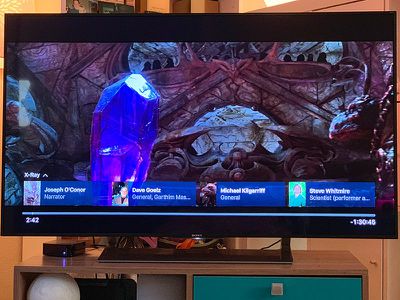
On Apple TV, the X-Ray feature can be used by tapping on the Apple Remote's main button and then swiping upwards after the "X-Ray" text appears on the screen.
From there, you can view information on the actors in a particular scene, jump to a different scene in a TV show or movie, see a full cast list, or read trivia facts.
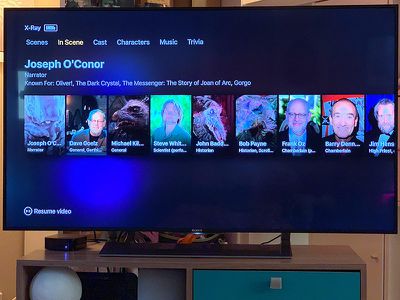
On some titles, there's also a collection of bonus photos and videos to look through, with behind-the scenes information, concept art, set design, and more.
X-Ray is a feature that's available on most devices where Amazon Prime Video can be watched, but it wasn't added to the Apple TV until recently and wasn't an available option when the Amazon Prime Video app for Apple TV launched in 2017. X-Ray is also available on the Amazon Prime Video app for iOS.
Apple today released tvOS 26.5, the fifth update to the tvOS operating system that came out last fall. tvOS 26.5 is available for the Apple TV 4K, and it comes over a month after Apple released tvOS 26.4.
tvOS 26.5 can be downloaded using the Settings app on the Apple TV. Open up Settings and go to System > Software Update to get the new software. Apple TV owners who...
Apple today provided developers with the first betas of upcoming watchOS 26.6, tvOS 26.6, and visionOS 26.6 betas for testing purposes. The software two weeks after Apple launched the 26.5 versions of each platform.
The software updates are available through the Settings app on each device, and because these are developer betas, a free developer account is required.
There's no word on...
Apple has announced that "Larger Text" support is coming to tvOS, allowing users to increase the on-screen text size to make it easier to read.
"Larger Text" lets you adjust the size of text in supported apps, with the option already available on other devices like the iPhone, iPad, and Vision Pro.
This was one of the new accessibility features that Apple previewed earlier this week, with ...
I have to say, the Amazon app was total sh** when first released but it’s 100% better now. It actually looks and acts like a native tvOS app instead of a crappy web interface.
Great, they give us x-ray (which is hit and miss on the Kindle app) but can’t give us 5.1 Dolby on Amazon Originals. I’m still getting Original series in 2.0 stereo. Come on, Amazon. This has been an issue since the app came to Apple TV and still doesn’t work.
I have to say, the Amazon app was total sh** when first released but it’s 100% better now. It actually looks and acts like a native tvOS app instead of a crappy web interface.
I still have two issues with the app, one which drives me crazy.
1) No sound feedback when swiping, which makes it seem non-native to me and makes it less exacting.
2) The damned Watch Next row keeps disappearing and I must futz with switching screens (go into Watchlist and back) over and over until it shows up. The iPad version does the same but I don’t use that anymore now that it’s on the Apple TV.
This second one drives me insane!
Amazon! Is it really so hard, setting ShowWatchNext = ALWAYS?
I’ve checked half a dozen movies that support x-ray and not one works on my Apple TV, but do on my iPad. I do see the release notes say “bug fix x-ray,” which seems to indicate the feature was already present before today. Not working for me and I’m on that current version. So either it’s still buggy or it’s server side and it’s not being turned on for everyone.
It’s a fun feature for movie buffs. I hope they get it squared away.