Everything New in iOS 12.2 Beta 3: Apple TV Remote Redesign, Apple News Tweak, Bug Fixes and More - MacRumorsOpen MenuShow RoundupsShow Forums menuVisit ForumsOpen Sidebar
Skip to Content

Everything New in iOS 12.2 Beta 3: Apple TV Remote Redesign, Apple News Tweak, Bug Fixes and More

Apple this morning released the third beta of iOS 12.2 to developers, and as with most early betas, the new software introduces refinements and user interface changes for various features.

There are several minor tweaks, such as an update to the Apple News logo, along with more major updates that include a new Apple TV Remote design and multiple important bug fixes. We've outlined everything new in the third beta of iOS 12.2 below.

- Apple TV Remote redesign - The ‌Apple TV‌ Remote has been redesigned again with a darker interface, both in the Remote app itself and in Control Center.
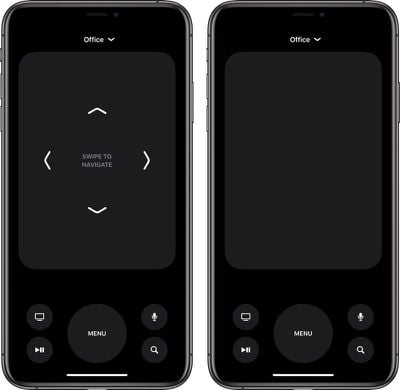
tvremotenewinterface
- Lock screen charging fix - The second beta of iOS 12.2 had a pesky bug that caused the iPhone's charge to be displayed on the Lock screen instead of the date. In beta 3, that's been fixed.

- ‌Apple News‌ logo - In the ‌Apple News‌ app, instead of spelling out "‌Apple News‌," Apple uses the "" symbol along with the word "News," similar to Apple Pay.

applenewslogo
- About screen - The interface for viewing information about your iPhone has been updated and rearranged in a more logical way with info like model number and serial number at the top with carrier information at the bottom.
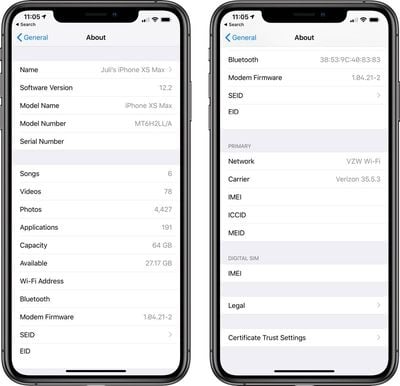
aboutscreenios122beta
- Group FaceTime bug fix - The Group ‌FaceTime‌ bug has been addressed in iOS 12.2 and Group ‌FaceTime‌ is now once again available to iOS 12.2 users.

- Developer updates - Alongside iOS 12.2 beta 3, Apple introduced new resources for developers. Siri Shortcuts design resources are available, as are new iOS system design templates, Adobe XD Apple Watch design resources, and an SF Compact Rounded font. Developers are also now able to offer subscription discounts on a broader basis thanks to a new API.

Siri Apple Store suggestions - There's a new section under ‌Siri‌ & Search > Apple Store that indicates ‌Siri‌ in iOS 12.2 will be able to suggest Today at Apple sessions for you based on your Safari and app usage.

Apple has introduced many other changes over the course of the beta testing period, with most of the updates outlined in our iOS 12.2 tidbits post.

Additional details on iOS 12 can be found in our iOS 12 roundup.

Related Forum: iOS 12

Popular Stories

Apple Card iPhone 16 Pro Feature

Apple Card Promo to Offer Free AirPods Pro 3

Friday May 15, 2026 8:59 am PDT by
Starting as early as next week, customers who sign up for an Apple Card at Apple's retail stores in the U.S. will receive $249 cash back when they purchase AirPods Pro 3, according to Bloomberg's Mark Gurman. The promotion has yet to be officially announced by Apple, so exact terms and conditions are not available at this time. AirPods Pro 3 are priced at $249 in the U.S., so customers who...
Apple WWDC25 iOS 26 CarPlay Light mode 250609

Six Popular iPhone Apps Now Available on CarPlay

Thursday May 14, 2026 9:10 am PDT by
Apple's CarPlay system for accessing iPhone apps on a vehicle's dashboard screen has received six popular apps in recent weeks: ChatGPT, Perplexity, Grok, Google Meet, WhatsApp, and the indie artist streaming platform Audiomack. Make sure you have the latest version of each app and they will automatically appear on CarPlay. ChatGPT Starting with iOS 26.4, CarPlay supports voice-based...
airpods pro 3 pink

New Apple Card Holders Can Get Free AirPods Pro 3, But There's a Catch

Monday May 18, 2026 8:11 am PDT by
Apple today launched a new promotion offering new Apple Card holders the chance to earn back the cost of AirPods Pro 3 through monthly cash rebates, but there is a recurring spend requirement attached. Customers who open a new Apple Card account and purchase AirPods Pro 3 directly from Apple by June 15 will qualify. Starting July 1 and running through April 30, 2027, cardholders can earn $25 ...

Top Rated Comments

Luiz Claudio Eudes Corrêa Avatar
95 months ago
I live in a Condo. If only there was a way to prevent all of my neighbors Apple TV's from showing up in my AirPlay device list.
On Airplay settings on your AppleTV, just switch from allowing close devices to only allow devices from your network (-;
Score: 14 Votes (Like | Disagree)
Swazaloo Avatar
95 months ago
I live in a Condo. If only there was a way to prevent all of my neighbors Apple TV's from showing up in my AirPlay device list.
Score: 14 Votes (Like | Disagree)
IRockThat828pScreen Avatar
95 months ago
I'm just so ready for iOS 13.
Score: 12 Votes (Like | Disagree)
95 months ago
can they actually redesign the actual apple tv remote? i mean...it's a piece of crap
Score: 9 Votes (Like | Disagree)
mpainesyd Avatar
95 months ago
You know those buttons you could barely see? Well, you see them even less now! Can't innovate my ass! /sarcasm
A mute button would be a welcome addition. It is irritating that apps like Netflix suddenly play loud previews.
Score: 7 Votes (Like | Disagree)
imola.zhp Avatar
95 months ago
I live in a Condo. If only there was a way to prevent all of my neighbors Apple TV's from showing up in my AirPlay device list.
We live in a single family home and still have this issue...

It also means that any apple TV's you have are showing up in their lists too.
Score: 6 Votes (Like | Disagree)