

MacStories Shares Useful Collection of 150 Custom iOS Shortcuts - MacRumorsOpen MenuShow RoundupsShow Forums menuVisit ForumsOpen Sidebar
Skip to Content

MacStories Shares Useful Collection of 150 Custom iOS Shortcuts

by

Apple in iOS 12 introduced a new Shortcuts app, built on the Workflow app that it acquired in 2017. Shortcuts lets you automate tasks, simplifying everything from calculating a tip to sharing an Apple Music song.

Shortcuts can do an endless number of things, but it can be tough to find useful new Shortcuts if you're not well versed in building them yourself. MacStories' Federico Viticci, known for creating useful Shortcuts, this morning announced a collection of Shortcuts that he's created over the years.
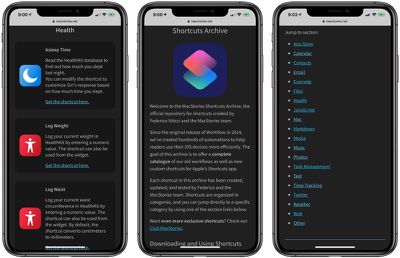
macstoriesshortcutsarchive
The MacStories Shortcuts archive includes 150 shortcuts at launch, but Viticci plans to add more over time. The archive is neatly organized into various categories, and everything is available for free. MacStories says that anyone is free to download, modify, and redistribute shortcuts from the archive to meet their needs.

Viticci updated and adapted all of the shortcuts that he's been using in the Workflow app for years, so this is a robust collection filled with automations for developers, writers, and the average iPhone user.

There are shortcuts for copying App Store release notes, saving screenshots, getting affiliate links, and more, and that's just in the ‌App Store‌ section.

Other useful shortcuts include a file downloader for iCloud Drive, a PDF creation tool, an option for zipping a collection of files, logging weight in the Health app, calculating average heart rate for the last two weeks, adding frames to screenshots from Apple products, getting images from a webpage, and many more.

If you want additional shortcuts, the Shortcuts subreddit on Reddit is also an excellent resource for finding new content in addition to the MacStories archive.


Top Rated Comments

96 months ago
Can someone enlighten me as to why you need some of these shortcuts? It seems to me the functionality is already built in for a lot of these. I've seen some very complicated shortcuts for very specific use cases, but many of these seem too simple to need. For example, one of the shortcuts listed gives the weather forecast for the day. "Hey Siri, what's the weather for today" does the same thing. Why do I need a shortcut?
Score: 6 Votes (Like | Disagree)
AngerDanger Avatar
96 months ago
Seems like there are a lot of ways this one could go wrong…


@keysofanxiety, this might be up your alley. ;)

Attachment Image
Score: 4 Votes (Like | Disagree)
keysofanxiety Avatar
96 months ago
Seems like there are a lot of ways this one could go wrong…


@keysofanxiety, this might be up your alley. ;)
Oh boy. There’s a strong possibility you’ll be receiving a few more of my mirror pictures in weird and wonderful poses. Ever seen an oiled man flexing next to a television remote?

Sorry in advance AD.
Score: 3 Votes (Like | Disagree)
Capeto Avatar
96 months ago
I'm looking for a shortcut to go to the App Store and automatically install all available app updates. Having to do this manually every day is a pain. Any ideas?
This literally takes 3 presses: Open App Store, Press Updates tab, Press “Update All”

Alternatively: Settings > iTunes & App Stores > Toggle “Updates” under “Automatic Downloads” to on
Score: 1 Votes (Like | Disagree)
96 months ago
The most useful one I’ve found so far is sending a mass text without forming a group chat.
Score: 1 Votes (Like | Disagree)

Popular Stories

shortcuts ios 27

Apple Brings Natural Language Creation to Shortcuts App

Monday June 8, 2026 11:06 am PDT by
Apple today announced that users can now describe a shortcut in natural language, with Apple Intelligence automatically building the automation in the background. Previously, creating a Shortcuts automation required users to manually build workflows step by step, making the feature largely the preserve of more technically minded users. With the upcoming update, users can simply describe what ...
iCloud iPhone 17 Pro

iPhone Users Who Pay for iCloud Storage Get Two New Perks on iOS 27

Thursday July 2, 2026 6:10 am PDT by
If you pay for certain iCloud+ storage plans beyond the 5GB that Apple offers for free, you will receive two more perks on iOS 27 at no additional cost. A summary of the two new iCloud+ perks on iOS 27:Increased daily usage limits for some new Apple Intelligence features, including image generation in the revamped Image Playground app. HomeKit Secure Video cameras receive generated video...
iPhone 4 on Black Feature

Apple Facing One of Its Worst Leaks Since the iPhone 4

Thursday July 2, 2026 9:53 am PDT by
Apple supplier Tata Electronics recently suffered a cyberattack that resulted in thousands of confidential files being published on the dark web, and this reportedly included some photos and documents related to the upcoming iPhone 18 Pro. We have elected not to share any of the leaked photos in this story due to the illegal nature in which they were obtained, but they can easily be found...















