

Ulysses 15 Introduces Split Text Editing Window, Keywords Manager, and More - MacRumorsOpen MenuShow RoundupsShow Forums menuVisit ForumsOpen Sidebar
Skip to Content

Ulysses 15 Introduces Split Text Editing Window, Keywords Manager, and More

by

Version 15 of Ulysses was released today, bringing some notable new features to the popular Mac and iOS app for writers.

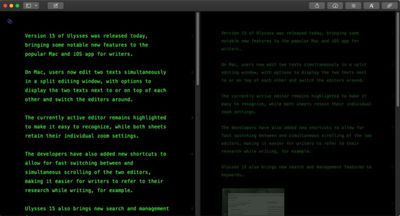
On Mac, users now edit two texts simultaneously in a split editing window, with options to display the two texts next to or on top of each other and switch the editors around.
ulysses 15
The currently active editor remains highlighted to make it easy to recognize, while both sheets retain their individual zoom settings.

The developers have also added new shortcuts to allow for fast switching between (Command-Option-Left/Right) and simultaneous scrolling (holding Option) of the two editors, making it easier for writers to refer to their research while writing, for example.

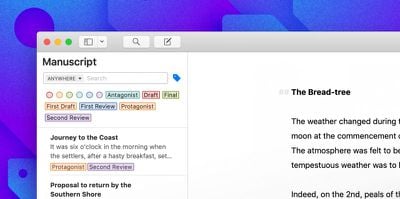
Ulysses 15 also brings new search and management features to keywords, with a new way to search for keywords in the sheets panel.
ulysses Mac Keyword Filtering
There's also a new Keywords Manager lets users edit all keywords in one spot, with options to change colors, rename, merge or delete them.

Elsewhere, users can now set pre-defined image sizes that apply during export, and Ulysses is now able to display previews of web images inside the editor (i.e., images that are referenced with a URL). Web images are now also supported when exporting to PDF, DOCX, or ePub.

In addition, Ulysses for Mac, iPhone and iPad now includes an option to turn on a dark mode for the export preview, enabling users to view what a final ebook, PDF document or blog post will look like without being blinded by a contrasting white screen.

Ulysses can be downloaded for free on the App Store and the Mac App Store. After a 14-day trial period, a subscription is required to unlock the app on all devices. A monthly subscription costs $4.99, while a yearly subscription is $39.99. Students can use Ulysses at a discounted price of $11.99 per six months. The discount is granted from within the app.


Tag: Ulysses

Top Rated Comments

AzzUrr1 Avatar
95 months ago
Interesting. I just hit submit on my Ph.D. application yesterday. Going to examine this and Scrivener to see which would be best for a thesis.

Any experience on this front out there?
As much as I appreciate Ulysses and Scrivener I would recommend LaTeX for scientific writing. A fantastic Mac client for this is Texpad
Score: 6 Votes (Like | Disagree)
95 months ago
I'm definitely a newb when it comes to all these writing apps, but what is the advantage of good old fashioned Microsoft Word? Once I learned how to properly use Styles and the internal-cross-referencing features, Word seems really powerful to me for writing big documents.
It might depend on what you’re trying to write. For a reference-heavy document, Word might be better, I don’t know.

For writing fiction, particularly novel length, I definitely prefer Ulysses over Word, Pages, Scrivener, and everything else I’ve tried. It’s easier when it comes to shuffling and moving chapters around, everything is right there in the app instead of a bunch of files in a folder, and, most importantly, you waste no time futzing around with font, text size, spacing. And when I’m in fullscreen mode, my entire screen is black and all my text grayed out except for the sentence I’m working on, which stays bright and at the center of the screen as I type (instead of going off the bottom or staying at the bottom).

I’m infinitely more productive with Ulysses, having written a number of novels now. And as much of a pain as exporting using CSS can be, I’ve gotten the hang of it and I can export to Word to send to my editor and into a file that I can feed into Vellum to produce a Kindle version that I use to read as I’m self-editing.

Ulysses has some minor issues, but I’m still with it because it just doesn’t get in the way, but does what I need. (Even able to write a properly formatted screenplay if you have the right export style.) Probably not worth the cost if you just need it on rare occasion, but easily worth it if it’s what you live in every day.
Score: 2 Votes (Like | Disagree)
mw360 Avatar
94 months ago
$50.oo / year Subscription price is a joke. There must be free software or lower priced that can offer the same.
Go ahead and post a link when you find it.
Score: 1 Votes (Like | Disagree)
94 months ago
$50.oo / year Subscription price is a joke. There must be free software or lower priced that can offer the same.
Score: 1 Votes (Like | Disagree)
95 months ago


What do you mean by "Xs 2"?
Writing “Xs 2” and “Xs 1” was rather cryptic, sorry. I should’ve written keyed twice and keyed once.
Score: 1 Votes (Like | Disagree)
95 months ago
I saw the homebrew text and was hopeful that somebody had developed a BASH console for iOS. I guess my hopes were too high.
https://twitter.com/iSH_app

For quite a while now.
Score: 1 Votes (Like | Disagree)

Popular Stories

Aston Martin CarPlay Ultra Screen

Apple Says CarPlay Ultra is Coming to These Vehicle Brands

Thursday May 21, 2026 11:53 am PDT by
Last year, Apple launched CarPlay Ultra, the long-awaited next-generation version of its CarPlay software system for vehicles. Nearly a year later, CarPlay Ultra is still limited to Aston Martin's latest luxury vehicles, but that should change fairly soon. In May 2025, Apple said many other vehicle brands planned to offer CarPlay Ultra, including Hyundai, Kia, and Genesis. CarPlay Ultra...
iphone 18 pro blue%402x

iPhone 18 Pro: Dark Cherry, Light Blue, and Dark Gray Chassis Leaked [Update]

Thursday June 4, 2026 5:18 am PDT by
Update: Since publication, new information has come to light suggesting the images have been AI-manipulated and are not in fact iPhone 18 Pro chassis parts. The original article follows. The color options Apple is reportedly planning for the upcoming iPhone 18 Pro and ‌iPhone 18 Pro‌ Max have appeared online today in the form of images of chassis parts of unknown authenticity....
iOS 27 All the New App Features

iOS 27: All the Rumored App Features

Wednesday June 3, 2026 3:48 pm PDT by
Siri is getting a major overhaul in iOS 27, but Apple also has some big updates planned for apps like Camera, Photos, and Wallet. There are multiple new AI features in the works, plus some non-AI upgrades. Camera Apple is moving Visual Intelligence from the Camera Control button to the Camera app in iOS 27, according to Bloomberg. There will be a Siri mode that will be available alongside...














