

A year and a half ago, Flexibits branched out from its popular calendar app Fantastical to debut Cardhop, an intuitive contacts management app for macOS. Cardhop took Apple's Contacts to the next level, offering a smart input field that intelligently parses the text you're typing and figures out what you want to do. Customizable quick actions let you easily perform tasks related to your contacts, such as placing a phone call, sending an email, or contacting on Skype.
Flexibits is now bringing the power of Cardhop to iOS, today launching a universal iPhone and iPad app that offers many of the same features found in the macOS version. The intelligent natural language input is here, automatically detecting whether you're trying to search, add, or edit a contact based on what you've typed.
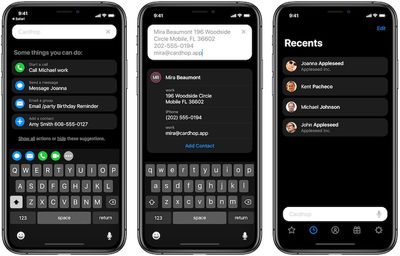
While Cardhop's contact cards will look very familiar to those who are used to Apple's native Contacts app, Cardhop's enhanced abilities make it much easier to manage and use the information stored on those cards.
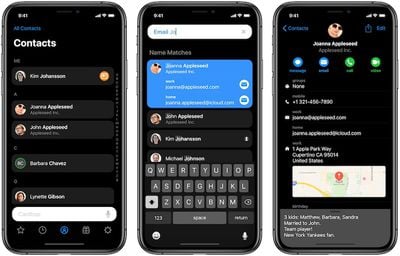
Cardhop for iOS makes it easy to edit your contacts, as all you have to do is tap and hold on the piece of information you're looking to update. As on macOS, there are customizable action keys that give you one-tap access to whatever functions you're most interested in, and those action keys live right above your keyboard at all times.
Cardhop for iOS offers a choice of dark and light themes, as well as a combination theme that shows your lists and results in a dark color and individual contact cards in a light color. Siri Shortcuts are also supported in Cardhop, letting you automate various actions with your contacts and integrate those actions across apps.
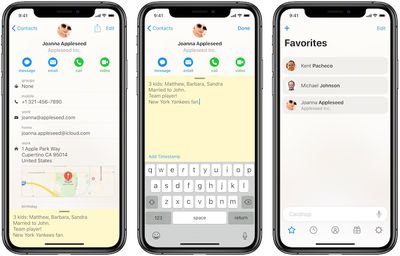
Notes is another area Flexibits has chosen to emphasize with Cardhop. While Apple's Contacts app lets you take notes about people stored in your database, Cardhop makes the feature more prominent with a slide-up interface and distinctive background (yellow or gray depending on theme), encouraging you to save information about the people you meet for more meaningful future interactions.
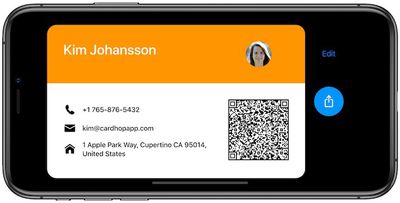
Cardhop also supports personal business cards, letting you customize a card with the information you want to share and displaying it like a business card on your phone. With a QR code embedded on the card, it's easy to share just by letting others scan the code using the camera app on their phones.
The natural language input field in Cardhop supports English, French, Italian, German, Spanish, and Japanese, and if the app incorrectly parses your input, you can hit a flag icon to help the app learn what it should have done.
Finally, Cardhop for iOS supports directory lookups for Google Contacts, G Suite, and Exchange to let you quickly pull down contact information from your accounts on those services. A free update to Cardhop for macOS launching today also brings directory lookups to the desktop.
Flexibits is launching Cardhop for iOS as a paid universal app with no additional in-app purchases required. A limited-time launch sale will see Cardhop priced at $3.99, and once that expires the regular price will be $4.99.




















Top Rated Comments
The same contacts that you already use will instantly be available in Cardhop. iCloud, Google, Exchange, and LinkedIn are all supported.
Although not entirely sure what happens if you add a new contact via Cardhop....is it automatically added to iOS contacts?
EDIT: I just installed the trial Mac version and can confirm if you add a contact via Cardhop it is added to normal contacts and syncs with iCloud.
Hopefully it will allow me to choose which account I add a new contact to, but I cannot figure out how to add a new contact yet... I'm sure it's easy, but just havnt found that yet.
My only initial complaint is how prominently birthdays are shown. Why is every app/platform and every American so obsessed with birthdays now?
I've invested in all the new charging technologies to speed charging up since being able to with the XR, wireless, USB-PD bedisde and car chargers. Very nice to have fast charging. I just can't find a way to get wireless charging integrated into my car (current model Jeep Grand Cherokee) that's slick enough to where I'm happy with it. I don't like vent mount phone holders, even if they do auto open and close mechanically, and the only flat surface I can find that's big enough to fit a flat charger to hold the XR in place is the dashboard which just seems weird so I still just cable charge in the car. At least until I can find that one perfect wireless option for it.
Honestly though in a normal day, with charging when I'm in the car, the XR's battery doesn't get low enough to where USB-PD charging really has full effect. Usually down to the 80s at the lowest point of the day and it charges back to 100% on my drive home.