Procreate Illustration App for iPad Gains New Text Manipulation Features
The Procreate app for iOS was today updated to version 4.3, introducing several major features that enable new text manipulation abilities within illustrations, as well as general speed and performance improvements.
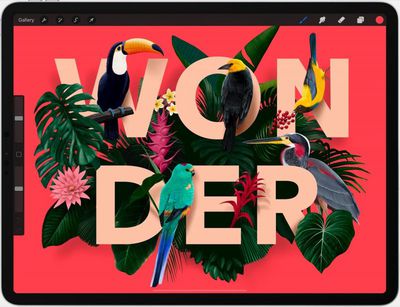
Users of the popular illustration app for iPad can now add editable typography to their illustrations, while precision sliders make it possible to refine spacing and alignment, and rasterize the results to finish.
This release also introduces the ability to drag and drop fonts into Procreate, while new layer export options allow you to share layers as folders containing PNG images, a multi-page PDF, or an animated GIF.
Elsewhere, there's new pressure smoothing settings to enhance strokes, and new layer blend modes including Darker/Lighter Color, Vivid Light, Linear Light, Pin Light, Hard Mix and Divide.
Procreate 4.3 is a free update for existing users. New users can download Procreate from the App Store for $9.99. [Direct Link]
Popular Stories
Apple is launching five new products on Friday, November 6, following pre-orders that opened last week, including its first touchscreen MacBook Pro models.
The following new products will be available from today:
iPad mini with OLED display and A20 Pro chip
iMac with M6 chip
14-inch MacBook Pro with M6 chip
14-inch MacBook Pro with OLED touchscreen
16-inch MacBook Pro with OLED...
When the iPhone Duo launched, we shared a list of some of the fun apps developers created for the new form factor. Two weeks out, developers are continuing to come up with fresh ideas, so we thought we'd share some of our favorites.
Games
Marbles Unhinged ($2.99) - Marbles Unhinged is a marble maze designed for the Duo. When you fold it, the floor turns into a ramp. If you stand the top...
Apple plans to merge the iPhone's Action button with the Camera Control starting next year, according to the leaker known as "Instant Digital."
In a new post on Weibo, the leaker claimed that a single press of the combined button would open the camera, while a long press would trigger the function assigned to the Action button. They explicitly clarified that the dedicated Action button would ...


















































