

Siri Shortcuts, Screen Time, and iMessage Screen Effects Coming to macOS This Year - MacRumorsOpen MenuShow RoundupsShow Forums menuVisit ForumsOpen Sidebar
Skip to Content

Siri Shortcuts, Screen Time, and iMessage Screen Effects Coming to macOS This Year

iOS apps and features including Shortcuts, Screen Time, and iMessage effects will be coming to macOS later this year, after they're first unveiled at Apple's Worldwide Developer's Conference in June. The information was shared today by 9to5Mac's Guilherme Rambo, who spoke with people familiar with the development of macOS 10.15.
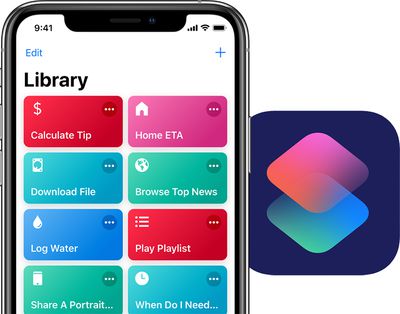
siri shortcuts duo
The major update to macOS, which is expected to launch in the fall, will include support for Siri Shortcuts. Apple updated the previous Workflow app for iOS to become ‌Siri‌ Shortcuts in September 2018, alongside the release of iOS 12. It allows you to create multi-step automations that you can initiate with a simple ‌Siri‌ command.

Today, Shortcuts has expanded to numerous third-party apps like American Airlines and Caviar. Later this year, Mac computers will get "system-wide" support for ‌Siri‌ Shortcuts, according to today's report.

Secondly, macOS 10.15 will see the addition of Screen Time, which tracks your device usage and reports back to you at the end of each week with statistics on what apps you use the most. Parents can use the feature to limit the time their kids spend in certain apps, and people trying to take a break from social media can set time limits on apps like Instagram and Twitter.

On macOS, this feature will work essentially the same as it does on iOS. It'll be housed in a new panel in System Preferences to customize its settings, and an overlay will appear when time limits are exceeded, where you can close the app or bypass the Screen Time lock with a passcode.

Lastly, macOS will be getting iMessage screen effects that have been exclusive to iPhones and iPads for a few years. These include full screen effects like Echo, Balloons, Confetti, and Lasers. On current versions of macOS, when an iPhone user sends these effects and they're read on a Mac, the iMessage screen on Mac simply states "Sent with [Effect Name]" below the message.

Today's news follows previous reports about Apple's plans to tie the iOS and macOS ecosystems more closely together. This includes letting developers release universal apps that work across iPhone, iPad, and Mac devices, which could happen by 2021. Last year at WWDC, Apple also ported a few iOS apps to macOS for the first time, including Home, News, Voice Memos, and Stocks.


Tag: macOS

Popular Stories

iCloud iPhone 17 Pro

iPhone Users Who Pay for iCloud Storage Get Two New Perks on iOS 27

Thursday July 2, 2026 6:10 am PDT by
If you pay for certain iCloud+ storage plans beyond the 5GB that Apple offers for free, you will receive two more perks on iOS 27 at no additional cost. A summary of the two new iCloud+ perks on iOS 27:Increased daily usage limits for some new Apple Intelligence features, including image generation in the revamped Image Playground app. HomeKit Secure Video cameras receive generated video...
iPhone 4 on Black Feature

Apple Facing One of Its Worst Leaks Since the iPhone 4

Thursday July 2, 2026 9:53 am PDT by
Apple supplier Tata Electronics recently suffered a cyberattack that resulted in thousands of confidential files being published on the dark web, and this reportedly included some photos and documents related to the upcoming iPhone 18 Pro. We have elected not to share any of the leaked photos in this story due to the illegal nature in which they were obtained, but they can easily be found...
American Express Gold Apple Pay Feature

American Express Announces New Apple Pay Feature

Tuesday June 30, 2026 10:27 am PDT by
American Express today announced that you can now redeem Membership Rewards points when checking out with Apple Pay on the web and in apps on the iPhone and iPad. When checking out with Apple Pay on iOS 18 or iPadOS 18 or later, tap on your eligible American Express card (Platinum, Gold, Green, and others) and select the Membership Rewards points option. You can use points to cover all or...

Top Rated Comments

Amadeus71 Avatar
94 months ago
More useless features on macOS - remember when there were reasons to look forward to a new version of OS X?
Score: 49 Votes (Like | Disagree)
Andres Cantu Avatar
94 months ago
Pretty negative responses so far, but I welcome feature parity between iOS and macOS, even if it’s for smaller things like these.
Score: 17 Votes (Like | Disagree)
QCassidy352 Avatar
94 months ago
The Mac mini is MIA.
Apple sells a very nice Mac mini, which was updated in late 2018.
Score: 16 Votes (Like | Disagree)
blinkytoo Avatar
94 months ago
To run Mac OS you need a Mac. Does Apple still make Macs?

The top of the line Mac Pro is 6 years old with 4+ year old hardware. The Macbook Pro has keys that stick. The Mac mini is MIA. The iMacs have 5200RPM hard drives that I had in my Mac 10 years ago and replaced with SSDs. Shouldn't all Mac come standard with SSDs in 2019?. I am still using my 2008 Mac Pro and am waiting for a compelling upgrade.

How does the worlds most valuable company forget to do what brought them to the dance?
I guess the heroin of iPhone profit has killed the golden Apple of innovation. "Can't innovate my ass" is right.
Score: 16 Votes (Like | Disagree)
justperry Avatar
94 months ago
Useless crap, especially Siri shortcuts, I really have a hard time getting Shortcuts.
Prefer stuff like APFS, or even Darkmode, not this stuff.
Score: 16 Votes (Like | Disagree)
8CoreWhore Avatar
94 months ago
i wish apple would improve macos spellcheck. give it parity with ios. had i typed this in ios and not macos, you would see several capital letters but instead there are none.
Score: 13 Votes (Like | Disagree)














