macOS Catalina's Preview App Lets You Sign Documents on Mac Using iPhone or iPad - MacRumorsOpen MenuShow RoundupsShow Forums menuVisit ForumsOpen Sidebar
Skip to Content

macOS Catalina's Preview App Lets You Sign Documents on Mac Using iPhone or iPad

In macOS Catalina, the Preview app has a new feature that makes it easier to sign PDFs and other documents by leveraging an iPhone or an iPad running the iOS 13/iPadOS operating system.

Rather than using the Trackpad to create a signature, or scanning a piece of paper, you can connect to your iPhone or ‌iPad‌ to sign there using either a finger or an Apple Pencil.
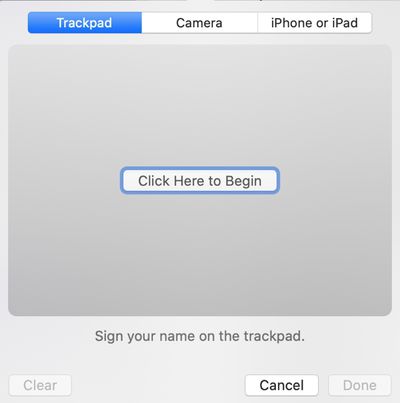
signiphoneipad
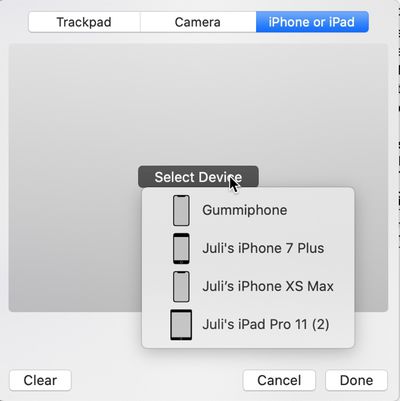
In the Preview app, under Tools > Annotate > Signature > Manage Signatures > Create Signatures, there is a new option to choose to create a signature with an iOS device. Clicking on this option lets you select an available iPhone or ‌iPad‌ to use.

selectdevicesignaturepreview
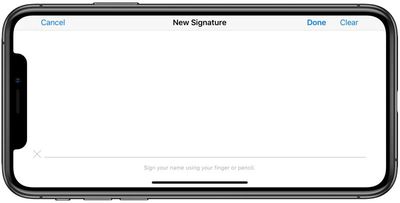
Devices running iOS 12 will show up in this list, but creating a signature only works on a device running iOS 13. Selecting an iPhone or ‌iPad‌ with iOS 13 will pop up a simple signature interface on the device in question, where you can sign with a finger on the iPhone or a finger or ‌Apple Pencil‌ on ‌iPad‌.

previewsignatureiphone
After you've signed, tap the done button, and your signature is instantly made available in the Preview app as an option to be inserted into your documents.
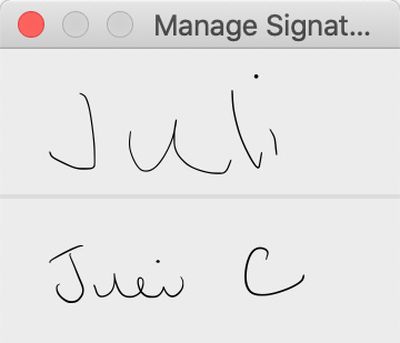
signaturespreview
We needed to have the devices unlocked to get the signature interface to pop up, but this may be a bug that will be addressed in a later beta.

You can already sign PDFs right on the iPhone or ‌iPad‌ using Markup features, but the new Preview option is a useful, streamlined way to get a signature on a document if you start the process using a Mac.


Related Forum: macOS Catalina

Popular Stories

macOS 27 on MacBook Pro

Apple Says macOS 27 Won't Be Compatible With These Macs

Wednesday June 3, 2026 8:29 am PDT by
During WWDC 2025, Apple revealed that macOS 26 Tahoe would be the final major macOS version for Intel-based Macs. macOS 27 will be compatible with Apple silicon Macs only, meaning that you will need a Mac with an M-series chip or a MacBook Neo with an A18 Pro chip in order to install the software update. Apple will unveil macOS 27 during its WWDC 2026 keynote this Monday, June 8, and the...
MacBook Neo on Yellow Feature

MacBook Neo is So Popular That Apple Reportedly Doubled Production

Wednesday June 3, 2026 9:24 am PDT by
On an earnings call in late April, Apple's CEO Tim Cook said that customer response to the MacBook Neo was "off the charts," and the popularity of the laptop has reportedly led the company to significantly boost production. Apple supply chain analyst Ming-Chi Kuo this week said he believes that MacBook Neo shipments to Apple were doubled from an initial target of 5 million units to 10...
iphone 18 pro blue%402x

iPhone 18 Pro: Dark Cherry, Light Blue, and Dark Gray Chassis Leaked [Update]

Thursday June 4, 2026 5:18 am PDT by
Update: Since publication, new information has come to light suggesting the images have been AI-manipulated and are not in fact iPhone 18 Pro chassis parts. The original article follows. The color options Apple is reportedly planning for the upcoming iPhone 18 Pro and ‌iPhone 18 Pro‌ Max have appeared online today in the form of images of chassis parts of unknown authenticity....

Top Rated Comments

TMRJIJ Avatar
91 months ago
I still don’t understand why Apple is so afraid of touchscreens on Macs when they are so good with them on mobile devices. It’s so much easier just to sign on the screen. Goofy workarounds like this should be unnecessary for the prices Apple charges.
I can list many reasons why Apple shouldn't put touchscreens on Macs but you probably already heard them before and disagreed.
Score: 37 Votes (Like | Disagree)
alexandr Avatar
91 months ago
this is pretty dope.
Score: 27 Votes (Like | Disagree)
91 months ago
Apple is blurring the lines between iOS and Mac in terms of functionality and cross-utility. It’s a brilliant strategy to leverage their success with iOS and encourage even more people into the Mac fold. Looking back I think the recent plateauing of iPhone sales is probably the best thing that could’ve happened to Apple users - it’s forced Apple to reevaluate their entire product line and look for ways to improve synergy and platform lock-in to increase company-wide revenue.
Score: 20 Votes (Like | Disagree)
TheShadowKnows! Avatar
91 months ago
That is all well and good.
But this analog signing method is just last century.

Opinion;:
macOS under the Preview app. should support signing using digital signatures, even if one does not own a certified public-key/private-key pair (thus, signing with self as the certificate authority).
Score: 12 Votes (Like | Disagree)
Contact_Feanor Avatar
91 months ago
The image of the iPhone has an interface that says: "sign your name using your finger or pencil."; is that a real screenshot? a doctored image? If it's a screenshot, is it a mistake in iOS 13 or a sign that pencil support for (maybe the next) iPhone is finally coming with iOS 13?
Score: 9 Votes (Like | Disagree)
91 months ago
I still don’t understand why Apple is so afraid of touchscreens on Macs when they are so good with them on mobile devices. It’s so much easier just to sign on the screen. Goofy workarounds like this should be unnecessary for the prices Apple charges.
Score: 9 Votes (Like | Disagree)