Hands-On With Apple's New iPadOS Software - MacRumorsOpen MenuShow RoundupsShow Forums menuVisit ForumsOpen Sidebar
Skip to Content

Hands-On With Apple's New iPadOS Software

With the launch of iOS 13, Apple decided to split iOS 13 for the iPad into its own dedicated operating system called iPadOS. Going forward, iPadOS will be the version of iOS that runs on Apple's ‌iPad‌ devices.

iPadOS includes all of the features of iOS 13, plus some additional tweaks and changes made specifically for a device with a larger display. In our latest video, we went hands-on with iPadOS to check out the new features.
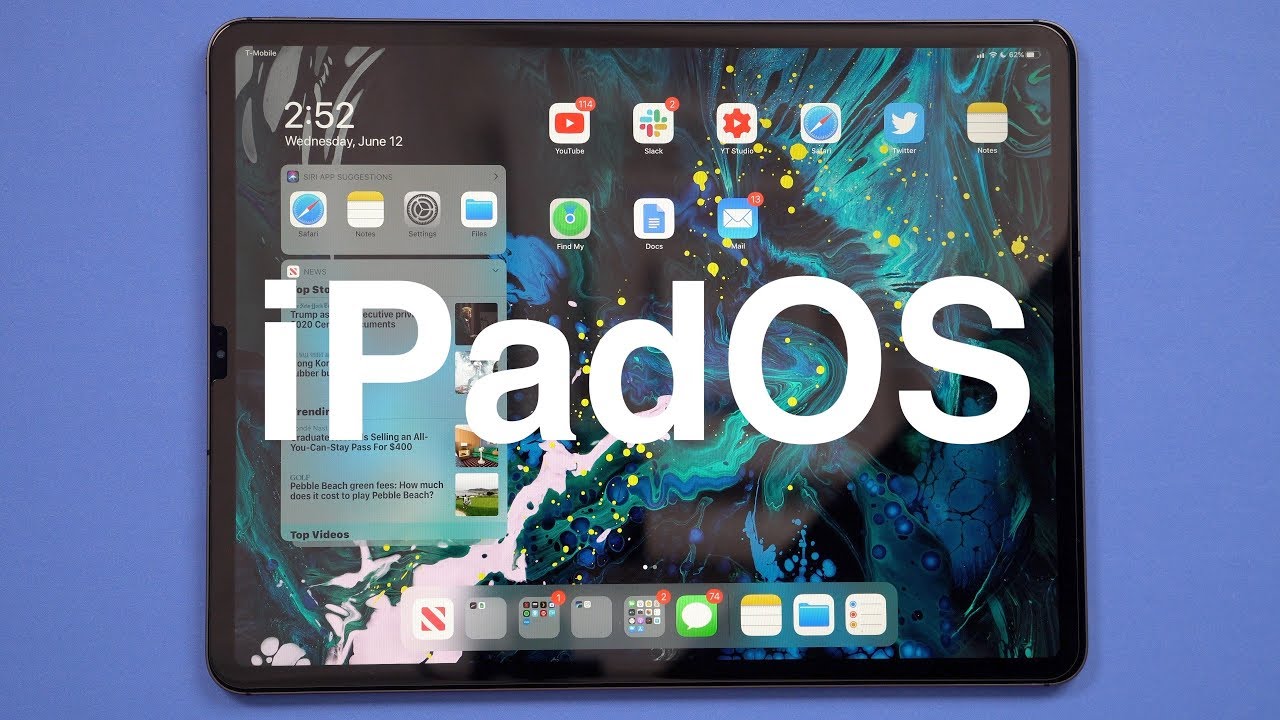

As mentioned above, iPadOS includes almost all of the iOS 13 features, such as Dark Mode, Find My, new app updates, Sign In with Apple, and more.

There are also iPad-specific features, though, such as a new Home screen that features smaller app icons so you can fit more apps on each page. The new Home screen also lets you move the Today view widgets from the left side of the screen onto the Home screen itself so you can see at-a-glance info like weather, upcoming events, news headlines, and more, whenever your ‌iPad‌ is in landscape mode.

Multitasking features specific to the ‌iPad‌ have also been overhauled. Split View now supports multiple windows from the same app, so you can do things like view two Safari pages side by side, and in Slide Over, you can now have multiple Slide Over windows open, flipping between them as needed for quicker swapping between apps.

You can keep all the apps you need to access occasionally stored in Slide Over, dragging upwards on the display to see everything that's open. App Exposé, a new feature available when you press on an app's icon, is designed to show you all of the windows from a particular app.

Apple improved Apple Pencil latency, dropping it from 20ms to 9ms, and Markup is more deeply integrated everywhere in iPadOS. You can tap on the corner of the display with an ‌Apple Pencil‌ to open up Markup, which can be used for webpages, documents, screenshots, emails, and more. A redesigned tool palette offers up quick access to tools and color palettes, and there's a new ruler and a new pixel eraser.

Like iOS 13, iPadOS brings support for external drives to the Files app, along with new folder sharing capabilities. A Column View lets you see previews of your files, and Quick Actions support allows you to do things like mark up and rotate images and create PDFs right from the Files app.

Safari has a new download manager and will always load the desktop version of a site, and there are new gestures that while also available on iPhone, work well on the ‌iPad‌'s larger display. Scrolling through long documents and webpages is faster through a new gesture that lets you grab the scroll bar and drag it, and selecting text can now be done by dragging a finger over it.

Selecting a word can be done with a double tap, selecting a sentence can be done with a triple tap, and a quadruple tap selects a paragraph at once. Double tapping selects elements like phone numbers and email addresses, and you can now pick up the cursor and move it wherever you want. There are new pinch-based gestures for copy and paste, and a new three finger swipe for undoing and redoing.

Both iPadOS and iOS 13 introduce a new swipe-based keyboard called the QuickPath keyboard, but in iPadOS, you can grab the keyboard and move it wherever you want on the display for a floating keyboard that offers one-handed typing access.

Used with macOS Catalina, the ‌iPad‌ can become a second display for your Mac thanks to the new Sidecar functionality, and the ‌iPad‌ now supports both mice and Xbox/PS4 game controllers.

For more detail on iPadOS, make sure to check out our iPadOS roundup.

Related Forum: iOS 13

Popular Stories

apple pro tell logo

Apple Launching Five New Products Today

Thursday November 5, 2026 12:59 am PST by
Apple is launching five new products on Friday, November 6, following pre-orders that opened last week, including its first touchscreen MacBook Pro models. The following new products will be available from today: iPad mini with OLED display and A20 Pro chip iMac with M6 chip 14-inch MacBook Pro with M6 chip 14-inch MacBook Pro with OLED touchscreen 16-inch MacBook Pro with OLED...
duo aquarium

More Fun iPhone Duo Apps: 30 New Picks to Try

Friday November 6, 2026 3:27 pm PST by
When the iPhone Duo launched, we shared a list of some of the fun apps developers created for the new form factor. Two weeks out, developers are continuing to come up with fresh ideas, so we thought we'd share some of our favorites. Games Marbles Unhinged ($2.99) - Marbles Unhinged is a marble maze designed for the Duo. When you fold it, the floor turns into a ramp. If you stand the top...


silver iphone 18 pro

Apple Rumored to Drop the iPhone's Action Button Next Year

Friday November 6, 2026 6:07 am PST by
Apple plans to merge the iPhone's Action button with the Camera Control starting next year, according to the leaker known as "Instant Digital." In a new post on Weibo, the leaker claimed that a single press of the combined button would open the camera, while a long press would trigger the function assigned to the Action button. They explicitly clarified that the dedicated Action button would ...

Top Rated Comments

twocents Avatar
97 months ago
One of the biggest indirect benefits of now having iPadOS is the near certain guarantee that we can expect new features / changes to be presented annually at WWDC! Up till now, there were a few gap years where the iPad line just kept up with iOS alongside the iPhone
Score: 26 Votes (Like | Disagree)
QCassidy352 Avatar
97 months ago
I'm amazed how Apple is dividing us into the rich who will be content creators with $15k machines, and the rest of the poor people who can pretend to create, but will only be consumers with $1k iPads and iPhones.
Thanks Tim Apple!
I’m not sure if this is a joke... if not, I’ll just point out that most content creation can be done on any Mac, including those available for $1k+.
Score: 13 Votes (Like | Disagree)
97 months ago
How long before you begin to see separate prices for iPad and iPhone apps again? First they encourage the merger of the two and when revenue probably fell based on that, the iPadOS is born. The over/under is one year for the appearance of ... the iPadOS app store.
Score: 12 Votes (Like | Disagree)
jeremiah256 Avatar
97 months ago
I'm amazed how Apple is dividing us into the rich who will be content creators with $15k machines, and the rest of the poor people who can pretend to create, but will only be consumers with $1k iPads and iPhones.
Thanks Tim Apple!
Don't get wrapped up in the hype about what you need to create content. It is too easy to believe that to be a creator you need a computer that can handle multiple streams of 8K video, hundreds of audio tracks, or can run 10 VMs simultaneously. In the real world, most professionals are making nice livings with moderate level computers.

Your phone can probably record 4K. A MacBook (less powerful than the MacBook Air) can edit 4K.


So can an iPad Pro.


For most media consumption, there is no discernible difference for example, between a 1080P video and a 4K video due to the devices used for that consumption.
Score: 8 Votes (Like | Disagree)
tegranjeet Avatar
97 months ago
Wish they would have named it padOS, and renamed iOS to phoneOS. And CarPlay to carOS. Then we would have macOS, padOS, phoneOS, watchOS, tvOS, and carOS.
Score: 8 Votes (Like | Disagree)
Yr Blues Avatar
97 months ago
How long before you begin to see separate prices for iPad and iPhone apps again? First they encourage the merger of the two and when revenue probably fell based on that, the iPadOS is born. The over/under is one year for the appearance of ... the iPadOS app store.
I like what I'm seeing. Eventually it will be a real MacBook alternative for those who want a different workflow.
Score: 8 Votes (Like | Disagree)
Latest Stories
Siri AI Rumored to Become 'More Like an Agent' as Early as Next Year
3 hours ago
Apple Taking New Approach to Developing iOS 28 and macOS 28
4 hours ago
Early Apple Black Friday Deals on Apple Watch, MacBook Air, and More
23 hours ago
'Backglow' Lets You Customize New MacBook Pro's Glowing Apple Logo
23 hours ago
Top Stories: Apple Product Launches, iOS 27.3 Beta, and More
1 day ago
More Fun iPhone Duo Apps: 30 New Picks to Try
2 days ago
Hands-On With Apple's New OLED Touchscreen MacBook Pro
2 days ago
Apple Store With All-New Design Opening Soon in Southern California
2 days ago
Control the Glowing Apple Logo on Your New MacBook Pro
2 days ago
Apple Shares New 'Apple Card: Apply and Use in Minutes' Ad
2 days ago
Apple Says More Than 100,000 Apps Optimized for iPhone Duo, Here's What's Still Missing
2 days ago
Early Black Friday Deals Kickoff With Steep Discounts on Apple Watch Ultras and More
2 days ago
The MacRumors Show: iOS 27.3 Looks Like a Huge Update
2 days ago
Best Buy's Black Friday Event Begins With Sitewide Savings on Apple, TVs, More
2 days ago
Apple Releasing Yet Another Two New Products Next Week
2 days ago
MacBook Air Drops to Lowest Price in Months With Amazon's $250 Discount
2 days ago
Apple Rumored to Drop the iPhone's Action Button Next Year
2 days ago
Apple's Extended Return Policy Now in Effect for 2026 Holiday Season
2 days ago
Apple Music Classical Updated With New Icon and Refreshed Design
2 days ago
OLED iPad Mini, M6 iMac, and New MacBook Pros Available From Today
2 days ago
Apple Surveys iPhone Duo Buyers About Crease and Camera
3 days ago
Apple's First Touchscreen Mac is Now Arriving to Customers
3 days ago
Claude Gets Personal Finance Feature With Bank Account Linking
3 days ago
Apple Arcade Adds Crossy Road Rush and NBA 2K27
3 days ago
Apple's New HomeView Smart Home Hub: Here's How Much RAM It Has
3 days ago
iPad Mini vs. iPad Air Buyer's Guide: Now Just $50 Apart
3 days ago
First iOS 27.3 and macOS Golden Gate 27.3 Public Betas Now Available
3 days ago
Apple Announces a New Mac Sales Record
3 days ago
Paid $200 for Logic Pro? Apple Says You Won't Get This New Feature
3 days ago
Instagram's Edits Video Editor is Now Available on Mac
3 days ago









































