Everything New in iOS 13 Beta 2: SMB Server Connectivity, Notes Checklists Changes, New Animoji Stickers and More - MacRumorsOpen MenuShow RoundupsShow Forums menuVisit ForumsOpen Sidebar
Skip to Content

Everything New in iOS 13 Beta 2: SMB Server Connectivity, Notes Checklists Changes, New Animoji Stickers and More

Apple this morning released the second iOS 13 beta for developers, addressing bugs, introducing new bugs, and adding and refining iOS 13 features.

There are no super exciting new changes in the second beta of iOS 13, but several features that were not functional in the first beta are now working. All of the changes we've found so far are below:

- SMB Server Connectivity - One of the new features in iOS 13 is an option in the Files app to connect to server using SMB. This feature wasn't working in the first beta, but is functional in beta 2, so iOS 13 users can do things like connect to a home NAS.
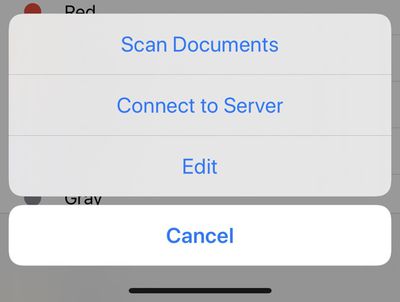
filesconnecttoserver
- APFS Drives in Files - APFS formatted drives are now supported by the Files app.

- Downtime - According to Apple's release notes, the Downtime feature in Screen Time now syncs to the Apple Watch.

- Safari Share Sheet - When sharing a webpage from the Safari Share Sheet, there are new options to share it as a PDF or a Web Archive. There's also an "Automatic" option that picks the most suitable format for each app or action.
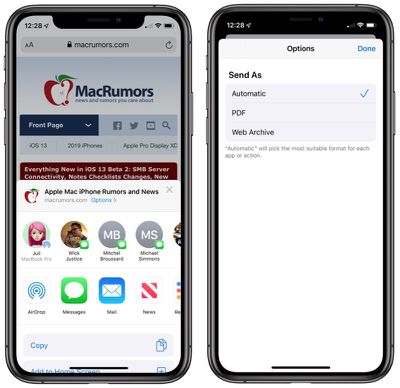
newsafarishareoptions
- Notes Checklists - In iOS 13 beta 2, there's a new option to automatically move checked off items in a list to the bottom of the list. You can adjust this in settings or use the popup that comes up the first time you create a list after updating to beta 2.
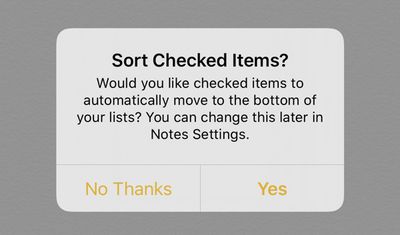
notessortcheckeditems
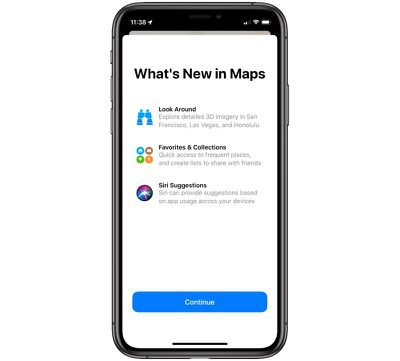
- Maps Splash Screen - When opening up the Maps app for the first time there's a splash screen that lets you know all of the new features in the update.
ios13mapssplashscreen
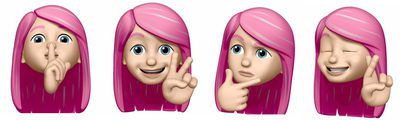
- New Animoji Stickers - There are new Animoji stickers available in iOS 13 beta 2 that feature new poses.
ios13b2newanimojistickers
- High-Key Mono Lighting - The new High-Key Mono Portrait Mode Lighting option is available in beta 2 on 2018 iPhones.

- Portrait Mode Lighting Slider - The slider that allows you to adjust the intensity of Portrait Mode lighting options is now available.

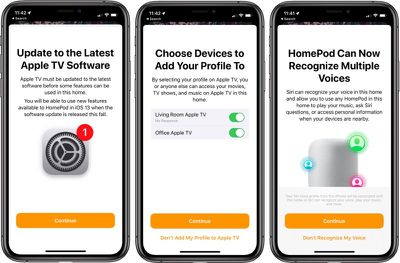
- HomePod and Apple TV Features - When opening up the Home app in beta 2, there's a new splash screen that lets you know about multi-user recognition on ‌HomePod‌ and profiles on ‌Apple TV‌. You'll be instructed to set up Hey Siri if it's not activated already, and prompted to add your profile to ‌Apple TV‌.

appletvhomepodios13
Voice Control - When the Voice Control Accessibility feature is turned on, there's a blue microphone icon at the top of the device to indicate that the iOS device is in Voice Control mode.

CarPlay - The Now Playing section of ‌CarPlay‌ features album art in beta 2.

There are a number of other known issues that developers should be aware of before installing the beta, all of which are available through the release notes provided with the software on the developer website.

We've heard reports that iOS 13 beta 2 and iPadOS beta 2 feel more stable than the original betas, but there are a number of remaining bugs and Apple still warns against installing the software on a main device.


Related Forum: iOS 13

Popular Stories

iOS 27 Next to iPhone

Here's When iOS 27 Rolls Out Today in Every Time Zone [Update: It's Out]

Sunday September 13, 2026 3:00 am PDT by
Update 10:04 a.m.: iOS 27 is rolling out now, though it may take a bit for all users to see it, so keep checking! Apple is about to release iOS 27, which will finally deliver more advanced Siri AI capabilities as well as a variety of other refinements, improvements, and new features to iPhones. It's Apple's biggest software update of the year, and Apple announced at Wednesday's iPhone event...
iOS 27 Icon iPhone

iOS 27 Available Now With These 8 New Features

Monday September 14, 2026 9:00 am PDT by
Update — 10 a.m. Pacific Time: Apple has released iOS 27. During its iPhone 18 Pro and iPhone Duo event last week, Apple announced that iOS 27 will be released widely on Monday, September 14. iOS 27 should be available around 10 a.m. Pacific Time / 1 p.m. Eastern Time today via the Settings app, under General → Software Update. Below, we have highlighted eight new features and...
Apple iCloud Plus expansion hero

iCloud+ Now Includes Apple TV, Apple Arcade, and Curated Apple Music Stations in Over 100 Countries

Tuesday September 15, 2026 1:43 am PDT by
Apple today announced a new subscription initiative that turns paid iCloud+ subscriptions into a broader services bundle in more than 100 countries. In select countries, Apple says every paid iCloud+ plan, including the cheapest 50GB tier, now includes Apple TV and Apple Arcade "at no additional cost," while family sharing extends the storage, TV and Arcade access to up to five people....

Top Rated Comments

Antoni Nygaard Avatar
95 months ago
In tvOS 13 beta 2 under video and audio there is a new wireless audio sync feature

Attachment Image
Score: 11 Votes (Like | Disagree)
AllergyDoc Avatar
95 months ago
Sounds like some excellent upgrades. Can't wait for the public beta to come out.
Score: 10 Votes (Like | Disagree)
95 months ago
MacRumors editors: please use a Tim Cook version of this Memoji whenever you write an article regarding “Apple quietly adds/removes x product/feature.”

Attachment Image
Score: 9 Votes (Like | Disagree)
95 months ago
Hey @Apple, I appreciate that you're trying to be polite here, but you're going against your own user interface guidelines! :mad:


The buttons should be "Cancel" and "Sort", should they not? Maybe I'm confused by the guidelines, but I thought that Yes/No type buttons were a no-no? Instead, the buttons should be verbs, action-oriented.

Apple, don't lose sight of your high standards.
[doublepost=1560808450][/doublepost]
Until there's downloadable maps, there's no way I can replace Google Maps and thus still will use Google maps 99% of the time.
Do you travel outside of signal coverage areas frequently? I do monthly now, and I was surprised how poorly Apple Maps works when you don't have a cell signal. Even my gf's Android phone from years ago did GPS far better than Apple Maps does.

Attachment Image
Score: 9 Votes (Like | Disagree)
NightFox Avatar
95 months ago
A good UX practice is to write in language that the user uses daily and never assume that they understand the language of business and what an acronym might mean.

What is an NAS?
What is a UX? ;)
Score: 8 Votes (Like | Disagree)
sully54 Avatar
95 months ago
Love that enhancements made to checklists in notes.

I would still like to see some sort of integration between reminders and calendar. There no reason why a reminder with a date alert shouldn’t show up in the calendar.
Score: 8 Votes (Like | Disagree)