Hands-On With the New tvOS 13 Update for Fourth and Fifth-Generation Apple TV - MacRumorsOpen MenuShow RoundupsShow Forums menuVisit ForumsOpen Sidebar
Skip to Content

Hands-On With the New tvOS 13 Update for Fourth and Fifth-Generation Apple TV

Apple in June unveiled new versions of iOS, macOS, watchOS, and tvOS, but the TV update, tvOS 13, hasn't received much coverage, so we thought we'd go hands-on with the software so MacRumors readers know what to expect when tvOS 13 launches this fall.

tvOS updates are always more minor in scale than other software updates, but tvOS 13 brings a decent number of new features worth checking out.


After installing tvOS 13, the first thing that's noticeable is a new Home screen. The updated Home screen does away with the top menu bar and the Watch Now screen that used to be front and center, replacing it with icons that include Apple TV, the App Store, iTunes movies, iTunes TV shows, and Apple Music.

Watch Now is now only accessible within the TV app rather than being available right when you turn the ‌Apple TV‌ on. Instead of displaying Watch Now content, highlighting the TV app on the Home screen offers up a "What to Watch" interface with content recommendations.
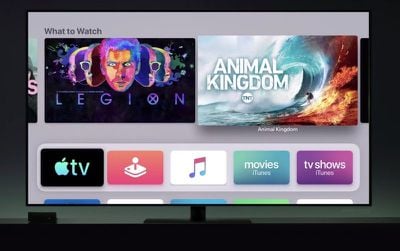
tvos13interface
Highlighting the ‌App Store‌ brings up app recommendations, and the same is true for Movies and TV shows. The ‌Apple Music‌ icon shows "Today's Video Hits" with autoplay silent video.

Apps are able to play full-screen video previews right on the Home screen, which is similar to how content autoplays in Netflix when you're browsing through available TV shows and Movies.

tvOS 13 brings a new Picture-in-Picture mode, designed to let you watch TV shows or movies while you're navigating through the rest of the tvOS 13 operating system. Controls at the bottom of the picture-in-picture interface allow for returning to full screen, pausing content, and closing the picture-in-picture window.
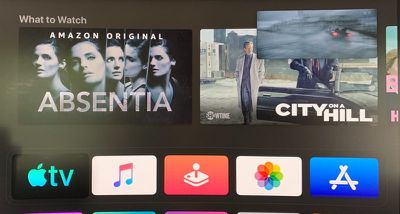
tvos13pictureinpicture
Multiple users are supported in tvOS 13, so more than one profile is available on the ‌Apple TV‌. Each member of the family can sign into their own ‌Apple TV‌ profiles to get customized Watch Now lists, content recommendations, and ‌Apple Music‌ playlists. Switching between profiles can be done through the new Control Center. The Control Center includes the time and date, easy access to search, a Now Playing widget, AirPlay controls, a sleep feature, and an option to switch between users.
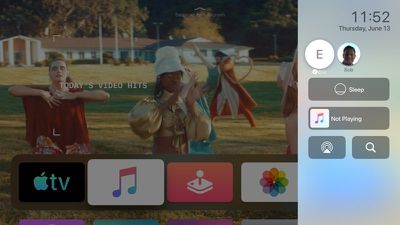
tvos13controlcenter
There's a new ‌Apple Music‌ feature that displays scrolling lyrics synced in time with the music that's playing, and Apple has added a new Wireless Audio Sync option that uses the iPhone's microphone to calibrate audio synced to ‌Apple TV‌, such as through a speaker system.

tvOS 13 gets the ‌Apple TV‌ ready for Apple Arcade, Apple's upcoming subscription gaming service. As part of ‌Apple Arcade‌ preparations, Apple has added support for the Xbox Wireless Bluetooth Controller and the PlayStation DualShock 4 Controller, allowing gaming controllers many people already have at home to be used with ‌App Store‌ games.

There are also new screensavers in tvOS 13, which were created by the BBC Natural History Unit, aka the team behind the "Blue Planet" series. These new screensavers showcase the deep ocean around the world, showing off under-the-sea creatures and scenes. The new screensavers don't appear to be active in the beta, but will be available when tvOS 13 launches.

tvos13screensavers
Right now, tvOS 13 is available to both developers and public beta testers, and Apple is planning to launch it in the fall after a few months of beta testing to work out bugs and refine features.

For more on what's coming in tvOS 13, make sure to check out our tvOS 13 roundup.

Related Roundup: Apple TV
Buyer's Guide: Apple TV (Don't Buy)

Popular Stories

Apple iCloud Plus expansion hero

iCloud+ Now Includes Apple TV, Apple Arcade, and Curated Apple Music Stations in Over 100 Countries

Tuesday September 15, 2026 1:43 am PDT by
Apple today announced a new subscription initiative that turns paid iCloud+ subscriptions into a broader services bundle in more than 100 countries. In select countries, Apple says every paid iCloud+ plan, including the cheapest 50GB tier, now includes Apple TV and Apple Arcade "at no additional cost," while family sharing extends the storage, TV and Arcade access to up to five people....
Where is the New Apple TV Feature

Next Apple TV's Chip Revealed in Latest Leak

Tuesday September 8, 2026 10:19 am PDT by
The next Apple TV 4K will be equipped with an A19 or A19 Pro chip, according to evidence in Apple's code uncovered by MacRumors contributor Aaron Perris. In particular, the device's model identifier points towards the A19 generation of chips. Accordingly, the next Apple TV would have 8GB or 12GB of RAM, up from 4GB in the current 2022 model with the A15 Bionic chip. Other rumored upgrades for...
iOS 27 Feature Cool

Apple Releases New iOS 27, iPadOS 27, macOS 27, and tvOS 27 Public Betas

Monday August 31, 2026 2:13 pm PDT by
Apple today released the sixth public betas of iOS 27, iPadOS 27, tvOS 27, and macOS Golden Gate, allowing anyone with a compatible device to download and test the new software. The sixth betas come a week after Apple seeded the fifth betas and a few hours after the eighth developer betas. You can get started by signing up on Apple's beta website and then opting in to the public beta by...

Top Rated Comments

Sethal Avatar
94 months ago

Apps are able to play full-screen video previews right on the Home screen, which is similar to how content autoplays in Netflix when you're browsing through available TV shows and Movies.
One of the worst features about Netflix and they bring it system wide to Apple TV. Fantastic.
Score: 44 Votes (Like | Disagree)
Frankied22 Avatar
94 months ago
That autoplay when browsing garbage needs to be removed ASAP. I absolutely hate that in Netflix. I want to just browse for what I want to watch and if you leave the selection on one thing for a second too long suddenly its blaring some trailer garbage in my face.
Score: 19 Votes (Like | Disagree)
mryingster Avatar
94 months ago
One of the worst features about Netflix and they bring it system wide to Apple TV. Fantastic.
My thoughts exactly. I want an option to disable this system-wide.
Score: 19 Votes (Like | Disagree)
iDento Avatar
94 months ago
Feature request: passcode for switching between multiuser profiles.
Score: 14 Votes (Like | Disagree)
Jimmy James Avatar
94 months ago
One of the worst features about Netflix and they bring it system wide to Apple TV. Fantastic.
Agreed. It distracts me from making my decision and presents my kids with shows I don’t necessarily want them to watch. Not a single redeeming benefit to my viewing.
Score: 10 Votes (Like | Disagree)
94 months ago
I want new ATV hardware! o_O
Score: 7 Votes (Like | Disagree)