What's New in iOS 13 Beta 7 - MacRumorsOpen MenuShow RoundupsShow Forums menuVisit ForumsOpen Sidebar
Skip to Content

What's New in iOS 13 Beta 7

Apple today released the seventh beta of iOS 13 to developers, bringing new bug fixes and refining iOS 13 and iPadOS features introduced in previous betas.

Now that we're up to the seventh beta, changes and tweaks are getting much more minor, but there are still a few new things worth noting.

- Folders - Folder backgrounds are once again gray, with changes made in the previous beta reverted.

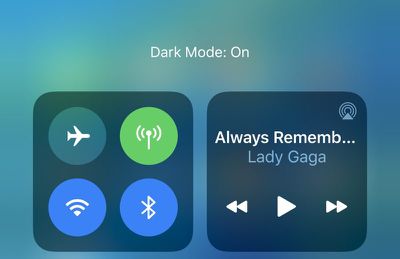
- Dark Mode - The Dark Mode Control Center widget wording has been tweaked. Instead of saying Light Appearance or Dark Appearance, it now says Light Mode or ‌Dark Mode‌.

darkmodelabeling
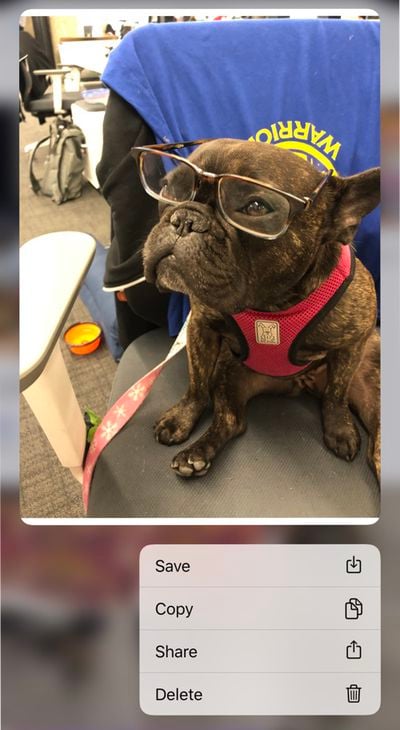
- Deleting Attachments in Messages - You can once again delete photo and other attachments from Messages. In a conversation, tap on the "i" and long press on a photo, link, or document to bring up a menu to delete it.
photosdeleteoption
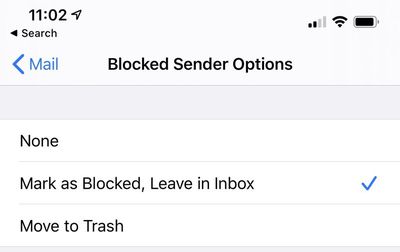
- Blocked Senders in Mail - There are new options to determine what to do with messages from blocked senders. You can move them to the trash or mark as blocked and leave them in the inbox (the default option).
mailblockedsender
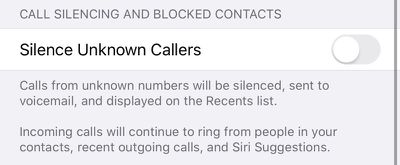
- Silence Unknown Callers - When toggling on Silence Unknown Callers, there's new text in the Phone app that lets you know incoming calls will continue to ring from people in your contacts, recent outgoing calls, and Siri Suggestions.
silenceunknowncallersios13
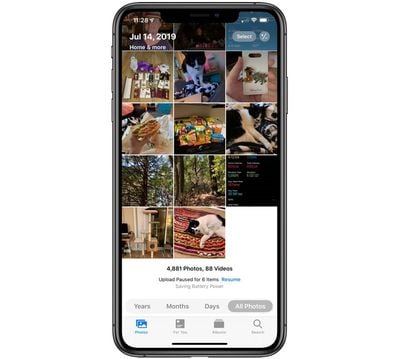
- All Photos View - When viewing "All ‌Photos‌" in the main ‌Photos‌ tab in iOS 13, ‌Photos‌ are displayed in a grid three across instead of the smaller thumbnails that were available before by default.
photosgridallphotos
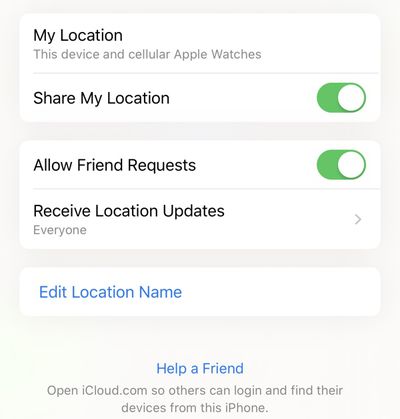
- Find My - Notify When Found is now working in the ‌Find My‌ app in this beta. There's also a new "Help a Friend" option in the Me tab that opens up iCloud.com so a friend can locate a lost device.
findmyhelpafriend
- Do Not Disturb - Do Not Disturb settings now sync properly between iPhone and Apple Watch.

Know of a feature that's new in iOS 13 beta 7 that we left out? Make sure to let us know in the comments and we'll update this article. For more on what's new in iOS 13, make sure to check out our iOS 13 roundup.


Related Forum: iOS 13

Popular Stories

iphone 18 pro blue%402x

iPhone 18 Pro: Dark Cherry, Light Blue, and Dark Gray Chassis Leaked [Update]

Thursday June 4, 2026 5:18 am PDT by
Update: Since publication, new information has come to light suggesting the images have been AI-manipulated and are not in fact iPhone 18 Pro chassis parts. The original article follows. The color options Apple is reportedly planning for the upcoming iPhone 18 Pro and ‌iPhone 18 Pro‌ Max have appeared online today in the form of images of chassis parts of unknown authenticity....
Aston Martin CarPlay Ultra Screen

Apple Says CarPlay Ultra is Coming to These Vehicle Brands

Thursday May 21, 2026 11:53 am PDT by
Last year, Apple launched CarPlay Ultra, the long-awaited next-generation version of its CarPlay software system for vehicles. Nearly a year later, CarPlay Ultra is still limited to Aston Martin's latest luxury vehicles, but that should change fairly soon. In May 2025, Apple said many other vehicle brands planned to offer CarPlay Ultra, including Hyundai, Kia, and Genesis. CarPlay Ultra...
iOS 27 All the New App Features

iOS 27: All the Rumored App Features

Wednesday June 3, 2026 3:48 pm PDT by
Siri is getting a major overhaul in iOS 27, but Apple also has some big updates planned for apps like Camera, Photos, and Wallet. There are multiple new AI features in the works, plus some non-AI upgrades. Camera Apple is moving Visual Intelligence from the Camera Control button to the Camera app in iOS 27, according to Bloomberg. There will be a Siri mode that will be available alongside...

Top Rated Comments

sniffies Avatar
89 months ago
Seriously, Apple, let us FaceID-protect Hidden Photos!

Don't be stupid!

Also, it's almost 2020, and Mail app still doesn't sync iCloud read status from macOS to iOS. What the hell!! iOS-to-macOS syncs just fine, but not macOS-to-iOS. Get your **** together!
Score: 18 Votes (Like | Disagree)
89 months ago
What a cute dog :)
Score: 8 Votes (Like | Disagree)
Kaibelf Avatar
89 months ago
What would this be for, to prevent someone that stole your phone from viewing the photos?
To prevent someone who you show a photo to by handing your phone to them from swiping around too far and seeing your eggplant emoji pics.

Question though from the article: When viewing "All Photos" in the main Photos tab in iOS 13, Photosare displayed in a grid three across instead of the smaller thumbnails that were available before by default.

In this latest beta can you still just pinch two fingers to easily change the size of the thumbnails?
Score: 7 Votes (Like | Disagree)
rjohnstone Avatar
89 months ago
No scheduling.


Where?


Attachment Image
Score: 6 Votes (Like | Disagree)
justperry Avatar
89 months ago
Yes you can configure it to do so.

In Settings > Display and Brightness
settings---display and brightness---automatic---options----sunset to sunrise or custom schedule

:)
My toggle was off, it says Automatic, stupid name if you ask me, since it won't say there's a setting behind the toggle, I never did, so I didn't know, Apple should change this so it's clear you can set it to your own schedule.
Score: 5 Votes (Like | Disagree)
mattopotamus Avatar
89 months ago
No scheduling.
incorrect. I have had it on a schedule from the first beta.
Score: 5 Votes (Like | Disagree)