Apple Seeds Second Beta of tvOS 13.2 Update to Developers [Update: Public Beta Available] - MacRumorsOpen MenuShow RoundupsShow Forums menuVisit ForumsOpen Sidebar
Skip to Content

Apple Seeds Second Beta of tvOS 13.2 Update to Developers [Update: Public Beta Available]

Apple today seeded the second beta of an upcoming tvOS 13.2 update to developers for testing purposes, one week after seeding the first tvOS 13.2 beta and two weeks after releasing the tvOS 13 update.

Designed for the fourth and fifth-generation Apple TV models, the new tvOS 13.2 developer beta can be downloaded onto the ‌Apple TV‌ via a profile that's installed using Xcode.
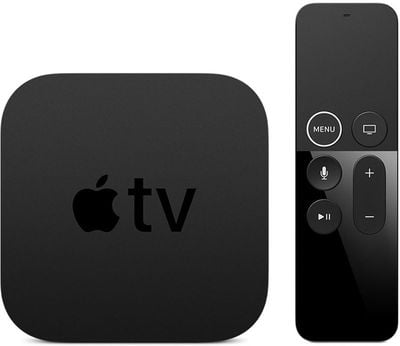
appletv4k2
tvOS updates (aside from major releases) have historically been minor in scale, focusing on under-the-hood bug fixes and improvements rather than major outward-facing changes. Apple provides little to no information on what's included in tvOS updates, so we may not discover anything new during the beta testing process.

Though we don't often know what's been added in tvOS updates, we let MacRumors readers know when new software is available so developers are able to download it upon release.

We didn't find anything new in the first tvOS 13.2 beta, but will update this post should we find new features in the second tvOS 13.2 beta.

tvOS 13, released earlier in September, introduced multi-user support, a new Control Center, Apple Arcade and controller support, new screensavers and more.

Related Roundup: Apple TV
Buyer's Guide: Apple TV (Don't Buy)

Popular Stories

General visionOS watchOS and tvOS Betas Feature Redux

Apple Releases Third watchOS 26.6, tvOS 26.6 and visionOS 26.6 Betas

Monday June 29, 2026 10:08 am PDT by
Apple today provided developers with the third betas of upcoming watchOS 26.6, tvOS 26.6, and visionOS 26.6 betas for testing purposes. The software comes two weeks after Apple seeded the second betas. The software updates are available through the Settings app on each device, and because these are developer betas, a free developer account is required. There's no word on what's in the...
Apple TV 2025 Thumb 2 Sans Text

iOS 27 Lets You Update Your Apple TV Using Your iPhone

Tuesday June 23, 2026 9:09 am PDT by
If the idea of digging out your Siri Remote to install a tvOS update on your Apple TV sounds like too much effort, Apple's upcoming iOS 27 software will have a new feature you'll surely welcome. Based on the latest iOS 27 beta 2, you can push Apple TV software updates straight from your iPhone, and you don't even need to turn the Apple TV on first. Apple's set-top box now appears in the...
Chase Sapphire Reserve Apple Perk Feature

Chase Sapphire Credit Cards Offering New Apple TV and Apple One Perks

Wednesday June 24, 2026 7:00 am PDT by
Chase recently introduced new Apple TV and Apple One perks for its Sapphire Preferred and Sapphire Reserve credit cards in the United States. Sapphire Preferred cardholders ($95 annual fee) are now eligible to receive a complimentary one-year Apple TV streaming subscription, or a $7.50/month discount on an active Apple One subscription for 12 months instead. Sapphire Reserve cardholders...

Top Rated Comments

89 months ago
Apple is not getting enough flack for removing Up Next from the TV app's Top Shelf, and replacing it with ads.
Score: 7 Votes (Like | Disagree)
BWhaler Avatar
89 months ago
Please fix the mess that is the Apple TV app. So buggy. Libraries don’t load, etc.

The problem with these shared code base apps is Apple TV stinks on multiple devices. I won’t upgrade to Catalina just because I don’t want to lose media functionality. (That, and it’s a buggy train wreck)
Score: 4 Votes (Like | Disagree)
MadeTheSwitch Avatar
89 months ago
I hope it is released soon. Airplay is a hot mess on tvOS 13. Very slow to play things. Slows down scrolling around the menus too. My Apple TV has never ran worse.
Score: 3 Votes (Like | Disagree)
89 months ago

Apple is not getting enough flack for removing Up Next from the TV app's Top Shelf, and replacing it with ads.
They took the best feature and buried it. Makes 0 sense.
Score: 2 Votes (Like | Disagree)
MadeTheSwitch Avatar
88 months ago

It's better to be concise but the window expands quite a bit
I quickly reached the limit. And they were three very short points. But I squeezed them in.
Score: 1 Votes (Like | Disagree)
katbel Avatar
88 months ago

Yeah, that’s what it did to me too. Just decided to update itself anyway despite auto updates being turned off. Made me so mad. I wouldn’t mind as much if it was a perfectly working update, but it’s not. Yesterday I was trying to airplay music to it, and it repeatedly turned off the Apple TV as if I wasn’t using it. So annoying. Sure hoping the next version fixes these problems.
I reported to Apple in a feedback, I suggest to do it yourself too ('https://www.apple.com/feedback/appletv.html'), more feedbacks more complaints to get something fixed 🤞
Score: 1 Votes (Like | Disagree)