Everything New in iOS 13.2 Beta 2: Delete Apps From Home Screen, Emoji, Siri Privacy and More - MacRumorsOpen MenuShow RoundupsShow Forums menuVisit ForumsOpen Sidebar
Skip to Content

Everything New in iOS 13.2 Beta 2: Delete Apps From Home Screen, Emoji, Siri Privacy and More

The first beta of iOS 13.2 brought a handful of changes like Deep Fusion support, Announce Messages With Siri and HomePod handoff options, but iOS 13.2 beta 2 introduces even more significant changes.

There are new emoji and new Siri privacy settings as we outlined earlier today, but there are also some other smaller changes worth highlighting.

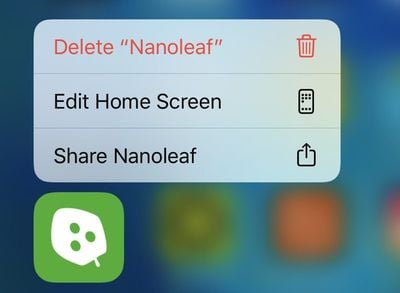
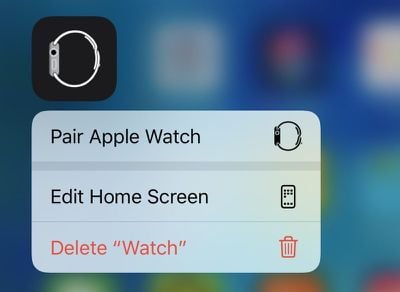
- Rearrange Apps - The "Rearrange Apps" option that pops up when 3D Touching or using a Haptic Touch on an app icon is now "Edit Home Screen."
deleteappsios132
- Delete Apps From Home Screen - There's a new option to delete apps right from the Home screen when pressing on them with a β€ŒHaptic Touchβ€Œ or 3D Touch.

deleteappshomescreenios132
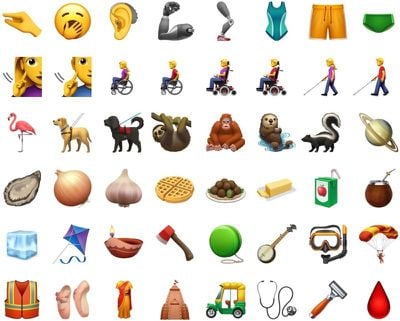
- New Emoji - iOS 13.2 beta 2 includes support for the Unicode 12 emoji with characters like yawning face, sloth, waffle, falafel, otter, and tons more.
newemojis

Image via Emojipedia

- New Emoji Picker - When using a multi-person emoji, there's a new skin tone picker that lets you select a different skin tone for each person.


- Siri Privacy Splash Screen - When you first install iOS 13.2, there's a new splash screen that lets you opt out of sharing β€ŒSiriβ€Œ and Dictation audio recordings with Apple.

- Delete Siri History - In the β€ŒSiriβ€Œ section of the Settings app, there's a new β€ŒSiriβ€Œ and Dictation option that lets you delete all of the β€ŒSiriβ€Œ and Dictation history associated with your iPhone from Apple's servers.
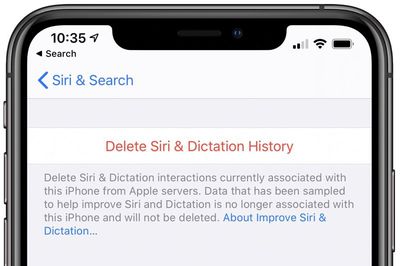
deletesirihistoryios132
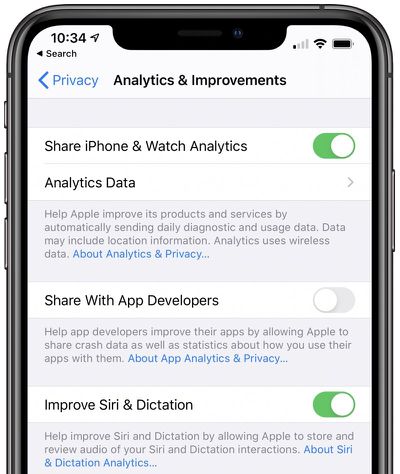
- Audio Recordings - In the Analytics and Improvements section of the Privacy portion of the Settings app, there is a new toggle to opt out of sharing your audio recordings with Apple for the purpose of improving β€ŒSiriβ€Œ.

optoutsiriios132
- AirPods Animation - In the last beta, we found images that reveal the design of the third-generation AirPods. This beta includes an animation that will walk users through changing the noise cancelation options on the new AirPods. Noise cancelation is one of the features expected to be included with the new earbuds.


- Video Recording - When capturing video on the new iPhone 11 and 11 Pro models, you can change the resolution and the frames per seconds settings of the video directly in the Camera app. To do so, tap on the small icons that are located at the top left of the interface. Resolution and FPS can be changed independently depending on where you tap.

cameracontrolsios132
Know of a feature that's new in iOS 13.2 beta 2 that we left out? Make sure to let us know in the comments and we'll update this article.


Related Forum: iOS 13

Popular Stories

iphone 18 pro blue%402x

iPhone 18 Pro: Dark Cherry, Light Blue, and Dark Gray Chassis Leaked [Update]

Thursday June 4, 2026 5:18 am PDT by
Update: Since publication, new information has come to light suggesting the images have been AI-manipulated and are not in fact iPhone 18 Pro chassis parts. The original article follows. The color options Apple is reportedly planning for the upcoming iPhone 18 Pro and β€ŒiPhone 18 Proβ€Œ Max have appeared online today in the form of images of chassis parts of unknown authenticity....
Aston Martin CarPlay Ultra Screen

Apple Says CarPlay Ultra is Coming to These Vehicle Brands

Thursday May 21, 2026 11:53 am PDT by
Last year, Apple launched CarPlay Ultra, the long-awaited next-generation version of its CarPlay software system for vehicles. Nearly a year later, CarPlay Ultra is still limited to Aston Martin's latest luxury vehicles, but that should change fairly soon. In May 2025, Apple said many other vehicle brands planned to offer CarPlay Ultra, including Hyundai, Kia, and Genesis. CarPlay Ultra...
iOS 27 All the New App Features

iOS 27: All the Rumored App Features

Wednesday June 3, 2026 3:48 pm PDT by
Siri is getting a major overhaul in iOS 27, but Apple also has some big updates planned for apps like Camera, Photos, and Wallet. There are multiple new AI features in the works, plus some non-AI upgrades. Camera Apple is moving Visual Intelligence from the Camera Control button to the Camera app in iOS 27, according to Bloomberg. There will be a Siri mode that will be available alongside...

Top Rated Comments

techsantos Avatar
87 months ago
I've been waiting 84 years to be able to change recording settings within the camera app. What am I going to complain about now?
Score: 51 Votes (Like | Disagree)
shanson27 Avatar
87 months ago
you can now change the resolution and the frames per seconds settings of the video directly in the Camera app ('https://www.reddit.com/r/iOSBeta/comments/dg1nfc/feature_ios_132_developer_beta_2_introduces/').


Attachment Image
Score: 24 Votes (Like | Disagree)
alpi123 Avatar
87 months ago
The new delete app feature and being able to change the video settings within the camera app are nice touches.
Score: 11 Votes (Like | Disagree)
alexandr Avatar
87 months ago
see, i hate when they limit a purely software function (such as changing the resolution and the frames per second settings of the video in this case), to specific hardware in an attempt to steer more people towards buying new phones. so lame.
Score: 9 Votes (Like | Disagree)
87 months ago

I've been waiting 84 years to be able to change recording settings within the camera app. What am I going to complain about now?
you can complain that it's only on iPhone 11 models, even though there are a large number of models that have multiple recording options. I'm not on the beta, but that's what the post makes it sound like. It's incredibly frustrating to have to go so out of my way to change such a simple setting.
Score: 9 Votes (Like | Disagree)
StellarVixen Avatar
87 months ago
Unnecessary complication of Home Screen menu.
Score: 9 Votes (Like | Disagree)