

Microsoft Office Apps for iOS Gain Dark Mode Support - MacRumorsOpen MenuShow RoundupsShow Forums menuVisit ForumsOpen Sidebar
Skip to Content

Microsoft Office Apps for iOS Gain Dark Mode Support

by

Update: As spotted by WCCFTech, Microsoft has now updated all of its Office apps – Word, Excel, PowerPoint, OneNote and Outlook – to support Dark Mode.


Microsoft OneNote received an update on iOS today that brings much-awaited ‌Dark Mode‌ support to the popular note-taking app.
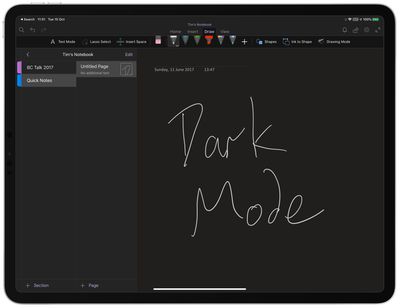
onenote dark mode ipad
OneNote is usually a particularly bright app because of the large white scrollable canvases and pale menus, so this update should be a welcome one for users who work with it long into the night.

Apart from supporting the new system-wide ‌Dark Mode‌ in iOS 13 and iPadOS, version 16.30 of OneNote makes no other changes to the app, as per the release notes:

Go easy on your eyes with Dark Mode: Switch to Dark Mode in low light environments or whenever you want to increase the legibility of the OneNote user interface and the readability of your notes.

Thanks for using OneNote! We listened to your feedback and updated the application with optimizations to help improve your note taking experience.

Microsoft has been adding ‌Dark Mode‌ support to a range of its apps. A Sticky Notes beta gained a dark mode earlier this month, while the rest of the Office iOS apps including Word, PowerPoint, and Excel already sport the twilight look in insider builds and are expected to go live with it any day now.


Top Rated Comments

88 months ago
Do SKYPE fro Business Already!!!!!!
Score: 1 Votes (Like | Disagree)
williamwoneill Avatar
88 months ago
I really like this app but I hate it in Dark Mode. The highlighter is garbage in this mode along with the other complaints above. I wish the would give me a way to turn it off for this app. The handwritten preview to this side also sucks. This is a step backwards for an app that I love.
Score: 1 Votes (Like | Disagree)
88 months ago
I think these are probably the few apps I wouldn’t use in dark mode, with the exception of outlook. I like to see what my documents would look like on a white background.

I am already having issues copy and pasting out of Notes into third party apps, as it pastes the white font colour onto a white background.
Score: 1 Votes (Like | Disagree)

Popular Stories

iCloud iPhone 17 Pro

iPhone Users Who Pay for iCloud Storage Get Two New Perks on iOS 27

Thursday July 2, 2026 6:10 am PDT by
If you pay for certain iCloud+ storage plans beyond the 5GB that Apple offers for free, you will receive two more perks on iOS 27 at no additional cost. A summary of the two new iCloud+ perks on iOS 27:Increased daily usage limits for some new Apple Intelligence features, including image generation in the revamped Image Playground app. HomeKit Secure Video cameras receive generated video...
Apple Event Logo

Apple Just Released a New Product

Thursday July 2, 2026 8:04 am PDT by
Apple's first product release of summer 2026 occurred this week, but do not get too excited, as it is merely the Beats Solo Buds in a new color. Beats Solo Buds are now offered in orange through Best Buy in the U.S., with availability set to expand to 7-Eleven stores in Japan on July 4. Apple already offered orange Solo Buds in India for free with the purchase of an iPhone 15 or iPhone 15 ...
iPhone 4 on Black Feature

Apple Facing One of Its Worst Leaks Since the iPhone 4

Thursday July 2, 2026 9:53 am PDT by
Apple supplier Tata Electronics recently suffered a cyberattack that resulted in thousands of confidential files being published on the dark web, and this reportedly included some photos and documents related to the upcoming iPhone 18 Pro. We have elected not to share any of the leaked photos in this story due to the illegal nature in which they were obtained, but they can easily be found...














