

Apple Reminds iPhone 5 Owners to Update to iOS 10.3.4 by November 3 - MacRumorsOpen MenuShow RoundupsShow Forums menuVisit ForumsOpen Sidebar
Skip to Content

Apple Reminds iPhone 5 Owners to Update to iOS 10.3.4 by November 3

by

Apple has started advising iPhone 5 owners to update to iOS 10.3.4 before November 3, otherwise several key functions like iCloud and the App Store will no longer work on their device because of a time rollover issue.
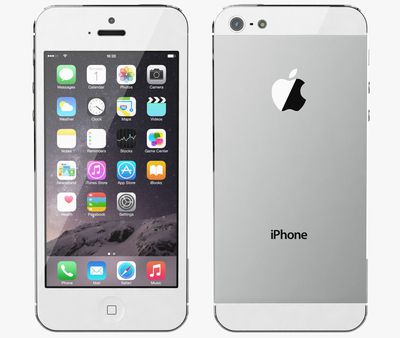
Apple iPhone 5 white
Back in July, Apple released updated versions of iOS for older iPhones and iPads models, including the iPhone 5, to address an issue that could impact GPS location performance and lead to the system date and time being incorrect. The GPS time rollover issue began affecting GPS-enabled products from other manufacturers on April 6, 2019, but Apple's affected devices aren't impacted by the problem until just before midnight UTC on November 3, 2019.

For iPhone 5 and the fourth-generation iPad with Wi-Fi and Cellular, the 10.3.4 update is required to maintain accurate GPS location and to continue to use functions that rely on correct date and time including ‌App Store‌, ‌iCloud‌, email, and web browsing. An iOS 9.3.6 update is available for the also-affected iPhone 4s and cellular models of the original iPad mini, the ‌iPad‌ 2, and the ‌iPad‌ 3.

From Apple's support document:

Starting just before 12:00 a.m. UTC on November 3, 2019, iPhone 5 will require an iOS update to maintain accurate GPS location and to continue to use functions that rely on correct date and time including App Store, iCloud, email, and web browsing. This is due to the GPS time rollover issue that began affecting GPS-enabled products from other manufacturers on April 6, 2019. Affected Apple devices are not impacted until just before 12:00 a.m. UTC on November 3, 2019.

If iPhone 5 models in particular are not updated by November 3, 2019, Apple says users will have to back up and restore using a Mac or PC in order to update, because over-the-air software updates and ‌iCloud‌ Backup will not work.

If you have an iPhone 5, check to make sure your device has updated successfully by following these steps.

  1. Launch the Settings app on your iPhone 5.
  2. Tap General -> About.
  3. Look for the number next to Software Version.

The updated software version should be 10.3.4.

Related Forum: iPhone

Top Rated Comments

86 months ago
Deleted.
Score: 14 Votes (Like | Disagree)
NufSaid Avatar
86 months ago
To support hardware like this that is so old is very generous when you think about it.
Score: 11 Votes (Like | Disagree)
86 months ago
You’ve got to hand it to Apple: providing a software update to the iPhone 4S in 2019 is beyond helpful.

Do you see Samsung offering an update to the Galaxy S1? Or Google to the Nexus S? They wouldn’t even bother.
Score: 10 Votes (Like | Disagree)
PickUrPoison Avatar
86 months ago

It depends. If apple bricks it, that not “generous”. If they are simply removing iCloud access that’s another matter.
Apple’s not bricking anything, and they’re not removing iCloud access.

Apple released 10.3.4 a few months ago to deal with a well-known problem (GPS rollover issue). If iPhone 5 users don’t update, they’re going to have problems.


How? It’s not supported anymore. It’s not like the iPhone 5 is getting iOS 13.
Not getting the latest version of iOS is not the same as unsupported.

Apple released a new version (10.3.4) a few months ago specifically to support customers still using iPhone 5. They need to update or they’ll have problems.
Score: 9 Votes (Like | Disagree)
acblue94 Avatar
86 months ago

MacRumors content image
Apple has started advising ('https://support.apple.com/en-us/HT210712#925') iPhone 5 owners to update to iOS 10.3.4 before November 3, otherwise several key functions like iCloud and the App Store will no longer work on their device because of a time rollover issue.

Back in July, Apple released updated versions of iOS ('https://www.macrumors.com/2019/07/22/apple-releases-gps-bug-fix-older-iphones-ipads/') for older iPhones and iPads models, including the iPhone 5, to address an issue that could impact GPS location performance and lead to the system date and time being incorrect. The GPS time rollover issue began affecting GPS-enabled products from other manufacturers on April 6, 2019, but Apple's affected devices aren't impacted by the problem until just before midnight UTC on November 3, 2019.

For iPhone 5 and the fourth-generation iPad with Wi-Fi and Cellular, the 10.3.4 update is required to maintain accurate GPS location and to continue to use functions that rely on correct date and time including App Store, iCloud, email, and web browsing. An iOS 9.3.6 update is available for the also-affected iPhone 4s and cellular models of the original iPad mini, the iPad 2, and the iPad 3.

From Apple's support document ('https://support.apple.com/en-us/HT210712#925'):
If iPhone 5 models in particular are not updated by November 3, 2019, Apple says users will have to back up and restore using a Mac or PC in order to update, because over-the-air software updates and iCloud Backup will not work.

If you have an iPhone 5, check to make sure your device has updated successfully by following these steps.
[LIST=1]
* Launch the Settings app on your iPhone 5.
* Tap General -> About.
* Look for the number next to Software Version.

The updated software version should be 10.3.4.

Article Link: Apple Reminds iPhone 5 Owners to Update to iOS 10.3.4 by November 3 ('https://www.macrumors.com/2019/10/27/apple-reminds-iphone-5-owners-update-ios-10-3-4/')
They should also remind iPhone 5 users that it’s 2019. And welcome them.
Score: 7 Votes (Like | Disagree)
Kabeyun Avatar
86 months ago

Macrumors had an article about this on July 22, 2019.

https://www.macrumors.com/2019/07/22/apple-releases-gps-bug-fix-older-iphones-ipads/
Thanks for that, but notification isn’t my point. iOS 13.1.4 isn’t out yet, at least not for me, and we have only a week to install it before there are adverse consequences. Time to deploy, Apple.

Edit: Holy crap, I’ve been thinking of 13.1.4, while this is all about 10.1.4. I’ll just face palm myself and move on. And I’m leaving my posts up to show that I’ll own a dumb error.
Score: 6 Votes (Like | Disagree)

Popular Stories

macOS 27 on MacBook Pro

Apple Says macOS 27 Won't Be Compatible With These Macs

Wednesday June 3, 2026 8:29 am PDT by
During WWDC 2025, Apple revealed that macOS 26 Tahoe would be the final major macOS version for Intel-based Macs. macOS 27 will be compatible with Apple silicon Macs only, meaning that you will need a Mac with an M-series chip or a MacBook Neo with an A18 Pro chip in order to install the software update. Apple will unveil macOS 27 during its WWDC 2026 keynote this Monday, June 8, and the...
MacBook Neo on Yellow Feature

MacBook Neo is So Popular That Apple Reportedly Doubled Production

Wednesday June 3, 2026 9:24 am PDT by
On an earnings call in late April, Apple's CEO Tim Cook said that customer response to the MacBook Neo was "off the charts," and the popularity of the laptop has reportedly led the company to significantly boost production. Apple supply chain analyst Ming-Chi Kuo this week said he believes that MacBook Neo shipments to Apple were doubled from an initial target of 5 million units to 10...
iphone 18 pro blue%402x

iPhone 18 Pro: Dark Cherry, Light Blue, and Dark Gray Chassis Leaked [Update]

Thursday June 4, 2026 5:18 am PDT by
Update: Since publication, new information has come to light suggesting the images have been AI-manipulated and are not in fact iPhone 18 Pro chassis parts. The original article follows. The color options Apple is reportedly planning for the upcoming iPhone 18 Pro and ‌iPhone 18 Pro‌ Max have appeared online today in the form of images of chassis parts of unknown authenticity....














