Apple Card Now Supports Exporting Transactions in OFX File Format
Apple Card users are now able to export their transaction data in an OFX file format for use with third-party financial apps such as Quicken and Mint, as noted by Kyle Seth Gray. The option shows up when a monthly statement is available.
The exporting feature first rolled out last month, but only with CSV file support.
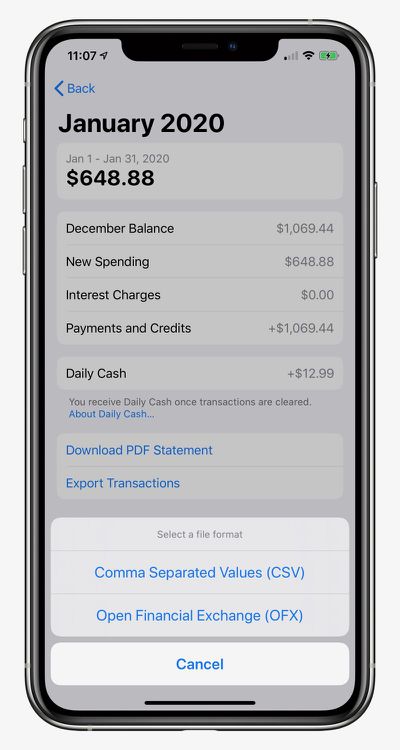
How to Export and Download Apple Card Transactions
- Open the Wallet app on your iPhone and tap on Apple Card.
- Tap on Card Balance.
- Under Statements, tap on the statement you want to export.
- Tap on Export Transactions and choose CSV or OFX.
Apple launched its credit card in the United States in August. Key features include color-coded spending summaries in the Wallet app, no fees beyond any applicable interest, and up to three percent cashback on purchases paid out daily.
To apply for an Apple Card, simply open the Wallet app on an iPhone running iOS 12.4 or later, tap the plus button in the top-right corner, and follow the on-screen steps. The process takes just a few minutes, and if approved, your digital Apple Card will be ready for purchases immediately. A physical titanium-based Apple Card is also available for use at retail stores that do not accept contactless payments.
Popular Stories
Today marks the seventh anniversary of the Apple Card becoming widely available in the U.S., following a more limited preview period.
Apple's credit card can be managed in the iPhone's Wallet app, with key benefits including color-coded spending summaries, no fees, and Daily Cash cash back paid out daily. Apple Card holders can also open a high-yield savings account.
The anniversary comes ...
Now through September 15, you can get 5% Daily Cash when you use the Apple Card via Apple Pay on up to $750 in combined eligible purchases at Booking.com, Hertz, ChargePoint, Exxon, and Mobil. The maximum total Daily Cash you can earn through this offer is $37.50, according to Apple, with complete details outlined on this page.
Ordinarily, the Apple Card offers 3% Daily Cash at these...
Update 10:04 a.m.: iOS 27 is rolling out now, though it may take a bit for all users to see it, so keep checking!
Apple is about to release iOS 27, which will finally deliver more advanced Siri AI capabilities as well as a variety of other refinements, improvements, and new features to iPhones. It's Apple's biggest software update of the year, and Apple announced at Wednesday's iPhone event...




/https://forums.macrumors.com/attachments/893650/)

















