

'Lockdown' Firewall App That Lets You Block Ads and Trackers in All Apps Expands to Mac - MacRumorsOpen MenuShow RoundupsShow Forums menuVisit ForumsOpen Sidebar
Skip to Content

'Lockdown' Firewall App That Lets You Block Ads and Trackers in All Apps Expands to Mac

by

Lockdown, a popular open source firewall app that's designed to let users block any connection to any domain, is now available for Macs in addition to iOS devices.

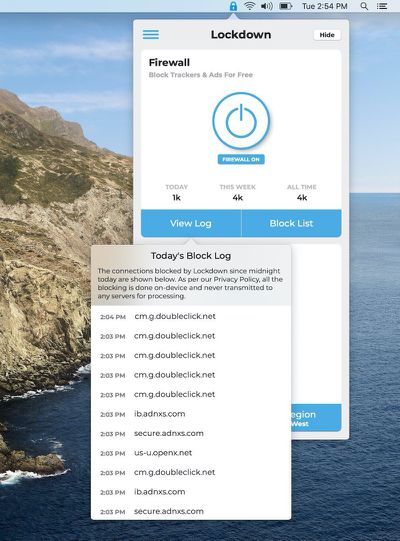
Launched on the iPhone back in July, Lockdown blocks ad tracking services, analytics platforms that monitor device usage, ads, and more across all apps that you use (rather than just Safari like most ad blockers). Lockdown on iOS has blocked more than a billion trackers for Lockdown users, according to developer Rahul Dewan.
lockdown
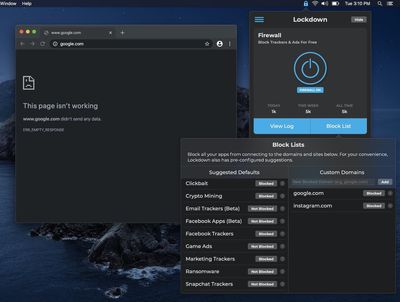
Lockdown for Mac is designed to be as simple and as customizable as the iOS version of the app. The app comes with a pre-installed list of recommended domains to block to prevent tracking, such as Facebook tracking and analytics tracking options from companies like Google and Mixpanel, but custom lists can be added as well.
lockdown2
The app is free to use, and since it operates on device, there is no user data collection. Lockdown is designed by the developers behind Duet Display, and it is monetized through an optional Secure Tunnel VPN service.

Lockdown can be downloaded from the Mac App Store for free. [Direct Link]

Top Rated Comments

82 months ago
The positioning of that on/off button within the outer circle is going to keep me awake tonight. 🤦‍♂️
Score: 25 Votes (Like | Disagree)
82 months ago

Tried to download it, but it "requires" Catalina...


Little Snitch only blocks/allows/monitors network traffic and connections. This blocks ad tracking that is used to target you with advertisements and analytics that are sold to marketing firms.
This app is definitly not needed if you have Little Snitch. This morning I just created my own Little Snitch rule blocking the 555 domains that Locknote is blocking (you can find the list on their github). But if you are looking for very good list for Little Snitch (with much much more domains blocked than Locknote), take a look at

https://raw.githubusercontent.com/naveednajam/Little-Snitch---Rule-Groups/master/unified_hosts_base/sb_unified_hosts_base.lsrules

or

https://pgl.yoyo.org/adservers/serverlist.php?hostformat=littlesnitch-rule-group-subscriptions&mimetype=plaintext
Score: 14 Votes (Like | Disagree)
69Mustang Avatar
82 months ago

The positioning of that on/off button within the outer circle is going to keep me awake tonight. 🤦‍♂️
Dammit! Cannot unsee. :mad: You are a monster for pointing that out.
Score: 11 Votes (Like | Disagree)
82 months ago

Am I missing something? It looks centered to me.
Power icons like this generally have the circle centered, without regard for the positioning of the bit that sticks up (if it does actually protrude). Your diagram shows that this is not the case here.
Score: 8 Votes (Like | Disagree)
82 months ago

100 Dollar subscription cost per year vs. one time.
It is only a subscription for a VPN upgrade. Our firewall is free and open source!


Lockdown for iOS is great when it’s working. Problem is, it’ll stop functioning randomly but appear to still be blocking URLs as intended. I’d hoped they’d address this before launching other projects.

For the Mac I’m wary of installing Lockdown. I used to use Duet display, made by the same developers according to the article, and enjoyed it. Until one day the Genius Bar traced kernel panics I had been having back to Duet as the source and told me to get rid of it. As soon as I did the problems went away.
Hey there - creator of Duet Display here. I am so sorry about this issue, but it was actually a macOS bug that caused a kernel panic for a very small number of users, so there was nothing we could do. We did not require any code changes, but they helped us resolve the issue in a future OS update and it has been resolved for some time now.


Its probably coded in SwiftUI which is only in Catalina.
Yes, this is exactly it. We are very limited on resources, and SwiftUI really helped us accelerate development for the macOS version.
Score: 7 Votes (Like | Disagree)
Pafoofnik Avatar
82 months ago

Tried to download it, but it "requires" Catalina...

Yep. I'm told that it'll run on my MacBook Pro (yippee!) but it requires MacOS 10.15 and a 64-bit processor. I guess my MacOS 10.14.6 and a 64-bit processor doesn't make the grade. (boo!)
Score: 6 Votes (Like | Disagree)

Popular Stories

Aston Martin CarPlay Ultra Screen

Apple Says CarPlay Ultra is Coming to These Vehicle Brands

Thursday May 21, 2026 11:53 am PDT by
Last year, Apple launched CarPlay Ultra, the long-awaited next-generation version of its CarPlay software system for vehicles. Nearly a year later, CarPlay Ultra is still limited to Aston Martin's latest luxury vehicles, but that should change fairly soon. In May 2025, Apple said many other vehicle brands planned to offer CarPlay Ultra, including Hyundai, Kia, and Genesis. CarPlay Ultra...
iphone 18 pro blue%402x

iPhone 18 Pro: Dark Cherry, Light Blue, and Dark Gray Chassis Leaked [Update]

Thursday June 4, 2026 5:18 am PDT by
Update: Since publication, new information has come to light suggesting the images have been AI-manipulated and are not in fact iPhone 18 Pro chassis parts. The original article follows. The color options Apple is reportedly planning for the upcoming iPhone 18 Pro and ‌iPhone 18 Pro‌ Max have appeared online today in the form of images of chassis parts of unknown authenticity....
iOS 27 All the New App Features

iOS 27: All the Rumored App Features

Wednesday June 3, 2026 3:48 pm PDT by
Siri is getting a major overhaul in iOS 27, but Apple also has some big updates planned for apps like Camera, Photos, and Wallet. There are multiple new AI features in the works, plus some non-AI upgrades. Camera Apple is moving Visual Intelligence from the Camera Control button to the Camera app in iOS 27, according to Bloomberg. There will be a Siri mode that will be available alongside...















