

Affinity Publisher for Mac Gains IDML Import, Preflight Checking, Template Support, and More - MacRumorsOpen MenuShow RoundupsShow Forums menuVisit ForumsOpen Sidebar
Skip to Content

Affinity Publisher for Mac Gains IDML Import, Preflight Checking, Template Support, and More

by

Serif today announced across-the-board updates for its popular suite of Affinity creative apps, including Affinity Photo, Affinity Designer, and the Apple award-winning Affinity Publisher for Mac.
publisher 1
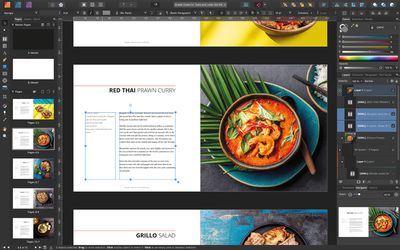
The biggest news relates to Publisher, with its first big update since launching in the summer. Version 1.8 of the Mac app brings IDML compatibility, allowing users to import InDesign files for the first time.

The IDML import capability should appeal to businesses and other professional users who want to access older document catalogs, and should make it easier for those who want to make the switch to the Affinity suite.
Affinity Publisher 1
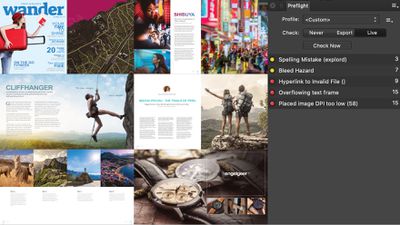
Publisher now also supports full pre-flight checking that can alert users to possible document errors, including poor image resolutions, bleed hazards, text overflow, spelling errors, missing images or fonts, and more.

In addition, Publisher now offers the ability to save documents as templates for re-use in future projects, as well as the ability to combine multiple Affinity Publisher documents together into a single file, with smart merge of master pages, text styles, table of contents and indexes.

Elsewhere, there's added support for Excel file import to bring in spreadsheet tables and data, PDF export that's up to five times faster than before, and several other improvements and fixes.

Affinity Photo 1
Affinity Photo and Designer are also getting v1.8 updates today. Some of the new features include: Smart object support when importing PSD files; a new stock imagery search panel in Designer; customizable keyboard shortcuts in both apps; and Nik plug-in compatibility for Affinity Photo.

Affinity v1.8 apps are available to purchase from the Serif website for a one-off payment with no subscription. Affinity Publisher, Photo, and Designer cost $49.99 on Mac, while Affinity Photo and Designer for iPad cost $19.99. Existing users can download the updates free.


Top Rated Comments

82 months ago

Importing my InDesign work has been the number one reason I still have not used Publisher. I just converted several of my recent layouts to the IDML format, and opened them in Publisher. They worked great, but many of the font sizes had to be reduced to get them to fit properly.

Does anyone know of an easy automation to converting CS6 or newer INDD files to IDML without having to open each file and individually save each? Any if you do, can you give some details :)

Now that I can import, I need to learn the differences between InDesign and Publisher. If anyone has a good reference or Youtube video, please recommend it :)

I've been using the Adobe Suite forever now, and on my personal systems, am still on CS6 - I don't want to pay monthly for that. SO I have been stuck with Mojave due to that 32 bit restriction, since I need to use Adobe Photoshop, Illustrator and InDesign. Now, once I get a good grasp and feel confident in the Serif Suite, I will upgrade and say goodbye to Adobe.

I did try to install and run CS6 in Parallels in Mojave - but Illustrator and InDesign always crash on load - Parallels support could not figure it out. Only Photoshop worked this way.
we’ve been using Publisher for over a year now. We started during the public beta and after a few weeks moved wholesale from InDesign.

I’m now at the point where I genuinely prefer publisher. Getting table of contents working correctly requires something close to a PhD but apart from that, it’s all been pretty straightforward.

There are some really dramatic benefits to Publisher over indesign. The always on wysiwyg display is a bit of a game changer.

My number one complaint? That it’s not possible to disable embedding of documents instead of linking them. You can set it as a preference, but embedding is still there and possible.

There are situations where I can see embedding could be desirable, ie, archiving or for remote working, but in normal day-to-day use as a professional organisation, you should have absolute confidence about how files are working.
Score: 3 Votes (Like | Disagree)
82 months ago
I cannot wait for the day when the Affinity Suite (including a PDF app with Acrobat Pro capabilites) is here and knocks some sense into Adobe. PDF has been around for over 20 years and an open standard for more than 10, yet Adobe feels their app is so special they charge $300-$450 for the app (or $20/mo, forever).

Affinity...give us an alternative to Acrobat!
Score: 2 Votes (Like | Disagree)
Marco Klobas Avatar
82 months ago

Does anyone know of an easy automation to converting CS6 or newer INDD files to IDML without having to open each file and individually save each? Any if you do, can you give some details :)
Have you tried this script ('https://redokun.com/resources/batch-convert-idml-file')?

Paid solutions are IDMarkz ('https://markzware.com/products/idmarkz/') or Output Factory ('http://zevrix.com/outputfactory.php').
Score: 2 Votes (Like | Disagree)
Gorms Avatar
82 months ago
Whoa, whoa, whoa. Smart Object support for PSD’s in Affinity Photo? That’s big news and also incredibly useful to me at this moment in time. I didn’t think they were gonna be able to do smart objects in AP as it was some Adobe proprietary thing, looks like I was wrong. Thanks and nice work Serif!
Score: 2 Votes (Like | Disagree)
82 months ago
Similar to when InDesign originally came out and supported QuarkXPress file conversion, you can't really expect the converted files to be exact. You typically have to do some tweaking and adjustments, but it's easier than having to try and rebuild layouts from scratch.
Score: 2 Votes (Like | Disagree)
Apple Knowledge Navigator Avatar
82 months ago
Excellent! Keep it coming Serif
Score: 2 Votes (Like | Disagree)

Popular Stories

macOS 27 on MacBook Pro

Apple Says macOS 27 Won't Be Compatible With These Macs

Wednesday June 3, 2026 8:29 am PDT by
During WWDC 2025, Apple revealed that macOS 26 Tahoe would be the final major macOS version for Intel-based Macs. macOS 27 will be compatible with Apple silicon Macs only, meaning that you will need a Mac with an M-series chip or a MacBook Neo with an A18 Pro chip in order to install the software update. Apple will unveil macOS 27 during its WWDC 2026 keynote this Monday, June 8, and the...
MacBook Neo on Yellow Feature

MacBook Neo is So Popular That Apple Reportedly Doubled Production

Wednesday June 3, 2026 9:24 am PDT by
On an earnings call in late April, Apple's CEO Tim Cook said that customer response to the MacBook Neo was "off the charts," and the popularity of the laptop has reportedly led the company to significantly boost production. Apple supply chain analyst Ming-Chi Kuo this week said he believes that MacBook Neo shipments to Apple were doubled from an initial target of 5 million units to 10...
iphone 18 pro blue%402x

iPhone 18 Pro: Dark Cherry, Light Blue, and Dark Gray Chassis Leaked [Update]

Thursday June 4, 2026 5:18 am PDT by
Update: Since publication, new information has come to light suggesting the images have been AI-manipulated and are not in fact iPhone 18 Pro chassis parts. The original article follows. The color options Apple is reportedly planning for the upcoming iPhone 18 Pro and ‌iPhone 18 Pro‌ Max have appeared online today in the form of images of chassis parts of unknown authenticity....














