

Dell Mobile Connect App Update Allows Screen Mirroring of iPhones on Windows PCs - MacRumorsOpen MenuShow RoundupsShow Forums menuVisit ForumsOpen Sidebar
Skip to Content

Dell Mobile Connect App Update Allows Screen Mirroring of iPhones on Windows PCs

by

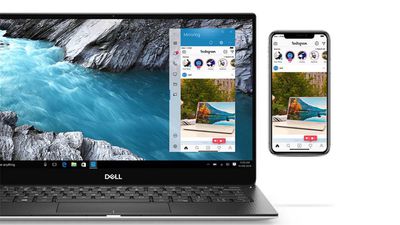
Dell this week updated its Mobile Connect iOS app with new features that offer seamless integration between Apple iPhones and Windows PCs, including wireless screen mirroring.
dell mobile connect
Version 3.0 of the app lets users control their phone with their PC's touchscreen, keyboard and mouse, which also enables drag and drop for photo and video files to transfer them between devices.

In addition to screen mirroring, the update includes Windows support for taking and making iPhone calls handsfree, text messaging, notifications, contacts search, and more when paired with an iPhone.

The Dell Mobile Connect PC app has a few requirements: The Dell laptop needs to be a 2018 model or later with Bluetooth, and the supported Dell laptop ranges include XPS, Inspiron, Vostro, Alienware, and the G Series.

The Dell Mobile Connect app is a free download for iPhone available on the App Store. [Direct Link]


Tags: Dell, Windows

Top Rated Comments

AlliFlowers Avatar
80 months ago
It would be nice if this were supported by Windows in general.
Score: 12 Votes (Like | Disagree)
ArtOfWarfare Avatar
80 months ago

Microsoft can’t even push their Windows 10 updates without any issue. When was the last time we heard a Windows 10 update was rolled out smoothly?
Microsoft rolls out updates smoothly on a pretty regularly basis... stuff working as intended doesn't warrant writing an article, thus why you don't hear about it.
Score: 6 Votes (Like | Disagree)
80 months ago
Wow!! Why the hell is this not available on Mac devices!! Killer app
Score: 5 Votes (Like | Disagree)
waydabber Avatar
80 months ago
I want the same on my Mac!
Score: 5 Votes (Like | Disagree)
iRutherford Avatar
80 months ago
I swear this is the next app to be yanked off the App Store. You heard it here first!
Score: 5 Votes (Like | Disagree)
torontotim Avatar
80 months ago

Damn. My 2017 XPS isn't supported :-(
Just install it - it will work. I'm running it on a Huawei Matebook X Pro paired with my XS Max. No problem.

I installed the PC app via the Microsoft App Store. It said it was incompatible but allowed the install anyhow. Prompted for the mirroring drivers, I then restarted the Dell PC app to pick the drivers up and I'm mirroring my iPhone on my Huawei laptop.

It's a kludge using Accessibility / touch control and screen broadcasting to work, but it works well enough. Nice to have iMessage up on my 28" 4K screen with my mouse and keyboard available to respond to messages.

Just make sure your phone is sitting on a dock pointed at you, for Face ID recognition. Mine sits on a Qi charging base angled at me perfectly. I don't even have to look at it to log into different apps.


There are somethings very wrong about this. The fact that the Mac can't do it, is one very wrong thing. Another one is that it's Windows. Another that it's Dell. Another is the idea that a somebody using Windows would be using an iPhone.

On and on.
So should I snap a pic of my iPhone XS Max mirrored on my Huawei Matebook X Pro - really push you over the edge?


Why can't Microsoft accomplish this, does this require hardware? From the link it looks like it just uses Bluetooth, maybe it requires a newer version of Bluetooth? I've always wanted to use Windows phone connect option but it only works on Android (the only function available for iphones is transferring web pages). Dell's app is exactly what Microsoft should have inside of Windows, would be nice to use something like this on a non Dell PC, I'd gladly pay for it.
Works just fine on non-Dell laptops. Installed it today on a Huawei Matebook X Pro and my XS Max. Working as designed. Full mirroring, alerts etc. although 90% of the alerts on my phone are already set up on my Windows laptop, so I get double/triple alerts (Chrome, Windows and now this Dell Mobile Connect all triggered from the same event).
Score: 4 Votes (Like | Disagree)

Popular Stories

MacBook Neo and Lenovo IdeaPad Slim 3x Feature

New Study Highlights Advantages of $549 Windows Laptop Over MacBook Neo

Wednesday May 13, 2026 10:38 am PDT by
Microsoft has responded to the MacBook Neo by commissioning a study that highlights advantages of some Windows laptops. Market research firm Signal65 evaluated four Windows laptops:Lenovo's IdeaPad Slim 3x Lenovo's Yoga 7i HP's OmniBook 5 HP's OmniBook X FlipWith a starting price of $549.99 on Best Buy's online store in the U.S. at the time of this writing, the IdeaPad Slim 3x is the only ...
Apple Card iPhone 16 Pro Feature

Apple Card Promo to Offer Free AirPods Pro 3

Friday May 15, 2026 8:59 am PDT by
Starting as early as next week, customers who sign up for an Apple Card at Apple's retail stores in the U.S. will receive $249 cash back when they purchase AirPods Pro 3, according to Bloomberg's Mark Gurman. The promotion has yet to be officially announced by Apple, so exact terms and conditions are not available at this time. AirPods Pro 3 are priced at $249 in the U.S., so customers who...
Apple WWDC25 iOS 26 CarPlay Light mode 250609

Six Popular iPhone Apps Now Available on CarPlay

Thursday May 14, 2026 9:10 am PDT by
Apple's CarPlay system for accessing iPhone apps on a vehicle's dashboard screen has received six popular apps in recent weeks: ChatGPT, Perplexity, Grok, Google Meet, WhatsApp, and the indie artist streaming platform Audiomack. Make sure you have the latest version of each app and they will automatically appear on CarPlay. ChatGPT Starting with iOS 26.4, CarPlay supports voice-based...














