Facebook App Gains 'Quiet Mode' Setting to Help Manage Usage - MacRumorsOpen MenuShow RoundupsShow Forums menuVisit ForumsOpen Sidebar
Skip to Content

Facebook App Gains 'Quiet Mode' Setting to Help Manage Usage

by

Facebook is rolling out a new feature in its iOS app that lets users temporarily mute push notifications and put the app on hold if they think it's taking up too much of their time.
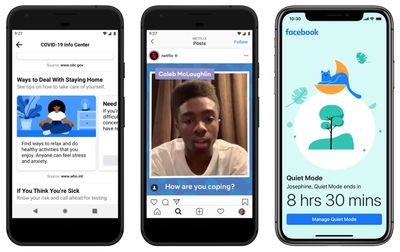
facebook quiet mode
Called "Quiet Mode," the new setting can turned on for a certain period of time or scheduled to come on at specific intervals. Quiet Mode be found by tapping the hamburger icon in the bottom right corner of the mobile app's interface and looking under the section titled "Your time on Facebook."

Quiet Mode forms part of a series of measures that Facebook is implementing to help users better manage their time on the social network while keeping people connected during the current health crisis. As Facebook explains in a blog post:

As we all adjust to new routines and staying home, setting boundaries for how you spend your time online can be helpful. Whether it’s to help you focus on your family and friends, sleep without distraction or manage how you spend your time at home, we have tools that can help you find the right balance for how you use Facebook.

If Quiet Mode is enabled and the user opens the Facebook app, a splash screen reminds them that they opted to take a break and shows how long is left before Quiet Mode ends. It's not a total block, though – a Manage Quite Mode button on the same screen lets you turn off the setting.

Facebook has included options for monitoring usage for a while now, but Quiet Mode is supposed to be an easier way to keep tabs on how much time you spend on the social network. The company has also updated and refined the way its usage stats let you see how long you've spent in the app.

Apple also offers Screen Time in iOS that allows you to put daily usage limits on individual apps. You can learn more about Screen Time here.

Of course, if any app turns into a distraction black hole for you, the easiest way to deal with that is to just delete it from your device.


Top Rated Comments

Wanted797 Avatar
84 months ago
I activated quiet mode years ago.

Jokes aside this is a good thing.

Attachment Image
Score: 20 Votes (Like | Disagree)
JosephAW Avatar
84 months ago
When I have to access Facebook to watch a video or view a family thread I use Safari browser, no app. Most secure way now to control fb access on my device.
Score: 5 Votes (Like | Disagree)
clayj Avatar
84 months ago
Great.

Now where is Dark Mode?
Score: 3 Votes (Like | Disagree)
Reason077 Avatar
84 months ago
I deleted the Facebook app years ago. And also set up an email filter to get rid of most Facebook notification emails (at the time, turning off emails in Facebook's settings wasn't effective).

I still do use Facebook, occasionally, but from my laptop. I find not having the app means you waste far less time on it.
Score: 3 Votes (Like | Disagree)
Gorms Avatar
84 months ago
Ahhhhh man, everyone’s already made the joke/truth that i came here to make.

Anyways, you should delete Facebook
Score: 2 Votes (Like | Disagree)
tha_man Avatar
84 months ago
Good feature. A bit late though, I've completely disabled facebook notifications I while ago, it was too damn annoying, and now it isn't :) I do find FB very useful for it's events with ability to show them directly on calendar. I would miss a lot of concert and festivals without it. It has also replaced certain forums (sadly, because I liked forums better) and it's good for keeping contact with certain people without handing a phone number.
Score: 1 Votes (Like | Disagree)

Popular Stories

Meta

Meta Agrees to Limit Teens' Time on Facebook and Instagram, Calls on TikTok and YouTube to Match

Wednesday August 26, 2026 3:28 pm PDT by
Meta today said it will implement major changes to Facebook and Instagram's child safety features as part of a settlement agreement with almost all U.S. states. Here's what will change for users under 18 on Instagram and Facebook if the agreement is approved. Time Limit - Teens will have a two-hour daily time limit on Facebook and Instagram, though it can be overridden by a parent. The...
iOS 27 Next to iPhone

Here's When iOS 27 Rolls Out Today in Every Time Zone [Update: It's Out]

Sunday September 13, 2026 3:00 am PDT by
Update 10:04 a.m.: iOS 27 is rolling out now, though it may take a bit for all users to see it, so keep checking! Apple is about to release iOS 27, which will finally deliver more advanced Siri AI capabilities as well as a variety of other refinements, improvements, and new features to iPhones. It's Apple's biggest software update of the year, and Apple announced at Wednesday's iPhone event...
iOS 27 Icon iPhone

iOS 27 Available Now With These 8 New Features

Monday September 14, 2026 9:00 am PDT by
Update — 10 a.m. Pacific Time: Apple has released iOS 27. During its iPhone 18 Pro and iPhone Duo event last week, Apple announced that iOS 27 will be released widely on Monday, September 14. iOS 27 should be available around 10 a.m. Pacific Time / 1 p.m. Eastern Time today via the Settings app, under General → Software Update. Below, we have highlighted eight new features and...