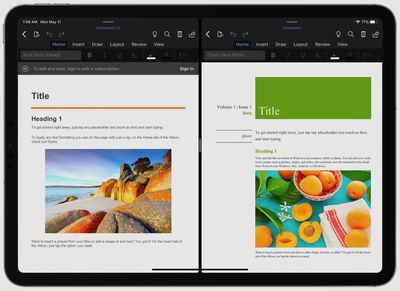
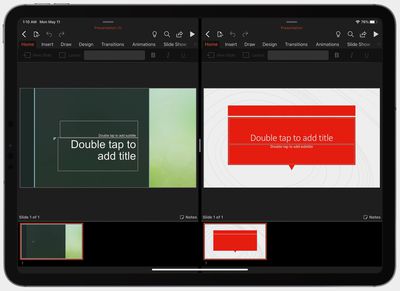
Microsoft today released updates to its suite of Office apps for iPad, including Word, PowerPoint, and Excel. Notably, Word and PowerPoint for iPad now support Split View, which allows you to open two documents simultaneously side-by-side.
Split View can be accessed by touching and holding on a document in any file view and then dragging it to the left or right side of the screen. To exit Split View, grab the slider in the middle of the screen and drag it to either the left or right to close one of the documents and take the remaining one full-screen.
Microsoft is also said to be working to implement full support for the new trackpad controls introduced in iPadOS 13.4, but these are not yet available. Basic trackpad functionality is present, but Microsoft still has some work to do to roll out support for the complete set of trackpad features.
Sunday September 13, 2026 3:00 am PDT by Eric Slivka
Update 10:04 a.m.: iOS 27 is rolling out now, though it may take a bit for all users to see it, so keep checking!
Apple is about to release iOS 27, which will finally deliver more advanced Siri AI capabilities as well as a variety of other refinements, improvements, and new features to iPhones. It's Apple's biggest software update of the year, and Apple announced at Wednesday's iPhone event...
Monday September 14, 2026 9:00 am PDT by Joe Rossignol
Update — 10 a.m. Pacific Time: Apple has released iOS 27.
During its iPhone 18 Pro and iPhone Duo event last week, Apple announced that iOS 27 will be released widely on Monday, September 14.
iOS 27 should be available around 10 a.m. Pacific Time / 1 p.m. Eastern Time today via the Settings app, under General → Software Update.
Below, we have highlighted eight new features and...
Tuesday September 15, 2026 1:43 am PDT by Tim Hardwick
Apple today announced a new subscription initiative that turns paid iCloud+ subscriptions into a broader services bundle in more than 100 countries.
In select countries, Apple says every paid iCloud+ plan, including the cheapest 50GB tier, now includes Apple TV and Apple Arcade "at no additional cost," while family sharing extends the storage, TV and Arcade access to up to five people....
Now let’s hope both Microsoft and Google update Docs and Word to handle trackpad support. I keep wondering if it is Microsoft and Google’s or even Mac’s best interest to offer rich trackpad support and see people flock away from Chromebooks, Windows and Mac’s to use their iPads instead? With my Magic Keyboard on my 12.9 i don’t see myself hopping onto anything else to type anything anytime soon.
Microsoft has already said that full trackpad support is coming later this year.
Maybe I'm dumb, but I just want to have two powerpoint decks side by side and be able to drag a slide from one deck to the other... I'm always pulling slides from various decks into one, but have never been able to do this cleanly on an iPad (and I have to think this isn't a unique use case)..
Anyone know an easy way to do this? I pretty much never create a slide deck from new :/
EDIT: Looks like you can copy and paste one slide to the other deck ... Fonts are all jacked up, but it's better than before!
Microsoft today released updates to its suite of Office apps for iPad, including Word, PowerPoint, and Excel. Notably, Word and PowerPoint for iPad now support Split View, which allows you to open two documents simultaneously side-by-side.
Split View can be accessed by touching and holding on a document in any file view and then dragging it to the left or right side of the screen. To exit Split View, grab the slider in the middle of the screen and drag it to either the left or right to close one of the documents and take the remaining one full-screen.
Microsoft is also said to be working to implement full support for the new trackpad controls ('https://www.macrumors.com/2020/05/08/microsoft-office-apps-to-get-trackpad-support/') introduced in iPadOS 13.4, but these are not yet available. Basic trackpad functionality is present, but Microsoft still has some work to do to roll out support for the complete set of trackpad features.
Article Link: Microsoft Word and PowerPoint for iPad Now Support Split View ('https://www.macrumors.com/2020/05/11/microsoft-word-powerpoint-ipad-split-view/')
🥱 Call me when they start bringing more features from full WORD, like maybe “REFERENCES” so anyone writing an academic paper can build citations? I mean come on.







/https://forums.macrumors.com/proxy.php%3Fimage=https://images.macrumors.com/article-new/2020/05/word_split_view.jpg&hash=ba2cce48a1c85916a59662e98419cffa)
/https://forums.macrumors.com/proxy.php%3Fimage=https://images.macrumors.com/article-new/2020/05/powerpoint_split_view.jpg&hash=9eb6c3c310af03a291c953d1ce47a043)















