HYPER Introduces Updated HyperDrive DUO 7-in-2 USB-C Hub for Mac Notebooks - MacRumorsOpen MenuShow RoundupsShow Forums menuVisit ForumsOpen Sidebar
Skip to Content

HYPER Introduces Updated HyperDrive DUO 7-in-2 USB-C Hub for Mac Notebooks

by

USB-C hubs that attach directly to Apple's notebooks have become quite commonplace in recent years, but Sanho Corporation's HYPER brand is today releasing an updated version of its HyperDrive Duo hub that includes a couple of new twists.
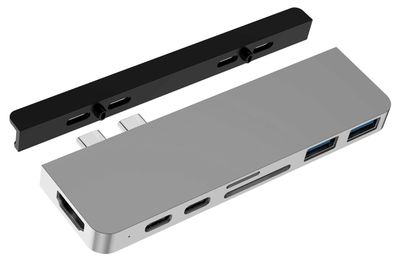
hyperdrive duo 2020
As with most USB-C hubs, the new HyperDrive DUO includes an array of expansion ports for your Mac, including an HDMI port, a pair of USB-C ports (one capable of Thunderbolt 3 with 100W power delivery), a pair of USB-A ports, and slots for both SD and microSD cards. New in this updated Mac version of the HyperDrive hub is support for 4K 60Hz HDMI.

Another new feature of the new HyperDrive DUO is that it comes with a new removable magnetic grip that is inserted between the hub and the notebook that increases the sturdiness of the attachment to help prevent accidental disconnects that can result in loss of data transmission or even data corruption. A similar grip can be found on the company's iPad Pro USB-C hub.
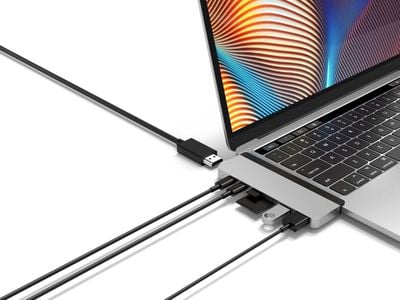
hyperdrive duo 2020 connections
The HyperDrive DUO itself is equipped with longer than normal USB-C connectors that extend through the magnetic grip, but the design also means that the accessory can be used with many MacBook cases by simply removing the magnetic grip, with the MacBook's case serving as the extra spacer for the connectors.

And for those who want to use the HyperDrive DUO hub with non-MacBook USB-C devices like an iPad Pro, it also comes with a short extension cable that gives flexibility for connecting to any single-connector USB-C device. A vegan leather pouch helps keep the hub, grip and extension cable protected and organized for travel.
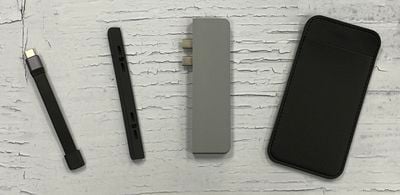
hyperdrive duo 2020 parts
The HyperDrive DUO is launching today for $99.99 in silver and space gray through HyperShop.com, B&H Photo, and other retailers.

Note: MacRumors is an affiliate partner with some of these vendors. When you click a link and make a purchase, we may receive a small payment, which helps us keep the site running.


Tag: Hyper

Top Rated Comments

baryon Avatar
85 months ago
Wow! For the price of $100 and some awkward bulkiness, you can now add the same, necessary functionality** to your computer that used to be standard several years ago, and is still standard on cheaper computers! What a time to be alive! But it's okay, in 10 years USB-C will be the standard for everything, and while your computer will be way obsolete by then, it will finally be able to function as designed without dongles!

** Minus one USB port. Some USB accessories may simply not work with no explanation. So you will probably need to buy 2-3 of these dongles just in case one only works with one thing, while the other only works with another thing. But you can only use one at a time. So it will really cost you $300-400 to get back the same functionality that Apple removed several years ago. But it's okay, because it's somehow better, now pay up!

Score: 14 Votes (Like | Disagree)
85 months ago
There would be no need for a product like this if Apple would have done the job properly and included more ports with the 2019 MBP when it was redesigned. They increased the thickness and weight, but still dug their heals in over USB-A, HDMI, etc. Now before any of you say 'more ports would have made it much thicker', have a look at the Lenovo X1 Carbon. It is thinner than the MBP, but yet has 2 x USB-A, 2 x USB-C/TB, HDMI and a headphone jack. Okay there is a proprietary ethernet port too, which requires a dongle, but it is an ultrabook. The MBP is sold as a mobile workstation.

There is no plausible excuse for not having sufficient ports on the 16" MBP, other than Apple treating its customer base with contempt as usual.
Score: 10 Votes (Like | Disagree)
otternonsense Avatar
85 months ago
Some ports should have never been omitted from the MBP chassis, like HDMI out. Apple's own dongle has been problematic with some 4K displays at work, and some afterparty dongles are not recognised at all by older screens and projectors (because we kinda have to present our work at clients' locations and OTA is rarely an option). Catalina updates have further broken support for screens that used to work just fine before.

3 years and counting with this USB-C only nuisance of a Mac and the only "improvement" I can think of is that usb-c to lightning cables have become a thing.


There is no plausible excuse for not having sufficient ports on the 16" MBP, other than Apple treating its customer base with contempt as usual.
Just solving problems they created themselves by selling their own adapters and dongles. How do you think the "other" revenue category became so big. Contempt and greed hand in hand.


Score: 7 Votes (Like | Disagree)
akbarali.ch Avatar
85 months ago
Why there's no simple USB-C hub, like with 4 USBC ports or 6 USBC ports. Like we have in regular USB hubs. Every type-C hub is the same as every other shoved with ports I don't want or need. They all are the same. There's pretty much no variations from brand to brand. Are there some underlying technological limitations?
Score: 7 Votes (Like | Disagree)
85 months ago

Why there's no simple USB-C hub, like with 4 USBC ports or 6 USBC ports.
...because implementing advanced USB-C features like DisplayPort and improved power delivery in a hub is complicated and you'd just be left with 4-6 USB-C shaped USB 3.1 ports that offered no advantage over regular USB-A (...and pretty much every USB-C peripheral not made by Apple comes with a USB-A cable or adapter anyway).

Remember, these devices are primarily about restoring the ports that should have been there all along on a pro laptop.

Ah. USB-C: a great solution for a phone or tablet that only has space for a single ultra-thin port - a pointless complication on a proper laptop or desktop that should have space for dedicated ports (that doesn't even make USB 3 any faster).


The product page doesn't mention Thunderbolt at all, so this seems to be an error. It's just USB-Power Delivery; it's a USB-C hub, not a Thunderbolt dock.
If you look at the picture, it connects to both TB3 ports on the side of the MacBook - pretty sure that only one of those is used to drive the extra ports on the dock, the other is wired directly to the first USB-C port on the dock. Hence it claims 40Gbps/100W charging on one port - but it would need to be certified by Intel to be called "Thunderbolt" .
Score: 6 Votes (Like | Disagree)
85 months ago
So now we need dongles for dongles. Let it be noted that these are all solutions to problems that Apple chose to create.

I have a similar dongle for my all USB-C MacBook Pro. It wriggles like crazy. The amount of large file transfers failed due to moving the laptop slightly to one side or reaching out and accidentally touching the cable is annoyingly staggering. If you have an all USB-C Mac, invest in a hub that connects with a wire, not one that sits firmly on one side. You'll have a more reliable setup. However, stable or not, sometimes when connecting a USB/3 drive, my wireless connection will erratically drop until I disconnect the dongle. It's really touch and (no) go. Thank you Apple. I know, "It's your fault for getting a ****** dongle. Serves you right for being stingy on good accessories," some of you might want to say, only that the dongle was actually a rather expensive one, had good reviews and was not advertised as "******," otherwise I'd not buy it in the first place. You only find out when it's too late, usually when it's too late to return the dongle or the Mac. Once upon a time, there was a laptop that you took out of the box, and "it just worked." Alas, many believe nowadays that this was just a myth. Again, thank you Apple.

Luckily for me, I got my old MacBook Retina 13" model with integrated USB-3 ports and HDMI and additional storage expansion though a nifty drive repaired and working again. I'm keeping this baby until one of us drops dead (I still prefer it to be my Mac, for all the love I feel towards it). I just hope I can find a sucker to buy my "New" MacBook Pro 13. Should't be too hard, after all, it's newer, thinner and shinier. After all, I got doped into being it, and I'm not the dumbest kid on the block. It's hardly been used at all (as soon as I got my old Mac repaired, I preferred using it instead). I'll even throw the dongle and the MagSafe workaround cable into the mix for free (yeah, workaround is the name of the game with the new generation). Be my guest.
Score: 5 Votes (Like | Disagree)

Popular Stories

duo aquarium

More Fun iPhone Duo Apps: 30 New Picks to Try

Friday November 6, 2026 3:27 pm PST by
When the iPhone Duo launched, we shared a list of some of the fun apps developers created for the new form factor. Two weeks out, developers are continuing to come up with fresh ideas, so we thought we'd share some of our favorites. Games Marbles Unhinged ($2.99) - Marbles Unhinged is a marble maze designed for the Duo. When you fold it, the floor turns into a ramp. If you stand the top...
apple pro tell logo

Apple Launching Five New Products Today

Thursday November 5, 2026 12:59 am PST by
Apple is launching five new products on Friday, November 6, following pre-orders that opened last week, including its first touchscreen MacBook Pro models. The following new products will be available from today: iPad mini with OLED display and A20 Pro chip iMac with M6 chip 14-inch MacBook Pro with M6 chip 14-inch MacBook Pro with OLED touchscreen 16-inch MacBook Pro with OLED...
iOS 28 AI

Apple Taking New Approach to Developing iOS 28 and macOS 28

Sunday November 8, 2026 7:42 am PST by
Apple has made a change to its development process for iOS 28, macOS 28, and corresponding software updates, according to Bloomberg's Mark Gurman. In his Power On newsletter today, he said Apple separates development of each year's new operating systems into three major stages. Typically, he said each stage consists of four weeks of coding followed by a four-week "convergence" period where...
Latest Stories
Apple Store Subscription Sign-Up Controversy Exposed
4 hours ago
Siri AI Rumored to Become 'More Like an Agent' as Early as Next Year
14 hours ago
Apple Taking New Approach to Developing iOS 28 and macOS 28
16 hours ago
Early Apple Black Friday Deals on Apple Watch, MacBook Air, and More
1 day ago
'Backglow' Lets You Customize New MacBook Pro's Glowing Apple Logo
1 day ago
Top Stories: Apple Product Launches, iOS 27.3 Beta, and More
2 days ago
More Fun iPhone Duo Apps: 30 New Picks to Try
2 days ago
Hands-On With Apple's New OLED Touchscreen MacBook Pro
2 days ago
Apple Store With All-New Design Opening Soon in Southern California
2 days ago
Control the Glowing Apple Logo on Your New MacBook Pro
3 days ago
Apple Shares New 'Apple Card: Apply and Use in Minutes' Ad
3 days ago
Apple Says More Than 100,000 Apps Optimized for iPhone Duo, Here's What's Still Missing
3 days ago
Early Black Friday Deals Kickoff With Steep Discounts on Apple Watch Ultras and More
3 days ago
The MacRumors Show: iOS 27.3 Looks Like a Huge Update
3 days ago
Best Buy's Black Friday Event Begins With Sitewide Savings on Apple, TVs, More
3 days ago
Apple Releasing Yet Another Two New Products Next Week
3 days ago
MacBook Air Drops to Lowest Price in Months With Amazon's $250 Discount
3 days ago
Apple Rumored to Drop the iPhone's Action Button Next Year
3 days ago
Apple's Extended Return Policy Now in Effect for 2026 Holiday Season
3 days ago
Apple Music Classical Updated With New Icon and Refreshed Design
3 days ago
OLED iPad Mini, M6 iMac, and New MacBook Pros Available From Today
3 days ago
Apple Surveys iPhone Duo Buyers About Crease and Camera
3 days ago
Apple's First Touchscreen Mac is Now Arriving to Customers
3 days ago
Claude Gets Personal Finance Feature With Bank Account Linking
3 days ago
Apple Arcade Adds Crossy Road Rush and NBA 2K27
3 days ago
Apple's New HomeView Smart Home Hub: Here's How Much RAM It Has
3 days ago
iPad Mini vs. iPad Air Buyer's Guide: Now Just $50 Apart
3 days ago
First iOS 27.3 and macOS Golden Gate 27.3 Public Betas Now Available
4 days ago
Apple Announces a New Mac Sales Record
4 days ago
Paid $200 for Logic Pro? Apple Says You Won't Get This New Feature
4 days ago






































