In this week's App Recap, we've highlighted utility app "Pastel," health app "Punkt," and utility app "Remote Control for Mac/PC Pro" as three apps that are worth checking out. We've also compiled a list of apps that received major updates this week.
Apps to Check Out
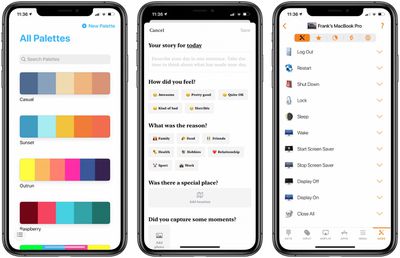
- Pastel (iOS, Free) - Pastel, an app marketed for developers and artists, allows for the creation of color palettes for use in various projects. Pastel includes diverse color selector options such as a color wheel, RGB sliders, crayons, and even the ability to import specific colors from a photo. In addition, the app allows users to copy a bitmap representation of a palette for use in a pixel editor. The free version of Pastel allows users to add up 20 palettes in their library, and users looking to upgrade to the full version that includes an unlimited number of palettes can opt for a single in-app purchase of $4.99.
- Punkt: One-Sentence Journal (iOS, Free) - With its streamlined interface, Punkt makes day-to-day journaling very straightforward and intuitive. When crafting a story, users simply add a single sentence. Additionally, users have the ability to select from a list of feelings and reasons, enter a specific location, and add photos to bring the story to life. Every story is saved on both the device and in iCloud, and users looking for more protection can protect stories with either Face ID or Touch ID. Although the app is free to download, adding photos and creating an unlimited number of stories per day is limited to those with a premium subscription. Punkt offers a range of monthly subscriptions in which users can choose to contribute a certain amount per month, an annual subscription, and a lifetime membership, which are priced at $0.99-$2.49, $6.49, and $13.99 respectively.
- Remote Control for Mac/PC Pro (iOS, $6.99) - Remote Control seamlessly pairs to a Mac client app that introduces efficient productivity methods for users. Users are able to control volume, playback, and AirPlay mirroring directly from an iOS device. Additionally, the app can morph into a trackpad for a Mac, control any app, launch and quit apps, and more. All of Remote Control's features are included with its purchase price, so no extra in-app purchases are present. In addition to the paid version, Remote Control's developer has also released a free version of the app that contains ads and all of the pro version's features without advanced media controls for apps and websites as well as the ability to control apps and execute system actions.
App Updates
- Darkroom: Photo & Video Editor - Popular editing app Darkroom was updated this week with the ability to manage albums within the app. In the library that's located within the Darkroom app, users now have the ability to create, rename, and delete albums. Any changes made within Darkroom will be reflected in the device's native photo library.
- Spike (iOS) - Collaborative email app Spike this week announced a major update that gives users the ability to manage tasks, create notes, and collaborate on documents in real-time without the need to leave the app. The new tasks feature allows users to seamlessly set reminders and set to-dos, which can help enhance day-to-day productivity. Spike has also added the ability to sync notes and tasks across all devices signed into the same account.
- Phone Buddy Notifier for Watch (iOS) - Phone Buddy, an Apple Watch app that alerts users when the Bluetooth connection with a paired iPhone is lost, was updated recently with several new features. The Distance Alerts feature was updated with a new customizable distance threshold for signal strength and time. In addition, the iPhone app was updated with a streamlined interface, and it's now possible to manage all alerts directly on the Apple Watch companion app.
Know of a great new app that we've missed? Let us know in the comments and we'll check it out for next week's App Recap.
Tag: App Recap