

Eve App for HomeKit Devices Gains Contextual Touch and Hold Menus, Quick Automation Access - MacRumorsOpen MenuShow RoundupsShow Forums menuVisit ForumsOpen Sidebar
Skip to Content

Eve App for HomeKit Devices Gains Contextual Touch and Hold Menus, Quick Automation Access

Eve Systems, known for its line of Eve-branded HomeKit products, today updated its Eve app to version 4.3, adding a number of useful new features.
evehomekitappupdate
The Eve update will primarily be of interest to those who own Eve ‌HomeKit‌ accessories, but it is one of the better ‌HomeKit‌ apps on the market, and it also works with non-Eve devices.

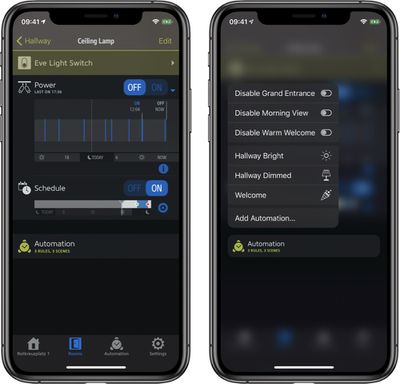
Eve 4.3 introduces Touch and Hold functionality, allowing users to touch and hold almost anywhere in the app to open up contextual menus that provide additional control options. Where the new gesture can be used:

  • At a Glance: quickly control an accessory, set a scene that it's part of and view all accessory details.
  • Room Overview: instantly toggle all lights in a room and refine room settings in a snap.
  • Accessory Details & Types: jumping back and forth between individual accessories' details and the overview by Types has never been easier.
  • Automation: quickly toggle Rules and set Scenes.

Quicker automation access has been bundled into the app update. When viewing an accessory's details, there's an "Automation" entry that lists Rules and Scenes that it is part of. Entries support long press gestures for toggling Rules and setting Scenes, and tapping the "Add Rule" or "Add Scene" buttons provides a quick way to create a new automation.

Along with these major new features, the update provides different colors for each Home, a feature that's useful to those who have multiple homes, and it adds additional icons for ‌HomeKit‌ devices.

There's also support for Eve Window Guard and the Eve Cam, a camera with HomeKit Secure Video support that is set to start shipping in the near future.

The Eve for ‌HomeKit‌ app can be downloaded from the App Store for free. [Direct Link]

Popular Stories

macOS 27 on MacBook Pro

Apple Says macOS 27 Won't Be Compatible With These Macs

Wednesday June 3, 2026 8:29 am PDT by
During WWDC 2025, Apple revealed that macOS 26 Tahoe would be the final major macOS version for Intel-based Macs. macOS 27 will be compatible with Apple silicon Macs only, meaning that you will need a Mac with an M-series chip or a MacBook Neo with an A18 Pro chip in order to install the software update. Apple will unveil macOS 27 during its WWDC 2026 keynote this Monday, June 8, and the...
MacBook Neo on Yellow Feature

MacBook Neo is So Popular That Apple Reportedly Doubled Production

Wednesday June 3, 2026 9:24 am PDT by
On an earnings call in late April, Apple's CEO Tim Cook said that customer response to the MacBook Neo was "off the charts," and the popularity of the laptop has reportedly led the company to significantly boost production. Apple supply chain analyst Ming-Chi Kuo this week said he believes that MacBook Neo shipments to Apple were doubled from an initial target of 5 million units to 10...
iphone 18 pro blue%402x

iPhone 18 Pro: Dark Cherry, Light Blue, and Dark Gray Chassis Leaked [Update]

Thursday June 4, 2026 5:18 am PDT by
Update: Since publication, new information has come to light suggesting the images have been AI-manipulated and are not in fact iPhone 18 Pro chassis parts. The original article follows. The color options Apple is reportedly planning for the upcoming iPhone 18 Pro and ‌iPhone 18 Pro‌ Max have appeared online today in the form of images of chassis parts of unknown authenticity....

Top Rated Comments

78 months ago
The new version hangs on startup. Fortunately, the developer is bringing out a quick update (I read this in the Dutch app reviews).
Score: 1 Votes (Like | Disagree)















