iOS 14 Adds Accessibility Feature for Tapping on the iPhone to Perform Actions - MacRumorsOpen MenuShow RoundupsShow Forums menuVisit ForumsOpen Sidebar
Skip to Content

iOS 14 Adds Accessibility Feature for Tapping on the iPhone to Perform Actions

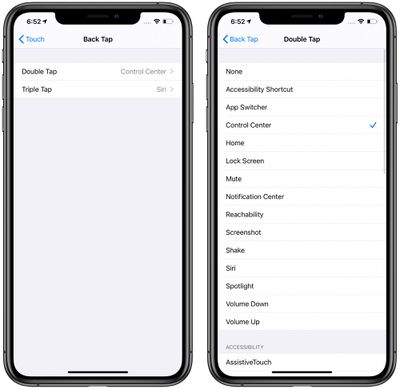
iOS 14, released for developers today, includes an interesting new Accessibility option that's designed to allow users to double tap or triple tap on the back of the iPhone to perform various actions.
backtapios14
The feature can be used to do things like access Control Center, Notification Center, the Lock screen, the Home screen, or the App Switcher, or it can change the volume, bring up Siri, mute the iPhone, take a screenshot, or access a Shortcut.

It can also be set up to work with a number of Accessibility features like Assistive Touch, Magnifier, or VoiceOver.

The Back Tap options can be accessed in the Settings app by tapping Accessibility > Touch > Back Tap. Tapping to trigger an action appears to work fairly well when the iPhone's back is tapped in any spot on the device with either the double tap or triple tap gesture.

Back Tap is just one of many new Accessibility features that Apple has built into iOS 14. VoiceOver has also received major improvements with support for image descriptions, text recognition, and screen recognition, as well as Headphone Accommodations that can amplify soft sounds and adjust certain frequencies for music, movies, phone calls, podcasts, and more.


Related Forum: iOS 14

Popular Stories

Apple Card iPhone 16 Pro Feature

Apple Card Promo to Offer Free AirPods Pro 3

Friday May 15, 2026 8:59 am PDT by
Starting as early as next week, customers who sign up for an Apple Card at Apple's retail stores in the U.S. will receive $249 cash back when they purchase AirPods Pro 3, according to Bloomberg's Mark Gurman. The promotion has yet to be officially announced by Apple, so exact terms and conditions are not available at this time. AirPods Pro 3 are priced at $249 in the U.S., so customers who...
Apple WWDC25 iOS 26 CarPlay Light mode 250609

Six Popular iPhone Apps Now Available on CarPlay

Thursday May 14, 2026 9:10 am PDT by
Apple's CarPlay system for accessing iPhone apps on a vehicle's dashboard screen has received six popular apps in recent weeks: ChatGPT, Perplexity, Grok, Google Meet, WhatsApp, and the indie artist streaming platform Audiomack. Make sure you have the latest version of each app and they will automatically appear on CarPlay. ChatGPT Starting with iOS 26.4, CarPlay supports voice-based...
ipad mini 7 blue

OLED iPad Mini: Release Date, Pricing, and What to Expect

Thursday May 14, 2026 5:08 am PDT by
According to the latest rumors, Apple is close to launching its next-generation iPad mini. So what should we expect from the successor to the iPad mini 7 that Apple released over a year ago? Read on to find out. Processor and Performance Apple is working on a next-generation version of the iPad mini (codename J510/J511) that features the A19 Pro chip, according to information found in code...

Top Rated Comments

QuarterSwede Avatar
77 months ago
Super cool!
Score: 11 Votes (Like | Disagree)
77 months ago
FYI: This only works on models that support tap to wake. It is not available on my iPhone SE 2nd gen.
Score: 6 Votes (Like | Disagree)
Hal~9000 Avatar
77 months ago
This seem’s like a fantastic trick for the large Pro Max iPhone in order to easily bring down Control Center when using the phone one handed. Just another feather in the cap of the great update that is iOS 14 🙂
Score: 6 Votes (Like | Disagree)
77 months ago
Interesting... wonder if it works with a case on...
Score: 6 Votes (Like | Disagree)
Mr. Awesome Avatar
77 months ago
Awesome! And arguably more useful then the squeeze gesture on Android phones.
Score: 4 Votes (Like | Disagree)
RA1N1 Avatar
77 months ago
Ok, I am mind-blown by this feature. thumbs up Apple 👍
Score: 3 Votes (Like | Disagree)