Widgets in iPadOS 14 Limited to Today View in Landscape Mode - MacRumorsOpen MenuShow RoundupsShow Forums menuVisit ForumsOpen Sidebar
Skip to Content

Widgets in iPadOS 14 Limited to Today View in Landscape Mode

In iOS 14 for iPhone and iPod touch, widgets can be pinned in different sizes on any home screen page, providing useful information at a glance. The same can't be said for iPad.
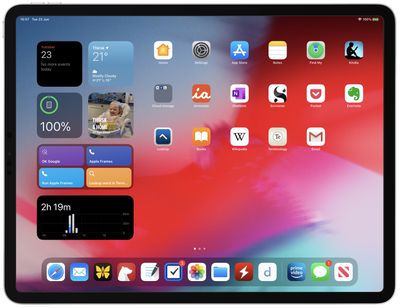
ipados 14 widgets
In iPadOS 14, the use of widgets is limited to the Today View sidebar that only appears on the first screen of apps when viewing in landscape mode. When viewed in portrait mode, Widgets disappear along with the Today View and the user's apps are automatically rearranged in a typical grid to fill the screen.

In other respects, ‌Widgets‌ in iPadOS 14 share the same new functionality as widgets in iOS 14. Users can create a Smart Stack of widgets, which uses machine learning to surface the right widget based on time, location, and activity. ‌Widgets‌ also can be customized for work, travel, sports, entertainment, and other areas of interest.

Currently, the App Library feature is missing in iPadOS 14, although it could possibly appear in a later beta. Apart from this and the limitation of widgets, iPadOS 14 shares the same new features as iOS 14, along with some additional ones that make better use of the larger screen, including new interface functionality for stock apps, universal Search, new Apple Pencil features, and more.


Related Forum: iOS 14

Popular Stories

iOS 27 Next to iPhone

Here's When iOS 27 Rolls Out Today in Every Time Zone [Update: It's Out]

Sunday September 13, 2026 3:00 am PDT by
Update 10:04 a.m.: iOS 27 is rolling out now, though it may take a bit for all users to see it, so keep checking! Apple is about to release iOS 27, which will finally deliver more advanced Siri AI capabilities as well as a variety of other refinements, improvements, and new features to iPhones. It's Apple's biggest software update of the year, and Apple announced at Wednesday's iPhone event...
iOS 27 Icon iPhone

iOS 27 Available Now With These 8 New Features

Monday September 14, 2026 9:00 am PDT by
Update — 10 a.m. Pacific Time: Apple has released iOS 27. During its iPhone 18 Pro and iPhone Duo event last week, Apple announced that iOS 27 will be released widely on Monday, September 14. iOS 27 should be available around 10 a.m. Pacific Time / 1 p.m. Eastern Time today via the Settings app, under General → Software Update. Below, we have highlighted eight new features and...
deep black iphone 18 pro

Apple Says iPhone 18 Pro Max Sold in U.S. Differs in One Way

Saturday September 12, 2026 3:27 pm PDT by
As noted by Nicolas Lellouche, who writes for the French tech website Numerama, Apple has updated its tech specs pages for the iPhone 18 Pro and iPhone 18 Pro Max to clarify which models are equipped with its new C2 cellular modem and where. Apple now says the iPhone 18 Pro has a C2 modem worldwide, while the iPhone 18 Pro Max uses the chip in every country except for the U.S. According...

Top Rated Comments

81 months ago
Love the logic. Small screen - large widgets, large screen - no widgets
Score: 83 Votes (Like | Disagree)
sfwalter Avatar
81 months ago
This is the most disappointing news from WWDC. I have that large screen real estate and I can't take *full* advantage of this. I wonder what Apple's reasoning behind this could be. Hopefully, it's only an early beta issue. Probably not but one could only hope.
Score: 27 Votes (Like | Disagree)
81 months ago

This is the most disappointing news from WWDC. I have that large screen real estate and I can't take *full* advantage of this. I wonder what Apple's reasoning behind this could be. Hopefully, it's only an early beta issue. Probably not but one could only hope.
I get the sense that it is coming and its just not ready yet for the first beta.
Score: 21 Votes (Like | Disagree)
gleepskip Avatar
81 months ago

Mac should also allow widgets on the desktop screen.
Everything old is new again


Attachment Image
Score: 16 Votes (Like | Disagree)
ob81 Avatar
81 months ago
Imagine being able to take advantage of your full iPad screen with the widgets. Not blown up iPhone versions, but versions made for an 11” screen. That would be something.
Score: 8 Votes (Like | Disagree)
81 months ago
Lame, I don’t want 3/4 of my screen real-estate taken up by static and boring icons.
Score: 7 Votes (Like | Disagree)