

iOS 14 Lets You Add Captions to Photos - MacRumorsOpen MenuShow RoundupsShow Forums menuVisit ForumsOpen Sidebar
Skip to Content

iOS 14 Lets You Add Captions to Photos

Apple's iOS 14 update adds several new features to the Photos app, including an option to add captions to images right from the iPhone, which is something that ‌Photos‌ users have been wanting for quite some time.

ios14photoscaptions
The ‌Photos‌ app for Mac previously supported captions through the Description field, but on the iPhone, there has been no method for adding similar information. In iOS 14, entering a caption is quick and easy.

Tap to view any photo full screen on the iPhone, and then swipe up to get to the caption field. Tap the field, type the caption, and press enter.

Captions in iOS 14 sync across all devices if iCloud Photo Library is enabled, and the Description field in macOS Big Sur has been renamed to Captions for continuity.

Adding a caption to a photo using iOS 14 allows for an additional level of tagging and organization because captions can be searched for using the ‌Photos‌ search interface. There's still no native option for editing metadata for photos, but Captions make it easier to add labels that are visible cross device.
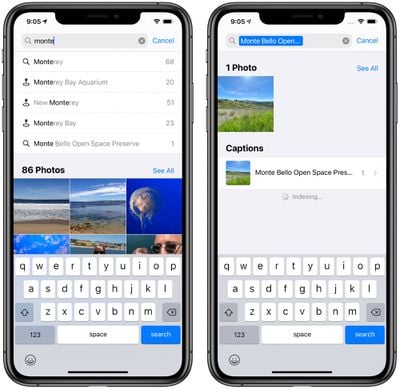
ios14photoscaptions2
There are a few other useful improvements to the ‌Photos‌ app, such as filters for viewing all images or albums by Favorites, Edited, ‌Photos‌, and Videos, sorting inside albums, and better autoplay for Live Photos. Navigating through photos also lets you zoom in and out on all albums, much like you can do with the "All ‌Photos‌" interface in iOS 13, so it's easier to find specific images that you're looking for.

Related Forum: iOS 14

Popular Stories

iCloud iPhone 17 Pro

iPhone Users Who Pay for iCloud Storage Get Two New Perks on iOS 27

Thursday July 2, 2026 6:10 am PDT by
If you pay for certain iCloud+ storage plans beyond the 5GB that Apple offers for free, you will receive two more perks on iOS 27 at no additional cost. A summary of the two new iCloud+ perks on iOS 27:Increased daily usage limits for some new Apple Intelligence features, including image generation in the revamped Image Playground app. HomeKit Secure Video cameras receive generated video...
American Express Gold Apple Pay Feature

American Express Announces New Apple Pay Feature

Tuesday June 30, 2026 10:27 am PDT by
American Express today announced that you can now redeem Membership Rewards points when checking out with Apple Pay on the web and in apps on the iPhone and iPad. When checking out with Apple Pay on iOS 18 or iPadOS 18 or later, tap on your eligible American Express card (Platinum, Gold, Green, and others) and select the Membership Rewards points option. You can use points to cover all or...
series 10 apple watch titanium digital crown

Report: Apple Watch Redesign Coming Next Year With New Band System

Tuesday June 30, 2026 8:45 am PDT by
A "major overhaul" of the Apple Watch's design is due to arrive next year with a new system for connecting bands, according to a known Weibo leaker. In a set of recent posts, the leaker known as "Instant Digital" linked the new claim to older rumors about an "Apple Watch X" model, which was said to introduce a fresh design and break compatibility with the existing watch band system. Citing...

Top Rated Comments

cocky jeremy Avatar
79 months ago
I just want the ability to make folders and move photos from the camera roll to those folders. I don't want multiple copies or links. I just want to move them!
Score: 21 Votes (Like | Disagree)
cmaier Avatar
79 months ago
Two days ago i taught my daughter how to do this so she could create an album of her stuffies. For each video, she puts a text caption explaining the name, the origin, the origin of the name, her favorite thing about it, etc. It’s adorable.

UPDATE: LOL. Some dude marked this as “disagree.” Probably hates puppies and the flag, too.
Score: 16 Votes (Like | Disagree)
Sethal Avatar
79 months ago
What about keywords, titles, descriptions, and location information? Why add an entirely new information field in “captions” instead of just using what we already have labeled and use on our Macs? This is one of the few things keeping me from using iPadOS and iOS solely. I’ve been waiting for years and I guess I’ll be waiting longer.
Score: 12 Votes (Like | Disagree)
79 months ago
Finally! Such a basic feature, it's a surprise they waited so long to add it...
Score: 12 Votes (Like | Disagree)
79 months ago

I just want the ability to make folders and move photos from the camera roll to those folders. I don't want multiple copies or links. I just want to move them!
Sorry what? ...

adding photos to any amount of folders does not create a single new copy. You know that right?
Score: 5 Votes (Like | Disagree)
79 months ago
Oh wow, this is small and big at the same time. I love it.

Not s/
Score: 4 Votes (Like | Disagree)















