Apple Seeds iOS 14 and iPadOS 14 Public Beta 4 to Testers - MacRumorsOpen MenuShow RoundupsShow Forums menuVisit ForumsOpen Sidebar
Skip to Content

Apple Seeds iOS 14 and iPadOS 14 Public Beta 4 to Testers

Apple today seeded new public betas of upcoming iOS 14 and iPadOS 14 updates to its public beta testing group. Today's software releases, which Apple labels as fourth betas to keep them in line with developer betas, are actually the third betas that Apple has provided and they come two weeks after the prior beta releases.

iOS 14 Public Beta 4
Public beta testers who have signed up for Apple's beta testing program can download the iOS/‌iPadOS‌ 14 updates over the air after installing the proper certificate from the Public Beta website on an iOS device, with instructions available in our how to. The updates should not be installed on primary devices as this is beta software and could have serious bugs.

iOS 14 brings changes to the Home Screen, including widget support. Widgets can now be placed right next to your apps, and with the focus on widgets, Apple has introduced new widgets from default apps and is allowing them to be customized in three sizes.

You can put widgets anywhere on any app page, with new widgets able to be found in the widget gallery. Along with widgets, Apple has introduced an App Library, which is an interface that shows all of the apps on your iPhone both in smart folders that are created automatically and in an alphabetical list.
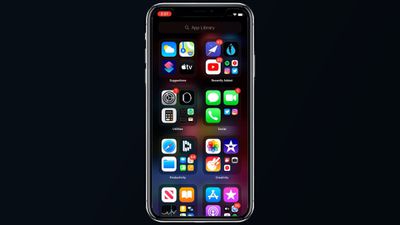
iOS 14 App Library
With the App Library providing access to all your apps, there's now an option to hide entire app pages from your iPhone, so you can avoid a cluttered Home Screen.

Apple has worked to make the iPhone's interface more compact, and incoming phone calls and Siri requests no longer take over the whole screen and are instead presented in a banner style, a feature also available on iPadOS.

There's a Picture in Picture mode for watching videos or using FaceTime while doing something else at the same time on the iPhone. The Messages app has new features focused on group conversations like pinned conversations, mentions, and inline replies.

A new App Clips feature lets you use small bite sized bits of an app without the need to download the whole app, useful for times when you need an app to buy a coffee, rent a scooter, or make a restaurant reservation. App Clips will work through Apple-designed App Clip codes, NFC tags, or QR codes, and can also be shared in Messages or from Safari.

The Health app supports the Sleep Tracking feature added in watchOS 7, and the iPhone will support the Sleep Mode and Wind Down features designed to help you get a better night's sleep. There's also a new Health Checklist that makes it easier to manage health and safety features like Emergency SOS, Fall Detection, and Medical ID.

The Weather app now provides info on severe weather events and minute-by-minute precipitation readings (U.S. only), and the Maps app supports cycling directions for the first time so bike riders can plan routes with info like busy streets, elevation changes, stairs, and more. Maps also now lets electric vehicle owners plan routes with EV charging spots.

The Home app is smarter with automation suggestions and an Adaptive Lighting feature that lets HomeKit lights adjust their color temperature throughout the day, plus there are new features for ‌HomeKit‌ Secure Cameras.

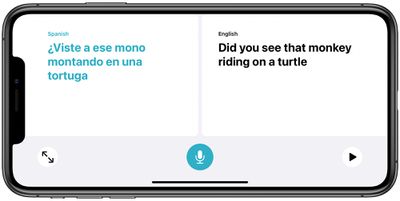
translateconversationmodeios14
A new Apple-designed Translate app provides text and voice translations to and from 11 languages, and with an on-device mode, translations can be done entirely on your phone.

Tons of new privacy features have been added in iOS and iPadOS 14. Apps need permission before accessing devices on a local network, you get notified when an app accesses the clipboard, and there are little icons in the status bar of the ‌Home Screen‌ when an app is using the camera or the microphone.

There are also new options for limiting access to select photos and providing apps with an approximate location rather than an exact location for better privacy protection. Safari has Privacy Report that tells you which trackers sites are using, and in the future, the App Store will include a summary of developers' privacy practices in an easy-to-read format.

AirPods can now seamlessly and automatically switch between devices, and AirPods Pro gain a new spatial audio feature for surround sound complete with dynamic head tracking.
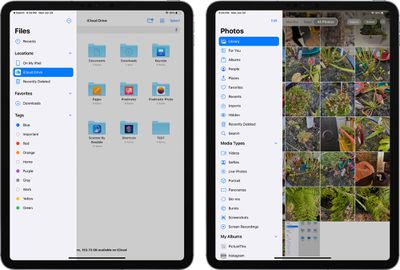
ipadossidebars
As for iPadOS 14, it includes most of the new iOS 14 updates, minus the ‌Home Screen‌ redesign. The biggest change is the new Scribble feature that lets you use the Apple Pencil to write on any text field, with the written text converted to typed text.

Scribble works throughout the operating system so you can use the ‌Apple Pencil‌ for Safari searches, adding new items in Calendar and Reminders, sending Messages, handwriting in the Notes app, and more.

The fourth developer beta added a new TV widget and introduced the Exposure Notification API for iOS 14 users, and these features are also in the new beta available to public testers.

For more on everything that's new in iOS and iPadOS 14, make sure to check out our iOS 14 and iPadOS 14 roundups, which have a detailed look on all of the new features.


Popular Stories

apple pro tell logo

Apple Launching Five New Products Today

Thursday November 5, 2026 12:59 am PST by
Apple is launching five new products on Friday, November 6, following pre-orders that opened last week, including its first touchscreen MacBook Pro models. The following new products will be available from today: iPad mini with OLED display and A20 Pro chip iMac with M6 chip 14-inch MacBook Pro with M6 chip 14-inch MacBook Pro with OLED touchscreen 16-inch MacBook Pro with OLED...
duo aquarium

More Fun iPhone Duo Apps: 30 New Picks to Try

Friday November 6, 2026 3:27 pm PST by
When the iPhone Duo launched, we shared a list of some of the fun apps developers created for the new form factor. Two weeks out, developers are continuing to come up with fresh ideas, so we thought we'd share some of our favorites. Games Marbles Unhinged ($2.99) - Marbles Unhinged is a marble maze designed for the Duo. When you fold it, the floor turns into a ramp. If you stand the top...

silver iphone 18 pro

Apple Rumored to Drop the iPhone's Action Button Next Year

Friday November 6, 2026 6:07 am PST by
Apple plans to merge the iPhone's Action button with the Camera Control starting next year, according to the leaker known as "Instant Digital." In a new post on Weibo, the leaker claimed that a single press of the combined button would open the camera, while a long press would trigger the function assigned to the Action button. They explicitly clarified that the dedicated Action button would ...

Top Rated Comments

Deliro Avatar
82 months ago

Dude, the first public beta was more stable than iOS 13 ever was. Nothing is worse than iOS 13.


said about every iOS version. Ever.
Score: 8 Votes (Like | Disagree)
Apple_Robert Avatar
82 months ago
The text keyboard disappears randomly on DB4. Keep that in mind if you decide to install PB 4. You will probably be affected.
Score: 3 Votes (Like | Disagree)
boss.king Avatar
82 months ago

The last PB was 3—I think they skipped PB2.
Nope, they skipped Beta 1.

The public and dev betas are the same, they just release to devs first in case of catastrophic issues.

So far we've had:
Beta 1 - Dev

Beta 2 - Dev
Beta 2 - Public

Beta 3 - Dev
Beta 3 - Public

Beta 4 - Dev
Beta 4 - Public

Beta 1 had no public release.
Score: 3 Votes (Like | Disagree)
82 months ago

That doesn’t answer my question though. Those sort of demos have been around for decades now, my beige Windows XP computer could do this. All this feature does is tie it to a point in space. So if I put my phone down while audio is playing and walk away, my content would get quieter. Or if I’m watching a video and swap my phone from one side to another it’ll screw with the audio. How is that a benefit?
Imagine this: You’re watching a movie on your phone, which you’re holding straight in front of you. You’re wearing AirPods Pro. The movie has surround sound. In the movie, there’s a talking character off to the right, and you hear them out of your right ear. Now, let’s say that you turn your head 90 degrees to the left in real life, but don’t move your body or your phone. You’ll still be hearing that person out of your right ear, which wouldn’t make sense because from the perspective of you watching the movie, the sound should now be coming from behind your head, which is turned to the left of the movie screen.

This wouldn’t be an issue in a theater, where you can turn your head but the speakers don’t move; they stay in place relative to the screen. But if you’re wearing headphones, the speakers move with your head, so if you move your head while the screen stays in place, the perceived location of the audio is moving independently of the screen, which can distract from the movie.

The idea is that they’re trying to virtually anchor the audio relative to the screen, so that it still seems “correct” if you move your head or your phone.
Score: 3 Votes (Like | Disagree)
roncron Avatar
82 months ago

Is it the same build as the Developer Beta that was released 2 days ago?
Yes
Score: 3 Votes (Like | Disagree)
imnotthewalrus Avatar
82 months ago

Can’t focus on my iPhone 11 Pro Max. I have to restart it everyone when I wanna take a photo.
Not an issue for me on the “regular” 11
looks like feedback time for you...
Score: 2 Votes (Like | Disagree)
Latest Stories
Siri AI Rumored to Become 'More Like an Agent' as Early as Next Year
2 hours ago
Apple Taking New Approach to Developing iOS 28 and macOS 28
4 hours ago
Early Apple Black Friday Deals on Apple Watch, MacBook Air, and More
22 hours ago
'Backglow' Lets You Customize New MacBook Pro's Glowing Apple Logo
23 hours ago
Top Stories: Apple Product Launches, iOS 27.3 Beta, and More
1 day ago
More Fun iPhone Duo Apps: 30 New Picks to Try
2 days ago
Hands-On With Apple's New OLED Touchscreen MacBook Pro
2 days ago
Apple Store With All-New Design Opening Soon in Southern California
2 days ago
Control the Glowing Apple Logo on Your New MacBook Pro
2 days ago
Apple Shares New 'Apple Card: Apply and Use in Minutes' Ad
2 days ago
Apple Says More Than 100,000 Apps Optimized for iPhone Duo, Here's What's Still Missing
2 days ago
Early Black Friday Deals Kickoff With Steep Discounts on Apple Watch Ultras and More
2 days ago
The MacRumors Show: iOS 27.3 Looks Like a Huge Update
2 days ago
Best Buy's Black Friday Event Begins With Sitewide Savings on Apple, TVs, More
2 days ago
Apple Releasing Yet Another Two New Products Next Week
2 days ago
MacBook Air Drops to Lowest Price in Months With Amazon's $250 Discount
2 days ago
Apple Rumored to Drop the iPhone's Action Button Next Year
2 days ago
Apple's Extended Return Policy Now in Effect for 2026 Holiday Season
2 days ago
Apple Music Classical Updated With New Icon and Refreshed Design
2 days ago
OLED iPad Mini, M6 iMac, and New MacBook Pros Available From Today
2 days ago
Apple Surveys iPhone Duo Buyers About Crease and Camera
3 days ago
Apple's First Touchscreen Mac is Now Arriving to Customers
3 days ago
Claude Gets Personal Finance Feature With Bank Account Linking
3 days ago
Apple Arcade Adds Crossy Road Rush and NBA 2K27
3 days ago
Apple's New HomeView Smart Home Hub: Here's How Much RAM It Has
3 days ago
iPad Mini vs. iPad Air Buyer's Guide: Now Just $50 Apart
3 days ago
First iOS 27.3 and macOS Golden Gate 27.3 Public Betas Now Available
3 days ago
Apple Announces a New Mac Sales Record
3 days ago
Paid $200 for Logic Pro? Apple Says You Won't Get This New Feature
3 days ago
Instagram's Edits Video Editor is Now Available on Mac
3 days ago