Dropbox Launches Password Manager, File Vault, and More Across iPhone and Mac - MacRumorsOpen MenuShow RoundupsShow Forums menuVisit ForumsOpen Sidebar
Skip to Content

Dropbox Launches Password Manager, File Vault, and More Across iPhone and Mac

Dropbox today announced that it has made three new features available to the public following beta testing, including a password manager, file vault, and automatic computer backup functionality on the Mac and PC, as noted by The Verge.
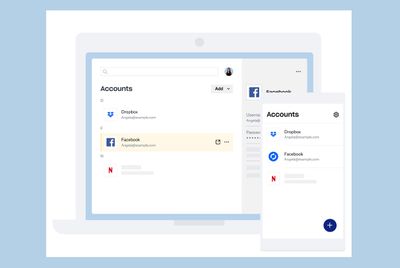
dropbox passwords
An overview of the new features:

  • Dropbox Passwords: Similar to 1Password, this password manager allows you to save your account usernames and passwords and sync them across your devices, with autofilled or suggested passwords when you sign into websites and mobile apps. Dropbox Passwords is available as a desktop app, mobile app, and browser extension for Dropbox Plus and Dropbox Professional subscribers.
  • Dropbox Vault: This feature allows users to create a location in Dropbox with an additional layer of security for sensitive files. The vault is protected by a PIN and can be shared with trusted contacts. Vaults can only be opened from Dropbox.com and the Dropbox mobile app. This feature will only be available for Dropbox Plus users.
  • Dropbox Computer Backup: This feature allows users to automatically back up certain key folders on their Mac or PC, such as Desktop, Documents, and Downloads, to Dropbox. This feature is being made available to all Dropbox users.

More details can be found in Dropbox's blog post from June.

Tag: Dropbox

Popular Stories

Apple Wallet

iOS 27 Will Add Two New Apple Wallet Features to Your iPhone

Monday June 1, 2026 12:15 pm PDT by
Apple is set to unveil iOS 27 during its WWDC 2026 keynote on Monday, June 8, and the update will reportedly include two new Apple Wallet features. First, iOS 27 will reportedly let users create their own digital passes by scanning items like movie tickets, concert passes, and gym membership cards. Many apps already offer Apple Wallet passes, but now users will be able to create a custom...
Dynamic Island iPhone 18 Pro Feature

iPhone 18 Pro Battery Capacities Allegedly Leaked

Tuesday June 2, 2026 1:54 am PDT by
Battery capacities for Apple's upcoming iPhone 18 Pro have allegedly surfaced, and the numbers suggest only a modest increase over the iPhone 17 Pro. According to prolific Weibo-based leaker Digital Chat Station, Apple is testing the iPhone 18 Pro with different battery capacities for the China and U.S. versions of the device, similar to last year's iPhone 17 Pro models. The Chinese model is ...
macOS 27 on MacBook Pro

Apple Says macOS 27 Won't Be Compatible With These Macs

Wednesday June 3, 2026 8:29 am PDT by
During WWDC 2025, Apple revealed that macOS 26 Tahoe would be the final major macOS version for Intel-based Macs. macOS 27 will be compatible with Apple silicon Macs only, meaning that you will need a Mac with an M-series chip or a MacBook Neo with an A18 Pro chip in order to install the software update. Apple will unveil macOS 27 during its WWDC 2026 keynote this Monday, June 8, and the...

Top Rated Comments

billyok Avatar
76 months ago
Dropbox announces its newest products, bloatware and feature creep.
Score: 13 Votes (Like | Disagree)
cocky jeremy Avatar
76 months ago
Do we really need another password manager?
Score: 10 Votes (Like | Disagree)
cmaier Avatar
76 months ago
I’ll stick with 1Password, since I‘m still not on their subscription.
Score: 10 Votes (Like | Disagree)
nutmac Avatar
76 months ago

https://help.dropbox.com/accounts-billing/plans-upgrades/dropbox-family-plan

It looks like they have it for a limited audience (whatever that means).
I don't understand the pricing. It costs whopping $200/year ($20/month) for 6 members to share the 2TB storage pool. That is the same amount offered to $100/year ($10/month) individual "Plus" plan. Apple's iCloud is also Family Sharing enabled and costs $10/month.
Score: 7 Votes (Like | Disagree)
76 months ago
I've used Dropbox for years. I thought about moving to iCloud last year instead, but found that I don't like some of iCloud's nature (like building folders automatically for apps at the root level of iCloud, etc). I want to control my structure well, so I've stayed with Dropbox.

I've tried other systems: Box, OneDrive, etc, but I find that Dropbox has the best sync in my opinion. I can move to family sharing, but the price hike over Plus doesn't seem worth it for my family (just my wife and I as my kids are too young to need it). I was thinking of just moving my wife's files into my account and sharing it, but if the family plan were a bit lower I would move to it—or give a Plus+1 account or something and I'd totally use that instead.

I also have 1Password and have used it for many years. I will stay with that since it is a great program. The secure storage area is intriguing in Dropbox, but only being able to access from the web/app is not so great—if there were a way to have that locally it would be amazing and I'd use it in a heartbeat, but I understand that is likely due to OS limitations.

I don't really like all the extra stuff Dropbox is adding, and there is bloat, but as a whole I still prefer it over any other option.
Score: 6 Votes (Like | Disagree)
76 months ago
Considering Dropbox's track record with security, I wouldn't let them anywhere near my passwords.
Score: 5 Votes (Like | Disagree)