

What's New in iOS 14 Beta 6: Spatial Audio Settings, Maps Splash Screen and More - MacRumorsOpen MenuShow RoundupsShow Forums menuVisit ForumsOpen Sidebar
Skip to Content

What's New in iOS 14 Beta 6: Spatial Audio Settings, Maps Splash Screen and More

Apple today seeded the sixth betas of iOS 14 and iPadOS 14 to developers for testing purposes, updating and refining some of the features that are included in the software.

As the beta testing period goes on, changes get much smaller and less notable. The sixth beta has some minor tweaks and feature additions, but there are no real major changes in the update. We've listed all of what's new in the sixth beta of iOS 14 below.

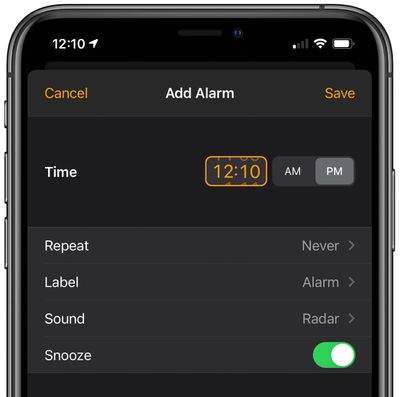
- Time Picker Design - The time picker interface, available in the Clock app when setting an alarm and other places in iOS, has seen a slight design tweak that adds an orange box around the time to make it more obvious that it can be interacted with to change the time.
ios14timepicker
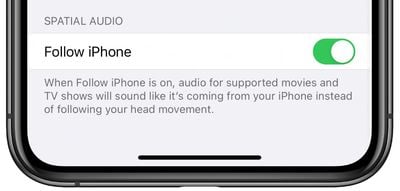
- Spatial Audio - Spatial Audio, the feature that brings surround sound to the AirPods Pro, isn't implemented as of yet, but Apple appears to be gearing up to add the feature to iOS 14 and the AirPods Pro. In today's beta, there's a new Spatial Audio toggle available in the Accessibility section of the Settings app. Choose AirPods and then at the bottom of the screen, there's a "Follow iPhone" toggle. Follow iPhone makes audio for supported movies and TV shows sound like it's coming from the phone instead of following head movement. There's also new code and internal messaging related to the spatial audio feature. Though this toggle is available, Spatial Audio is not yet functional.
spatialaudioios14
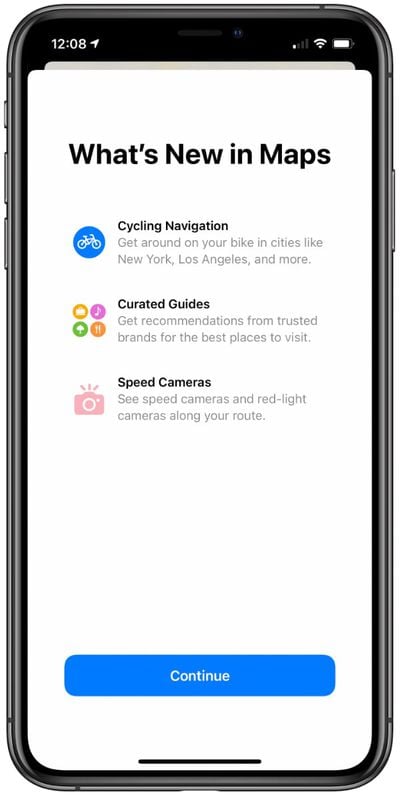
- Maps Splash Screen - There's a new splash screen for the Maps app that lets you know about new features that include cycling directions, curated guides, and support for speed cameras.
ios14mapssplashscreen
Know of any other changes in ‌iOS 14‌ beta 6 that we didn't list here? Let us know in the comments and we'll add them.

Related Forum: iOS 14

Popular Stories

Apple Card iPhone 16 Pro Feature

Apple Card Promo to Offer Free AirPods Pro 3

Friday May 15, 2026 8:59 am PDT by
Starting as early as next week, customers who sign up for an Apple Card at Apple's retail stores in the U.S. will receive $249 cash back when they purchase AirPods Pro 3, according to Bloomberg's Mark Gurman. The promotion has yet to be officially announced by Apple, so exact terms and conditions are not available at this time. AirPods Pro 3 are priced at $249 in the U.S., so customers who...
Apple WWDC25 iOS 26 CarPlay Light mode 250609

Six Popular iPhone Apps Now Available on CarPlay

Thursday May 14, 2026 9:10 am PDT by
Apple's CarPlay system for accessing iPhone apps on a vehicle's dashboard screen has received six popular apps in recent weeks: ChatGPT, Perplexity, Grok, Google Meet, WhatsApp, and the indie artist streaming platform Audiomack. Make sure you have the latest version of each app and they will automatically appear on CarPlay. ChatGPT Starting with iOS 26.4, CarPlay supports voice-based...
ipad mini 7 blue

OLED iPad Mini: Release Date, Pricing, and What to Expect

Thursday May 14, 2026 5:08 am PDT by
According to the latest rumors, Apple is close to launching its next-generation iPad mini. So what should we expect from the successor to the iPad mini 7 that Apple released over a year ago? Read on to find out. Processor and Performance Apple is working on a next-generation version of the iPad mini (codename J510/J511) that features the A19 Pro chip, according to information found in code...

Top Rated Comments

zorinlynx Avatar
75 months ago
Any speculation on what was wrong with the old time picker UI and why they felt the need to change it?

The old one feels more intuitive and easier to use.
Score: 19 Votes (Like | Disagree)
Krazy_Peanut Avatar
75 months ago
I hate how you have to add time now. I keep fu**ing it up when setting the time within calendar. It really isn’t that user friendly at all.
Score: 13 Votes (Like | Disagree)
AngerDanger Avatar
75 months ago

The time picker interface … has seen a slight design tweak that adds an orange box around the time
Be still my beating heart!
Score: 10 Votes (Like | Disagree)
SkimPappa Avatar
75 months ago

You could not have possibly redesigned the app in a more less user-friendly or intuitive way. I am dead serious. It is probably the worst example of user interface design I’ve ever seen as a 34 year old. They need to fire whoever has been designing their UI lately IMO, because most of it has been awful or questionable.
I hate using the alarm clock now.
Score: 9 Votes (Like | Disagree)
jrodri7 Avatar
75 months ago

So what features do you guys think will be cut ahead of release and pushed off to a later iOS 14.X update? Seems to happen every year now. I think Spatial Audio might be delayed.

I wonder if they are going to allow us to change our default mail and internet browser apps during the Beta.

Edit: Also I believe that "time picker" design was implemented prior to Beta 6.
The orange box around the time picker box is what changed in beta 6. It was not there in beta 5.
Score: 8 Votes (Like | Disagree)
75 months ago

That spatial audio function sounds really weird. Why would I want the sound to appear like it's coming from my phone instead of playing directly into my skull as usual?
I think Spatial audio with movies is just a stepping stone until they release Apple AR glasses, when positioning audio relative to your environment will be a key feature for suspension of belief.
Score: 7 Votes (Like | Disagree)















