iOS 14 Widgets Offer iPhone Users Creative Home Screen Ideas - MacRumorsOpen MenuShow RoundupsShow Forums menuVisit ForumsOpen Sidebar
Skip to Content

iOS 14 Widgets Offer iPhone Users Creative Home Screen Ideas

Updated on September 22nd with hands on video.

In iOS 14, Apple introduced ‌the concept of Home Screen‌ widgets, which provide information from apps at a glance. Widgets can be pinned to the Home Screen in various spots and sizes, allowing for many different layouts.

Despite the relative lack of 3rd party widgets at launch, iOS users around the world have been busy customizing their home screens and sharing their work with others.

(Besides using iOS 14 Widgets, Twitter user Ben Zhu also used Shortcuts to change the look of the icons in the screenshot above.)

On Twitter, the hashtag #iOS14HomeScreen started trending this weekend with users showing off their latest creations. MacRumors followers also shared their creations on Twitter and in this forum thread.

Some bigger brands have already released widget support, including IMDB, Google, and Twitch. Spotify is notably absent from the early supporting apps, though TuneTrack already offers Spotify "Playing Now" widget support in the meanwhile.

Hands On Video

We grabbed some of the tools we describe later in this article and shot this video which shows how you too can customize your iOS 14 home screen. Our videographer shows how to use Widgetsmith amongst other tools to create custom configurations as well as replacing the standard icons with your own images. There are some limitations to be aware of however.
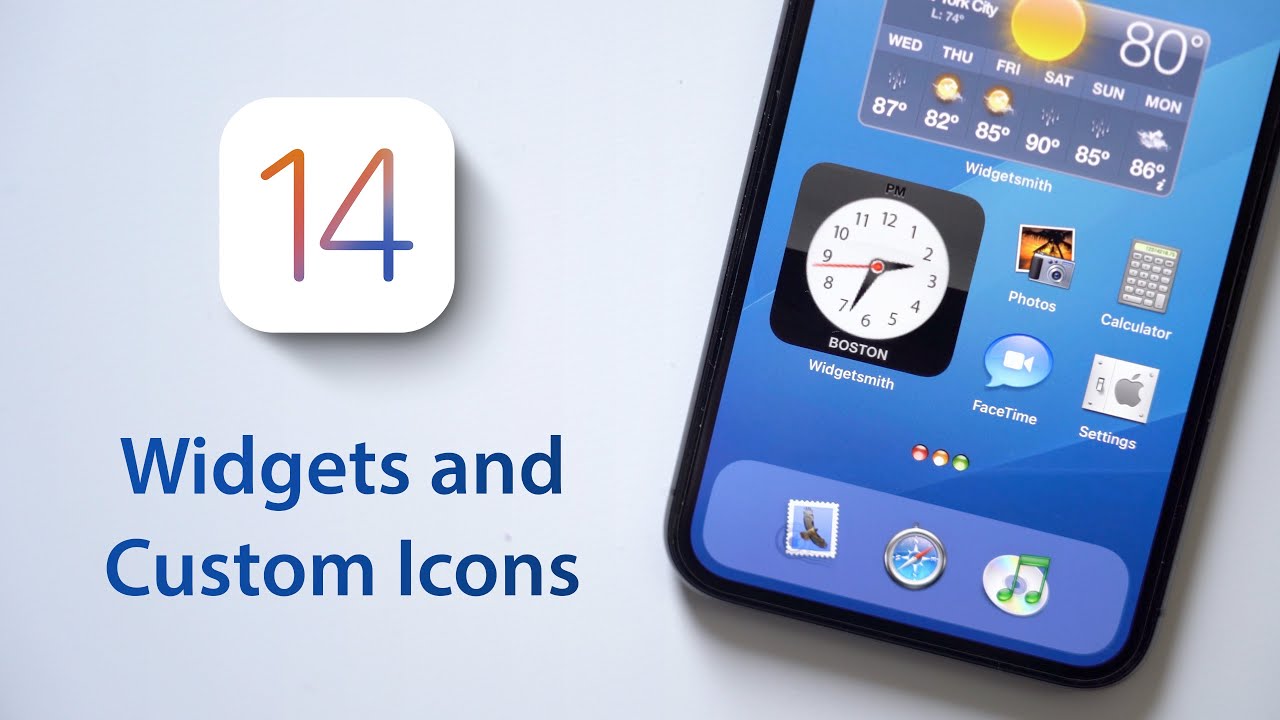
We even tried to create a special Mac OS X Aqua themed home screen just to see how it would go. Bottom line, it took a while and wasn't quite functional.

Widgetsmith

One of the early Widget apps that has seen a lot of popularity is Widgetsmith [Free] which offers the ability to create widgets alongside styling customizations. Widgetsmith allows you to create customized small, medium or large widgets with Time, Date, Photos, Custom Text, Upcoming Events, Reminders, and Health and Activity. Widgetsmith also offers Weather and Tide widgets as part of their premium subscription package which costs $1.99/month or $19.99/year.

The flexibility of the tool has made it popular with iOS 14 Home Screen screenshots that have been circulating around the web. Taken to the extreme, you can see highly stylized home screens:

Update: Widgetsmith has been updated to version 1.0.4 and includes a new custom color picker and a new Battery icon widget.

ColorWidgets
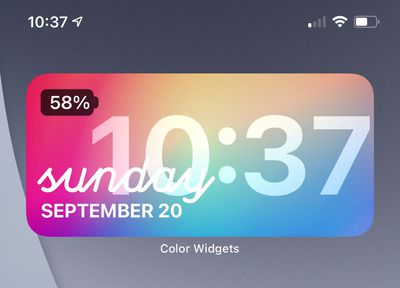
color widgets

Another popular choice we've seen is ColorWidgets [Free] which offers a free Time and Battery widget with a lot of colorful styles. Some premium styles are also offered for a $3.99 one time purchase.

Weather Widgets

Weather is a popular widget type that has already seen a number of supporting apps. There are certainly more that we missed, but notably, Apple's own Dark Sky doesn't have widget support yet.
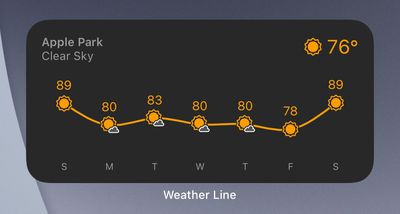
weather line

Other Widgets

Beyond that, there are a number of early widgets that we've run across, and here is a short list.

Fitness and Nutrition Widgets
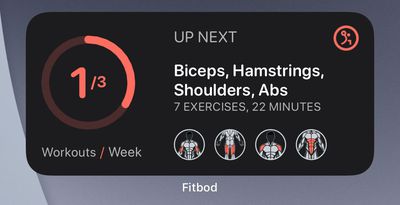
fitbod

  • Fitbod - Workout tracking. Free with IAP
  • FoodNoms - Food and calorie tracking. Free with IAP
  • Streaks - Forming habits on a daily basis. $4.99
  • Zones - Workout tracking. Free with IAP
  • Hour Blocks - Dayplanner that shows you what's next. $3.99

Finance Widgets
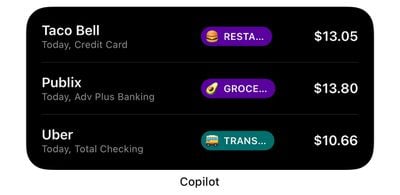
copilot

Travel Widgets

  • Flighty - Flight tracking app. Free with IAP
  • App in the Air - Travel assistant. Free with IAP
  • KAYAK - Book flights, hotels and cars. Free
  • Tripit - Travel planner. Free with IAP
  • World Clock - Time zone widget. Free with IAP

We will continue to cover notable Widgets as they are released. For a deeper dive, please visit our Twitter thread where we asked for widget recommendations and follow along in the 3rd Party Widgets Thread in our iOS 14 forum.

Additional Widgets

Additional interesting widgets that have launched:

  • Parcel - Delivery tracking. Free
  • WaterMinder - Daily water reminder. $4.99
  • Clatters - Social media monitoring. Free with IAP
  • Launcher - Launch apps from widgets. Free but Limited. $7.99 IAP.
Related Forum: iOS 14

Popular Stories

Apple HomeView lineup feature5

Apple HomeView Has These 15 Apps, Some CarPlay Apps and Widgets Also Supported

Wednesday October 14, 2026 9:03 am PDT by
Apple's tech specs page for its all-new HomeView smart home hub contains a list of all of the built-in Apple apps available on the device. While it has no App Store, the HomeView can also display CarPlay-enabled audio and video apps from a paired iPhone. This includes Audiobooks, Apple Music Classical, Apple News, and Apple TV, along with third-party apps such as Spotify, according to WIRED. ...

apple pro tell logo

Apple Launching Five New Products Today

Thursday November 5, 2026 12:59 am PST by
Apple is launching five new products on Friday, November 6, following pre-orders that opened last week, including its first touchscreen MacBook Pro models. The following new products will be available from today: iPad mini with OLED display and A20 Pro chip iMac with M6 chip 14-inch MacBook Pro with M6 chip 14-inch MacBook Pro with OLED touchscreen 16-inch MacBook Pro with OLED...
duo aquarium

More Fun iPhone Duo Apps: 30 New Picks to Try

Friday November 6, 2026 3:27 pm PST by
When the iPhone Duo launched, we shared a list of some of the fun apps developers created for the new form factor. Two weeks out, developers are continuing to come up with fresh ideas, so we thought we'd share some of our favorites. Games Marbles Unhinged ($2.99) - Marbles Unhinged is a marble maze designed for the Duo. When you fold it, the floor turns into a ramp. If you stand the top...

Top Rated Comments

80 months ago
$19.95/year subscription for a widget app?
Score: 19 Votes (Like | Disagree)
80 months ago
iPhone forums will now look like Android forums for the past 10 years... ;)
Score: 14 Votes (Like | Disagree)
sniffies Avatar
80 months ago

How do people change icons into custom images? Need a step-by-step :)
From twitter ('https://twitter.com/kcsnipes1149/status/1307776733181915136'):

You can use the shortcuts app to change the icon. Open shortcuts > add new shortcut > add action > scripting > open app > choose app > click the ... > add to Home Screen > under Home Screen name tap on the icon and choose an image. > add. Done!
Score: 14 Votes (Like | Disagree)
Rudy69 Avatar
80 months ago

Jailbreak
WTF! Read the article. It says they're using Shortcuts. Why spread misinformation?
Score: 12 Votes (Like | Disagree)
tegranjeet Avatar
80 months ago
Meh, just another distraction and battery eater. I tend to keep just one page of apps. thanks but not for me
Score: 9 Votes (Like | Disagree)
80 months ago
Some of the comments I'm seeing here about widgets, and elsewhere, point to something I've been telling my Android friends (and myself as I also have used and enjoy Android) for a long time... all of the customization is ultimately more of a time waste than anything else. If you enjoy it, great. But if not, if your phone is primarily a tool in your mind, instead of a fun thing to play with, then customization is kind of pointless.
Score: 7 Votes (Like | Disagree)
Latest Stories
Early Apple Black Friday Deals on Apple Watch, MacBook Air, and More
10 hours ago
'Backglow' Lets You Customize New MacBook Pro's Glowing Apple Logo
10 hours ago
Top Stories: Apple Product Launches, iOS 27.3 Beta, and More
17 hours ago
More Fun iPhone Duo Apps: 30 New Picks to Try
1 day ago
Hands-On With Apple's New OLED Touchscreen MacBook Pro
1 day ago
Apple Store With All-New Design Opening Soon in Southern California
1 day ago
Control the Glowing Apple Logo on Your New MacBook Pro
1 day ago
Apple Shares New 'Apple Card: Apply and Use in Minutes' Ad
2 days ago
Apple Says More Than 100,000 Apps Optimized for iPhone Duo, Here's What's Still Missing
2 days ago
Early Black Friday Deals Kickoff With Steep Discounts on Apple Watch Ultras and More
2 days ago
The MacRumors Show: iOS 27.3 Looks Like a Huge Update
2 days ago
Best Buy's Black Friday Event Begins With Sitewide Savings on Apple, TVs, More
2 days ago
Apple Releasing Yet Another Two New Products Next Week
2 days ago
MacBook Air Drops to Lowest Price in Months With Amazon's $250 Discount
2 days ago
Apple Rumored to Drop the iPhone's Action Button Next Year
2 days ago
Apple's Extended Return Policy Now in Effect for 2026 Holiday Season
2 days ago
Apple Music Classical Updated With New Icon and Refreshed Design
2 days ago
OLED iPad Mini, M6 iMac, and New MacBook Pros Available From Today
2 days ago
Apple Surveys iPhone Duo Buyers About Crease and Camera
2 days ago
Apple's First Touchscreen Mac is Now Arriving to Customers
2 days ago
Claude Gets Personal Finance Feature With Bank Account Linking
2 days ago
Apple Arcade Adds Crossy Road Rush and NBA 2K27
2 days ago
Apple's New HomeView Smart Home Hub: Here's How Much RAM It Has
2 days ago
iPad Mini vs. iPad Air Buyer's Guide: Now Just $50 Apart
2 days ago
First iOS 27.3 and macOS Golden Gate 27.3 Public Betas Now Available
3 days ago
Apple Announces a New Mac Sales Record
3 days ago
Paid $200 for Logic Pro? Apple Says You Won't Get This New Feature
3 days ago
Instagram's Edits Video Editor is Now Available on Mac
3 days ago
Prevent Siri and Search From Accessing Specific iPhone Apps
3 days ago
Best Early Black Friday Deals on iPhone 18 Pro and iPhone Duo
3 days ago










































