

Apple today seeded the second betas of upcoming iOS 14.2 and iPadOS 14.2 updates to developers, two weeks after seeding the first betas and a little over two weeks after releasing the iOS 14 and iPadOS 14 updates.
iOS and iPadOS 14.2 can be downloaded through the Apple Developer Center or over the air after the proper developer profile has been installed.
The iOS 14.2 update brings a new Music Recognition control for the Control Center, which enhances the integration of the Apple-owned Shazam app in the iOS operating system. Music Recognition lets you discover music playing around you and it can recognize music playing in apps even when you're wearing AirPods.
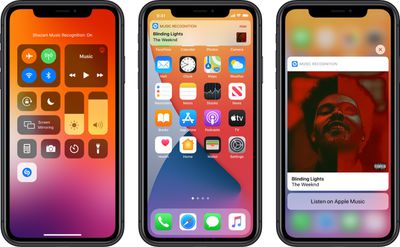
The Shazam Music Recognition feature can be added to Control Center through the Control Center options in the Settings app. To use the feature, open up Control Center and then tap on the Shazam icon to initiate a single recognition. While Apple devices have been able to use Shazam through Siri or the Shazam app for some time, the Control Center option makes it easier to get to the music recognition tool.
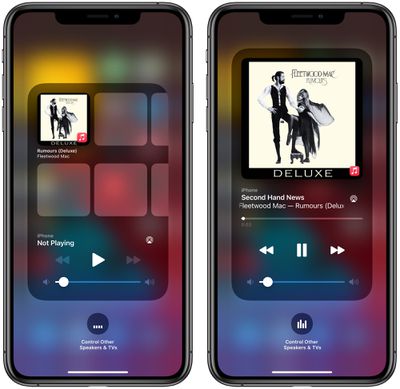
The new update also includes a redesigned Now Playing widget for the Control Center, which lists recently played albums that you might want to tap into and listen to when you have no music playing. There's also a redesigned interface for AirPlay, making it easier to play music across multiple AirPlay 2-enabled devices in the home.
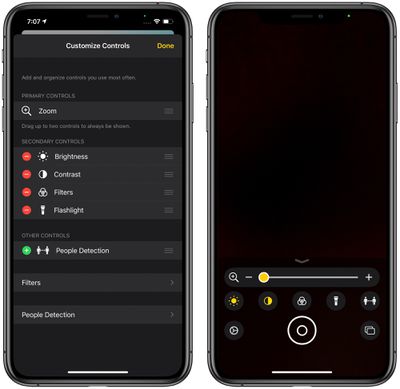
For those who have low vision, Apple added a "People Detection" feature in the Magnifier app that uses the camera to let iPhone users know how far away other people are, which can be useful for social distancing purposes.
The new iOS 14.2 beta will likely be in testing for some time as Apple works on releasing new iPhones, with the new iPhones expected to debut sometime in October.





/https://forums.macrumors.com/attachments/961103/)

















