

AirBuddy App for Easily Connecting AirPods to Macs Gets Redesign and New Features - MacRumorsOpen MenuShow RoundupsShow Forums menuVisit ForumsOpen Sidebar
Skip to Content

AirBuddy App for Easily Connecting AirPods to Macs Gets Redesign and New Features

App developer Guilherme Rambo last year released AirBuddy, an app that's designed to bring iOS-like AirPods integration to the Mac, and today, Rambo is releasing an updated version of the app, AirBuddy 2.

airbuddy 2 airpods connected
Compared to the original version of AirBuddy, the updated app features a redesigned user interface, reliability improvements, and several new features like historical usage data and custom connection modes.
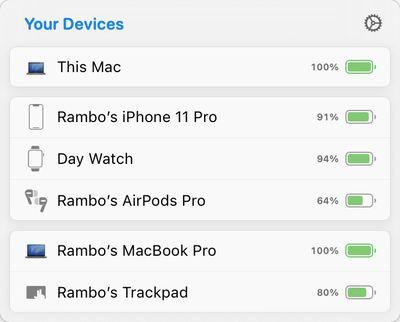
airbuddy 2 connected devices
AirBuddy 2 is meant to make connecting AirPods and Beats headphones to a Mac as seamless as connecting to an iOS device. When AirPods are near a Mac with AirBuddy 2 installed, a window pops up that lets you click to connect. Battery life is displayed in the menu bar or in the Today center, and a swipe lets you change to a new listening mode.

You can connect iPhones, iPads, and other Macs running AirBuddy 2 to your main Mac to monitor battery life, and in addition to making it easy to swap devices with headphones, it's also designed to make it simple to transfer a Magic Mouse, Magic Trackpad, or Magic Keyboard between Macs with a click.
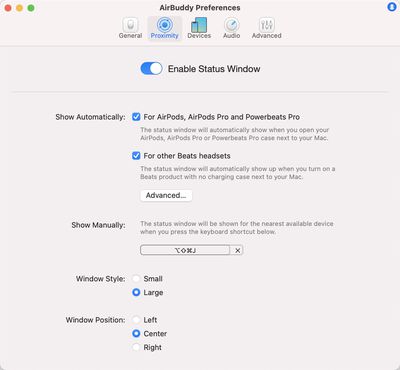
airbuddy 2 preferences
Custom connection modes are available to set listening mode, volume, and microphone access when AirPods connect to a Mac, and the app offers up historical data about headphone usage such as listening time, call time, and battery life for 12 hours, 24 hours, or the prior day.
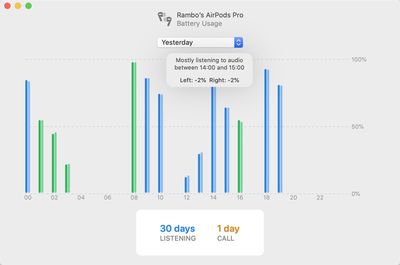
airbuddy 2 device listening history
AirBuddy 2 can be purchased from the AirBuddy website for $9.99. AirBuddy users who purchased the AirBuddy app in 2019 can upgrade for $4.99 in the app, and AirBuddy users who purchased the original app in 2020 will get a free upgrade to AirBuddy 2.


Popular Stories

macOS 27 on MacBook Pro

Apple Says macOS 27 Won't Be Compatible With These Macs

Wednesday June 3, 2026 8:29 am PDT by
During WWDC 2025, Apple revealed that macOS 26 Tahoe would be the final major macOS version for Intel-based Macs. macOS 27 will be compatible with Apple silicon Macs only, meaning that you will need a Mac with an M-series chip or a MacBook Neo with an A18 Pro chip in order to install the software update. Apple will unveil macOS 27 during its WWDC 2026 keynote this Monday, June 8, and the...
MacBook Neo on Yellow Feature

MacBook Neo is So Popular That Apple Reportedly Doubled Production

Wednesday June 3, 2026 9:24 am PDT by
On an earnings call in late April, Apple's CEO Tim Cook said that customer response to the MacBook Neo was "off the charts," and the popularity of the laptop has reportedly led the company to significantly boost production. Apple supply chain analyst Ming-Chi Kuo this week said he believes that MacBook Neo shipments to Apple were doubled from an initial target of 5 million units to 10...
iphone 18 pro blue%402x

iPhone 18 Pro: Dark Cherry, Light Blue, and Dark Gray Chassis Leaked [Update]

Thursday June 4, 2026 5:18 am PDT by
Update: Since publication, new information has come to light suggesting the images have been AI-manipulated and are not in fact iPhone 18 Pro chassis parts. The original article follows. The color options Apple is reportedly planning for the upcoming iPhone 18 Pro and ‌iPhone 18 Pro‌ Max have appeared online today in the form of images of chassis parts of unknown authenticity....

Top Rated Comments

73 months ago

Does Big Sur do most of this ?
Yes. Natively.
Score: 16 Votes (Like | Disagree)
bpeeps Avatar
73 months ago
How much did MacRumors get for this ad?
Score: 8 Votes (Like | Disagree)
73 months ago

Upgraded immediately, I loved v1. This update has addressed every minor gripe I still had with the app. I just wish Apple would add this functionality to macOS itself
Come back tomorrow for Big Sur. It IS added to MacOS. At least the basic functionality of connecting the AirPods automatically. Looks like a lot of new features were added. Not a surprise. Since the main purpose of the app is now handled by the OS, you either drop your project, or find other ways to add value for your customers.
Score: 7 Votes (Like | Disagree)
luvbug Avatar
73 months ago

Honestly, I don’t know. I just purchased the upgrade and have not seen anything that Big Sur does natively.

If people are walking into macOS Big Sur expecting AirPods functionality other than automatic device switching (which sucks on the Mac right now due to misuse of audio APIs) they’re in for some sore disappointment.
Then what on earth are you basing your posts on? Have you been running the last 11.0.1 beta (likely GM) since it came out and actually tested these BT functions? If not, then what? Just pulled something out of the air for sh*ts and grins?
Score: 5 Votes (Like | Disagree)
jonblatho Avatar
73 months ago

Then what on earth are you basing your posts on? Have you been running the last 11.0.1 beta (likely GM) since it came out and actually tested these BT functions? If not, then what? Just pulled something out of the air for sh*ts and grins?
Yes, I’ve been testing automatic device switching since it was available and kept my Mac updated. It’s still a mess on the Mac — rapidly improving, but enough of a mess that I have had to disable sound effects on multiple apps and even websites so that (for example) a new chat sound effect from Facebook’s website doesn’t cause audio to switch over to my Mac from my iPhone while playing music. Unless Apple has begun blacklisting certain high-profile incidents like these, and I don’t know why it would/should, these edge cases will continue to be a nuisance for the foreseeable future, pending updates on developers’ end.

An example of something that AirBuddy 2 allows that macOS Big Sur doesn’t is so-called “connection modes,” which resolves a major nuisance for me, an iMac user stuck on Bluetooth 4.2. Sometimes, when connecting my AirPods, macOS likes to choose the AirPods for both output and input, which given Bluetooth 4.2’s reduced bandwidth means atrocious output audio quality until you manually switch the input back to the built-in mics. It does this randomly, even with nothing open that could possibly need the microphone and certainly nothing actively using it. It’s best to just eliminate the issue altogether by telling it to connect for output only when connecting; AirBuddy allows this, and macOS alone doesn’t.
Score: 4 Votes (Like | Disagree)
73 months ago

Yep best to release this before Big Sur comes out and people figure out that 90% of it is baked in to the OS now.
Yeah-- no it's not.
Score: 4 Votes (Like | Disagree)














