Apple's battery health management feature cannot be disabled on Apple Silicon Macs, as there is no toggle switch for this in System Preferences on these machines.
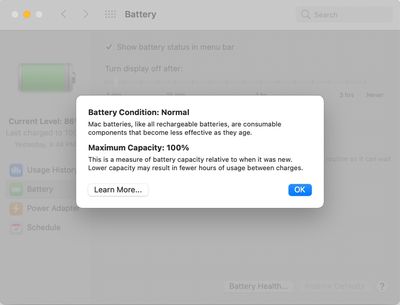
Battery health management cannot be disabled on Apple Silicon-based Macs
Introduced in macOS Catalina version 10.15.5, the battery health management system is designed to improve the lifespan of a Mac notebook's battery by reducing the rate at which it chemically ages. The feature achieves this by monitoring the battery's temperature history and its charging patterns, and temporarily reducing the battery's maximum charging capacity as necessary, according to Apple.
The feature can still be disabled on Intel-based Macs, but Apple warns this may reduce the battery's lifespan. On macOS Big Sur, navigate to System Preferences > Battery > Battery > Battery Health… and uncheck "Manage battery longevity." On macOS Catalina, the checkbox is located in System Preferences > Energy Saver > Battery Health…
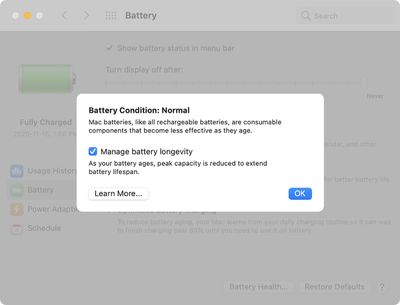
Battery health management can be disabled on Intel-based Macs
Nvidia is entering the consumer PC chip business for the first time and has thrown down the gauntlet to Apple, describing its new RTX Spark processor as "the most efficient PC chip ever built."
Nvidia says its RTX Spark Superchip is purpose-built to run AI agents that can work proactively across apps and run in the background as a personal "teammate."
With the chip, Nvidia says users...
Apple is set to unveil iOS 27 during its WWDC 2026 keynote on Monday, June 8, and the update will reportedly include two new Apple Wallet features.
First, iOS 27 will reportedly let users create their own digital passes by scanning items like movie tickets, concert passes, and gym membership cards. Many apps already offer Apple Wallet passes, but now users will be able to create a custom...
Battery capacities for Apple's upcoming iPhone 18 Pro have allegedly surfaced, and the numbers suggest only a modest increase over the iPhone 17 Pro.
According to prolific Weibo-based leaker Digital Chat Station, Apple is testing the iPhone 18 Pro with different battery capacities for the China and U.S. versions of the device, similar to last year's iPhone 17 Pro models. The Chinese model is ...
People don't get it. The complaint is not because one would want to disable the feature. It's because one should be free to decide whether to disable the feature or not.
It's your computer. You paid very, very handsomely for it. You're supposed to be able to do what you want to it.
Well, I guess lots of people here would be just delighted to be at the other end of a Darth Vader-style "I am altering the deal, pray I don't alter it any further" speech.
PS: I use the AlDente app, and I manage my battery infinitely better than any crappy machine-learning-AI mumbo-jumbo would ever be able to. So, I do disable it. I wouldn't recommend this to 99.99% of other Apple users, though.
Because they all think they are better hardware/software engineers than any that work at Apple. I wish there was a program that allowed these people to build their own laptops with a live streaming feed so we could watch them blow up within the first 72 hours. Assuming, that is, they can keep them running for more than 15 minutes.
Or maybe a reality show where they each get their own personal UNIVAC to keep running to win a prize while losers get shot out of a cannon into the Sun. It’s a win/win either way and would be funny as hell.
You have no idea what you’re talking about. I, unlike you, do — I’m an electrical engineer, I’ve designed Li-Ion battery-powered products, and I’ve read dozens of actual scientific papers, on peer-reviewed high-impact journals, about battery lifespan.
The Apple feature tries to predict when you’re going to need 100% battery charge, and time the charges that way. To maximize battery lifespan, the main thing it can do is keep it at a lower charge (e.g. 60% seems to be an ideal value) for as long as possible. Batteries degrade much much much faster when near 100% state of charge than when at 60% or even 80%.
I, unlike Apple, actually know when I’m going to need 100% charge. In my case, the answer is: never — OK, maybe once or twice a year, but this year I’ve yet to purposefully charge it beyond 60% (using the AlDente app to control the state of charge).
So, Apple may have the best and brightest engineers of the world. Maybe they can do the very best, state of the art machine-learning mumbo-jumbo (actually, from my experience it’s crap — optimized battery charging doesn’t work for me in the iPhone at all — but let’s pretend for a moment that it’s not crap). Unfortunately one thing that’s beyond Apple is predicting the future: i.e. when will you need 100% charge, so you can start charging it exactly X minutes before so the moment you unplug it, it’s at 100%. Since it can’t do that, those that care enough about managing their battery will always be able to do better. It’s simply impossible to argue with that.