PSA: You Can't Output Mac System Audio to Stereo-Paired HomePod Minis, But There Is a Workaround - MacRumorsOpen MenuShow RoundupsShow Forums menuVisit ForumsOpen Sidebar
Skip to Content

PSA: You Can't Output Mac System Audio to Stereo-Paired HomePod Minis, But There Is a Workaround

If you were thinking of buying two HomePod mini speakers to use as a stereo pair with your Mac, you might want to think again. As some users undoubtedly found with the original HomePod, it's not possible to AirPlay to multiple speakers from the menu bar on a Mac.
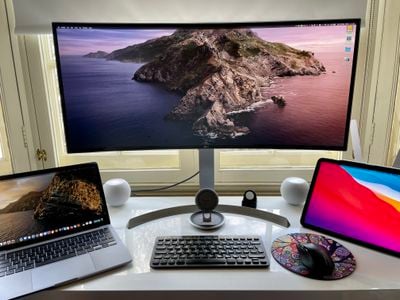
homepod mini stereo pair mac
The inability to select stereo-paired ‌HomePod‌ speakers as your Mac audio output device is a glaring omission in Apple's ‌AirPlay‌ rollout, and the situation unfortunately remains the same in macOS 11 Big Sur. You can only use them with certain Apple apps like Music and TV – all other Mac audio must be output to one speaker or the other, but not both at the same time.

While it's frustrating that Apple's own apps let users select stereo-paired HomePods as a single device, this does provide a workaround, although it's a kludge that has its drawbacks. The following steps show you how it's done.

  1. Launch the Music app on your Mac and select your stereo-paired ‌HomePod‌ minis as the audio output.
    homepod stereo pair music mac

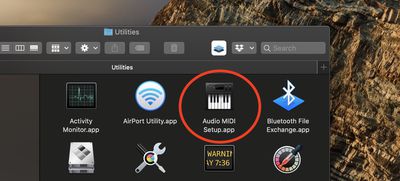
  2. Now, minimize the Music app (don't close it), then launch the Audio MIDI Setup app located in the Applications -> Utilities folder.
    audio midi setup app

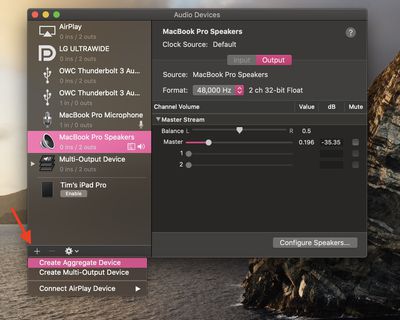
  3. In the Audio MIDI Setup app, click the + button in the bottom-left corner of the interface and select Create Aggregate Device from the dropdown.
    create aggregate audio

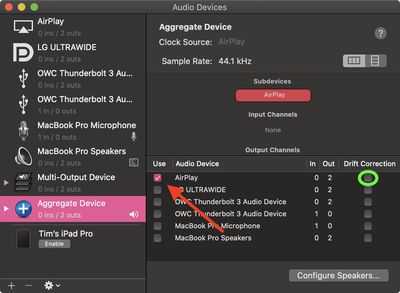
  4. Select the Aggregate Device in the sidebar and check the Use box next to AirPlay.
    airplay audio midi setup

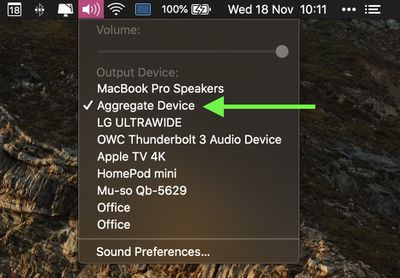
  5. Close the Audio MIDI Setup app, then select the Aggregate Device from the volume dropdown in the menu bar.
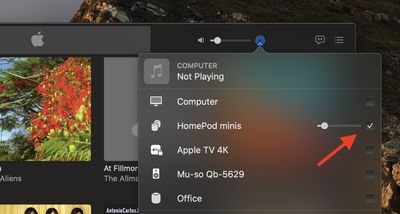
    aggregate device audio device

As for the caveats to this workaround, using it means you can only change the volume by tapping the physical ‌HomePod‌ controls themselves – you won't be able to adjust it from your Mac's menu bar. You also have to keep the Music app open at all times, otherwise you'll lose your audio and you'll have to repeat the steps.

Another thing to consider is that this is only ‌AirPlay‌ 1, so there's a delay in the sound output between playing/pausing, and audio will be slightly out of sync when watching videos, although checking the Drift Correction option (circled in green above) in the Audio MIDI Setup app can compensate for this.

As mentioned, the solution is far from ideal, but until Apple brings system-wide ‌AirPlay‌ 2 support to Macs, it's the only way to pipe your Mac's audio through stereo-paired HomePods, short of purchasing a third-party app like Airfoil.

Update: As MacRumors reader B4rbelith points out, if you play something in the Music app, you can then right-click AirPlay in the Audio MIDI Setup app's sidebar and select Use this device for sound output. This lets you control the volume from the menu bar, but the other caveats still apply.

Related Roundups: HomePod, HomePod mini

Popular Stories

HomePod 2 and Mini feature 1

Apple Releases HomePod Software 26.5

Monday May 11, 2026 9:59 am PDT by
Alongside iOS 26.5, iPadOS 26.5, and macOS Tahoe 26.5, Apple has released new HomePod 26.5 software for the HomePod and the HomePod mini. The update comes a little over a month after Apple released HomePod Software 26.4. According to Apple's release notes, HomePod Software 26.5 includes performance and stability improvements. ‌HomePod‌‌‌‌‌‌‌ software is installed...
HomePod mini and Apple TV Sage

New Apple TV and HomePod Mini Are 'Nearly Ready' to Launch, New Siri Remote Also Rumored

Sunday May 31, 2026 8:47 am PDT by
New models of the Apple TV 4K and HomePod mini are "nearly ready to go," according to the latest word from Bloomberg's Mark Gurman. Subscribe to the MacRumors YouTube channel for more videos. Both devices have been ready "for months," but Apple is holding off on launching them until the more personalized version of Siri is available, he said. "I am told the hardware for the next Apple TV...
macOS 27 on MacBook Pro

Apple Says macOS 27 Won't Be Compatible With These Macs

Wednesday June 3, 2026 8:29 am PDT by
During WWDC 2025, Apple revealed that macOS 26 Tahoe would be the final major macOS version for Intel-based Macs. macOS 27 will be compatible with Apple silicon Macs only, meaning that you will need a Mac with an M-series chip or a MacBook Neo with an A18 Pro chip in order to install the software update. Apple will unveil macOS 27 during its WWDC 2026 keynote this Monday, June 8, and the...

Top Rated Comments

GadgetBen Avatar
72 months ago
This is ridiculous, come on Apple sort it out.
Score: 39 Votes (Like | Disagree)
hellosil Avatar
72 months ago
Baffled by the fact that this needs a workaround to work.

For me its a reason not to buy a HomePod (Mini) yet.
Score: 17 Votes (Like | Disagree)
Quu Avatar
72 months ago
"It just works"

I actually have two Homepods (not the Mini kind) and Big Sur still doesn't support sending audio to them when they're grouped, just one or the other. So lame.
Score: 11 Votes (Like | Disagree)
72 months ago
You don't need to create an aggregate device. Just play something from Apple Music to your stereo HomePods, then open 'Audio Devices', right click on Airplay, and select 'Use this device for sound output'.
It's not ideal, and media players like IINA and VLC lag. Youtube through Safari works fine though, as it buffers the video to keep in time.


Attachment Image
Score: 10 Votes (Like | Disagree)
72 months ago

Latency. All your system sounds and time critical audio would be 3-4 seconds out time. Not an enjoyable experience.
But that's only a problem because they chose that to be a problem.

The HomePod has Bluetooth. Bluetooth can transfer sound with a reasonable latency. They just didn't implement it.
Also they could have just added a line-in. (With USB-C in the mini they could still do it with a custom cable or power brick.)

So the question stands: What's the reason they didn't do it?
Score: 9 Votes (Like | Disagree)
72 months ago
We don't need cables anymore, we can do everything over the air! ;)
Score: 7 Votes (Like | Disagree)