Google Authenticator iOS App Gains New Export Accounts Option - MacRumorsOpen MenuShow RoundupsShow Forums menuVisit ForumsOpen Sidebar
Skip to Content

Google Authenticator iOS App Gains New Export Accounts Option

Google has updated its 2FA Authenticator app for iOS with a new account transfer feature that makes it much easier to transfer two-factor authentication codes to a new iPhone.

google authenticator app
2FA adds an extra layer of security to your online accounts by requiring a randomly generated six-digit code after you've entered your password. Google's app generates codes for your accounts on the fly, but until now the process of transferring accounts to a new iPhone was time-consuming and involved multiple steps.

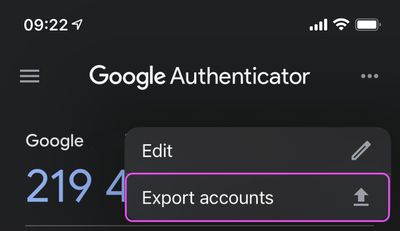
Thankfully, that's no longer the case, and you can now select which accounts to export by tapping the three dots in the top-right corner of the app and choosing Export accounts.

After you've chosen which accounts to export (you can export up to 10 accounts at a time), the Authenticator app will generate a QR code. Scan this code using the Authenticator app on your new device, and the chosen accounts will be automatically transferred.
authenticator export accounts
In addition to 2FA export, the latest update to the app also adds a refreshed interface and Dark Mode support, which respects your systemwide settings.

Remember, if you buy a new iPhone to replace your existing one and you use the Google Authenticator app, you should transfer those accounts to your new phone as soon as possible, because without the 2FA codes close at hand, you could find yourself locked out of your online accounts.

Google Authenticator is a free download for ‌iPhone available on the App Store.‌ [Direct Link]

Popular Stories

Gemini Siri Feature

Google Confirms Gemini-Powered Siri Coming Later This Year

Wednesday April 22, 2026 11:08 am PDT by
Google today commented on its partnership with Apple, confirming that Gemini will power a new, more personalized version of Siri that's set to be released later in 2026. Google Cloud chief Thomas Kurian mentioned the Apple partnership during Google Cloud Next 2026, a conference that's taking place in Las Vegas, Nevada today. Earlier this year, we announced a monumental partnership with one...
google photos wardrobe

Google Photos to Get AI 'Wardrobe' Feature

Wednesday April 29, 2026 3:50 pm PDT by
Google Photos is getting a new wardrobe planning feature that will help you decide what to wear. AI will pull in images of clothing from the Google Photos library, organizing clothing items into a digital closet. You will be able to put items together to create outfits, and even virtually try them with a digital avatar on to see how they'll look. The Google Photos app will show all items of...
Photos App Icon Liquid Glass

Google Says Pixel Phones Won't Get Apple's Liquid Glass Design

Wednesday May 6, 2026 1:57 pm PDT by
The Android operating system for Pixel smartphones is not going to take design cues from Apple and adopt a Liquid Glass aesthetic, Google Android president Sameer Samat said recently (via 9to5Google). In response to a social media mockup of an Android device with a Liquid Glass design, Samat said, "Not happening! Y'all are wild." The mockup was in response to a teaser video for The Android...

Top Rated Comments

71 months ago
Too few, too late. Authy has taken the spot as a decent and easy to transfer 2FA application with a much better approach of using iCloud storage for backups and restore. Move along, Google - you had your time.
Score: 22 Votes (Like | Disagree)
71 months ago
What a joke. Microsoft Authenticator has an iCloud backup that can be restored.
Score: 11 Votes (Like | Disagree)
dylanhf Avatar
71 months ago
Well that would have been useful... a week ago :rolleyes:
Score: 10 Votes (Like | Disagree)
71 months ago

Well that would have been useful... a week ago :rolleyes:
Yep - stuffed me up too
Score: 6 Votes (Like | Disagree)
71 months ago
I use Microsoft Authenticator now (I used Google Authenticator for many years and Authy for a year or two) and I'm very happy with it. Many ways to add your codes, backups (if you want, you can disable it), plus password-less login to your Microsoft account which I initially didn't think I'd use but boy is it a time-saver. You can also perform several security related tasks on your Microsoft account through the app. For someone like me with one foot in the Microsoft world and one foot in the Apple world it's perfect.
Score: 4 Votes (Like | Disagree)
mazz0 Avatar
71 months ago
Yep, I'm in the OTP Auth camp too (https://apps.apple.com/gb/app/otp-auth/id659877384). Hassle-free syncing across devices, Safari plugins to make entering the codes a doddle. I don't know why people would use Google's version. Even this solution requires that you have the new and old phone at the same time, so doesn't work for trade ins, or replacements of lost/broken phones.

I appreciate not storing the keys in the cloud is more secure, but come on, they're stored encrypted in iCloud with a key Apple don't have. I doubt anybody with the power to hack that is particularly interested in pretending to be me on MacRumors forums!
Score: 4 Votes (Like | Disagree)