

CalDigit's Latest Dock Features Four Thunderbolt 4 Ports and Four USB-A Ports - MacRumorsOpen MenuShow RoundupsShow Forums menuVisit ForumsOpen Sidebar
Skip to Content

CalDigit's Latest Dock Features Four Thunderbolt 4 Ports and Four USB-A Ports

CalDigit today introduced a new "Element Hub" dock, equipped with four Thunderbolt 4 ports and four USB-A ports for connecting external displays, storage drives, and other peripherals to devices like a MacBook Pro or iPad Pro. For data transfer, the Thunderbolt 4 ports provide speeds up to 40Gb/s, while the USB-A ports can reach up to 10Gb/s.
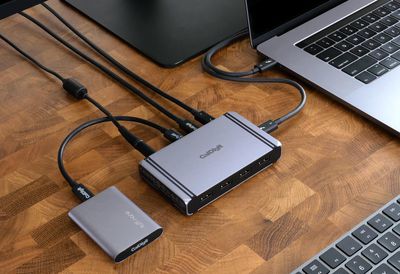
caldigit thunderbolt 4 dock lifestyle
Given that Thunderbolt 4 shares the same connector design as USB-C, and is backwards compatible with Thunderbolt 3, the dock can be used with many MacBook Pro, MacBook Air, and iPad Pro models released in recent years, as well as the fourth-generation iPad Air. The dock has pass-through charging, providing a fixed 30W for the MacBook Air, a fixed 60W for the 13-inch MacBook Pro, and up to 45W for the iPad Pro.

Included in the box with the Element Hub is a 150W power supply, a 0.8-meter Thunderbolt 4 cable, and two rubber feet.

The dock is available to pre-order for a discounted price of $139.99 (regular price $179.99) on CalDigit's website, and will begin shipping later this month in the United States. The dock is also available to pre-order in the UK, and will begin shipping in March.


OWC also introduced a Thunderbolt 4 dock last month that may be worth checking out for customers who are considering purchasing one. Priced at $249, that dock is equipped with four Thunderbolt 4 ports, four USB-A ports, a Gigabit Ethernet port, an SD card slot, and a combo 3.5mm audio in/out, with up to 90W pass-through charging.


Popular Stories

iCloud iPhone 17 Pro

iPhone Users Who Pay for iCloud Storage Get Two New Perks on iOS 27

Thursday July 2, 2026 6:10 am PDT by
If you pay for certain iCloud+ storage plans beyond the 5GB that Apple offers for free, you will receive two more perks on iOS 27 at no additional cost. A summary of the two new iCloud+ perks on iOS 27:Increased daily usage limits for some new Apple Intelligence features, including image generation in the revamped Image Playground app. HomeKit Secure Video cameras receive generated video...
iPhone 4 on Black Feature

Apple Facing One of Its Worst Leaks Since the iPhone 4

Thursday July 2, 2026 9:53 am PDT by
Apple supplier Tata Electronics recently suffered a cyberattack that resulted in thousands of confidential files being published on the dark web, and this reportedly included some photos and documents related to the upcoming iPhone 18 Pro. We have elected not to share any of the leaked photos in this story due to the illegal nature in which they were obtained, but they can easily be found...
American Express Gold Apple Pay Feature

American Express Announces New Apple Pay Feature

Tuesday June 30, 2026 10:27 am PDT by
American Express today announced that you can now redeem Membership Rewards points when checking out with Apple Pay on the web and in apps on the iPhone and iPad. When checking out with Apple Pay on iOS 18 or iPadOS 18 or later, tap on your eligible American Express card (Platinum, Gold, Green, and others) and select the Membership Rewards points option. You can use points to cover all or...

Top Rated Comments

71 months ago
In for one!

My onlyyyy tiny gripe is that I really wish companies would stop including the host port when advertising the total number of ports. It makes searching for exactly what you need a pain. This has 7 usable ports (4x USB & 3x TB4) and 1 Host TB4 port.
Score: 10 Votes (Like | Disagree)
71 months ago
Performance: The CalDigit product page says there hub is 40 Gbps and USB-C hubs are 5 or 10 Gbps. But they don't mention other Thunderbolt devices which are also 40 Gbps and they don't separate or include display data from other data.
To be more precise:
1) Thunderbolt in general: 40 Gbps total, 24 Gbps PCIe, 34.56 Gbps dual DisplayPort 1.2, 25.92 Gbps DisplayPort 1.4
2) USB-C gen 2: 22.66 Gbps total, 9.7 Gbps USB, 12.96 Gbps DisplayPort 1.4, 8.64 DisplayPort 1.2
3) USB-C gen 1: 16.96 Gbps total, 4 Gbps USB, 12.96 Gbps DisplayPort 1.4, 8.64 DisplayPort 1.2 (some such hubs may not support DP 1.4)

Thunderbolt 4 Hub (OWC or CalDigit): can perform as #2 with only direct connect USB devices or as #1 with downstream Thunderbolt devices or as a combination (USB uses PCIe data while the CalDigit is connected as #1).

A USB hub may contain a DisplayPort 1.4 MST Hub that supports DSC. If you have a GPU and OS that supports DSC (AMD navi and Catalina) then it may effectively double the display bandwidth using compression. The MST Hub decompresses the stream for displays that don't support DSC. This is how you can use a 4K 60Hz display with a USB-C hub like the CalDigit SOHO. But Apple broke DSC support in Big Sur (still broken in 11.2).
Score: 4 Votes (Like | Disagree)
71 months ago

That power brick...I know, it's 150 Watts but still.
I know lol but looks at this offline charging illustration, you need that 150W power brick for sure.MacRumors content image
Score: 4 Votes (Like | Disagree)
71 months ago

It’s a hub, not a Dock.
Described as a hub dock

a hock!
Score: 3 Votes (Like | Disagree)
LeadingHeat Avatar
71 months ago
Wow, this actually looks like a really good deal. CalDigit makes some quality products. I’ll have to check this out.
Score: 3 Votes (Like | Disagree)
chrfr Avatar
69 months ago

Got it today - excited plugged it in does not with with Catalina - SAD FACE
That's spelled out on Caldigit's page. Any Thunderbolt 4 hub/dock requires Big Sur.
Score: 2 Votes (Like | Disagree)














