DisplayLink Manager Updated With Native Support for M1 Macs and More - MacRumorsOpen MenuShow RoundupsShow Forums menuVisit ForumsOpen Sidebar
Skip to Content

DisplayLink Manager Updated With Native Support for M1 Macs and More

Over the weekend, the DisplayLink Manager app was updated with native support for Macs with the M1 chip, additional Retina resolutions for 4K displays, and a fix for an issue where screen tearing may occur in some high-load cases.
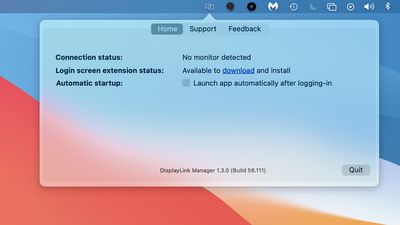
displaylink manager macos
DisplayLink Manager provides a convenient way to enable your DisplayLink dock, adapter, or monitor on macOS. The app combines DisplayLink's latest driver with features that streamline the setup of mutliple displays with up to 4K resolution. Version 1.3 of the app can be downloaded from the DisplayLink website, and requires macOS Big Sur 11.2 or any version of macOS Catalina, according to the release notes.

DisplayLink adapters have proven popular with M1 Macs, as they allow for multiple external displays to be connected. Officially, Apple says M1 Macs only support one external display (excluding the Mac mini, which can support a second display via HDMI).

Popular Stories

apple pro tell logo

Apple Launching Five New Products Today

Thursday November 5, 2026 12:59 am PST by
Apple is launching five new products on Friday, November 6, following pre-orders that opened last week, including its first touchscreen MacBook Pro models. The following new products will be available from today: iPad mini with OLED display and A20 Pro chip iMac with M6 chip 14-inch MacBook Pro with M6 chip 14-inch MacBook Pro with OLED touchscreen 16-inch MacBook Pro with OLED...
duo aquarium

More Fun iPhone Duo Apps: 30 New Picks to Try

Friday November 6, 2026 3:27 pm PST by
When the iPhone Duo launched, we shared a list of some of the fun apps developers created for the new form factor. Two weeks out, developers are continuing to come up with fresh ideas, so we thought we'd share some of our favorites. Games Marbles Unhinged ($2.99) - Marbles Unhinged is a marble maze designed for the Duo. When you fold it, the floor turns into a ramp. If you stand the top...
silver iphone 18 pro

Apple Rumored to Drop the iPhone's Action Button Next Year

Friday November 6, 2026 6:07 am PST by
Apple plans to merge the iPhone's Action button with the Camera Control starting next year, according to the leaker known as "Instant Digital." In a new post on Weibo, the leaker claimed that a single press of the combined button would open the camera, while a long press would trigger the function assigned to the Action button. They explicitly clarified that the dedicated Action button would ...

Top Rated Comments

75 months ago
I've been trumpeting the M1+DisplayLink combo a few times, might as well do it once more. In short, it's fantastic. Coming from an MBP16 + eGPU combo, it's so much more responsive overall. Completely silent. Nothing to eject, just pop the M1 off when done. Three ext monitors connected via one TB3 cable that includes power. One more TB3 port (and bus) free for other peripherals. Performs just as fast as a "real" GPU for my graphics/design-related workflows. Clamshell works fine. The native M1 app is just icing on the cake.

Trade-offs, which I consider minor compared to the upsides, are:
[LIST=1]
* Log in with Apple Watch doesn't work when ext monitors are active (due to screen recording API being active); it works when undocked in laptop mode.
* NightShift/Flux doesn't work on DisplayLink monitors, only on the primary 5k TB3 monitor that is direct-connected, and also works as a USB-C hub for DisplayLink daisy-chaining, for 2 more WQHD monitors.
* Can't think of #3.

I sold my 1-year old setup second hand and got enough money to get the M1, the dock, AirPods Max, and still had money left over. It's been 13 years since I had a Mac setup that worked as well as the current one does. That was a well-equipped "cheesegrater" Mac Pro with a 32" Cinema Display.
Score: 11 Votes (Like | Disagree)
Lestdog Avatar
75 months ago
Apple has totally dropped the ball on display support for m1 macs. I still can’t get 60hz on my benq 4K monitor.

If I were Intel, this is what I would be laughing at... "we at intel have cpu's that can actually make your monitor work"

Score: 9 Votes (Like | Disagree)
75 months ago
MST daisy chaining has been a feature of DisplayPort for several years now, yet Macs still do not have proper support for it. This does not appear to be a hardware issue because an Intel Mac that is booted into Windows can do MST with no problem. What is Apple's reason for continually refusing to include full support for MST in MacOS? Is it some petty attempt to "convince" people to buy Thunderbolt monitors?
Score: 8 Votes (Like | Disagree)
75 months ago
Everything Apple does indicates that they don't want users using external displays.

- They've refused to produce any for years save for a ridiculous $6k entry.
- They disabled Target Display Mode so people can't use high quality Mac displays as external displays anymore.
- They allowed M1 Macs to be gimped and did not prioritize multi display support.
Score: 7 Votes (Like | Disagree)
75 months ago

Apple has totally dropped the ball on display support for m1 macs. I still can’t get 60hz on my benq 4K monitor.

If I were Intel, this is what I would be laughing at... "we at intel have cpu's that can actually make your monitor work"

Almost a 100% sure you have a cable or adapter issue.

I have a 49" ultra wide Samsung screen running at 120Hz without issues. Make sure the adapter you are using is at least DP 1.2 (1.3 at least for 120Hz). Also make sure that the display port cable itself supports at least DP1.2. A display port 1.2 cable is backwards compatible but a DP 1.0 might not support the transfer rates needed for DP1.2+.

If you are using HDMI, you need at least an HDMI 2.0 adapter and an HDMI 2.0 cable (again, there are differences between HDMI cables for different revisions).

Also keep in mind that if you connect the adapter to an USB-C hub, depending on the hub, it might not have the bandwidth needed specially if you are using HDMI (USB-C tops at 10Gb/s and for 4k, 60Hz you need at least 14.93Gb/s - 8bit color - and 35.83 Gb/s for 120Hz). If the USB-C hub doesn't has 4 lanes for video you will be out of luck and even if it has 4 lanes of video it will drop the USB connection to USB 2.0 and only works using DP, not HDMI (I am not a 100% sure about this to be honest, but I think HDMI will not work).

So please try connecting the adapter directly to the machine (if you are not doing that) and check if you have the proper cables and adapters.
Score: 5 Votes (Like | Disagree)
entropys Avatar
75 months ago
I would just like Apple to do a MST driver. Enough with demanding thunderbolt monitors. There just aren’t many, and they cost too much, and thunderbolt to add an extra monitor makes no sense in an enterprise environment. Please allow multi display use over DP.

Like every other computer company.
Score: 5 Votes (Like | Disagree)
Latest Stories
Early Apple Black Friday Deals on Apple Watch, MacBook Air, and More
10 hours ago
'Backglow' Lets You Customize New MacBook Pro's Glowing Apple Logo
10 hours ago
Top Stories: Apple Product Launches, iOS 27.3 Beta, and More
17 hours ago
More Fun iPhone Duo Apps: 30 New Picks to Try
1 day ago
Hands-On With Apple's New OLED Touchscreen MacBook Pro
1 day ago
Apple Store With All-New Design Opening Soon in Southern California
1 day ago
Control the Glowing Apple Logo on Your New MacBook Pro
1 day ago
Apple Shares New 'Apple Card: Apply and Use in Minutes' Ad
2 days ago
Apple Says More Than 100,000 Apps Optimized for iPhone Duo, Here's What's Still Missing
2 days ago
Early Black Friday Deals Kickoff With Steep Discounts on Apple Watch Ultras and More
2 days ago
The MacRumors Show: iOS 27.3 Looks Like a Huge Update
2 days ago
Best Buy's Black Friday Event Begins With Sitewide Savings on Apple, TVs, More
2 days ago
Apple Releasing Yet Another Two New Products Next Week
2 days ago
MacBook Air Drops to Lowest Price in Months With Amazon's $250 Discount
2 days ago
Apple Rumored to Drop the iPhone's Action Button Next Year
2 days ago
Apple's Extended Return Policy Now in Effect for 2026 Holiday Season
2 days ago
Apple Music Classical Updated With New Icon and Refreshed Design
2 days ago
OLED iPad Mini, M6 iMac, and New MacBook Pros Available From Today
2 days ago
Apple Surveys iPhone Duo Buyers About Crease and Camera
2 days ago
Apple's First Touchscreen Mac is Now Arriving to Customers
2 days ago
Claude Gets Personal Finance Feature With Bank Account Linking
2 days ago
Apple Arcade Adds Crossy Road Rush and NBA 2K27
2 days ago
Apple's New HomeView Smart Home Hub: Here's How Much RAM It Has
2 days ago
iPad Mini vs. iPad Air Buyer's Guide: Now Just $50 Apart
2 days ago
First iOS 27.3 and macOS Golden Gate 27.3 Public Betas Now Available
3 days ago
Apple Announces a New Mac Sales Record
3 days ago
Paid $200 for Logic Pro? Apple Says You Won't Get This New Feature
3 days ago
Instagram's Edits Video Editor is Now Available on Mac
3 days ago
Prevent Siri and Search From Accessing Specific iPhone Apps
3 days ago
Best Early Black Friday Deals on iPhone 18 Pro and iPhone Duo
3 days ago









































