Brydge Brings Multi-Touch Support to Pro+ Keyboards, Debuts New 10.2-Inch Max+ Model - MacRumorsOpen MenuShow RoundupsShow Forums menuVisit ForumsOpen Sidebar
Skip to Content

Brydge Brings Multi-Touch Support to Pro+ Keyboards, Debuts New 10.2-Inch Max+ Model

Brydge today announced the upcoming launch of a new beta firmware update designed for the Pro+ keyboards, which launched last spring. The Pro+ keyboards feature integrated trackpads and came out ahead of when Apple added dedicated trackpad support to iPadOS.
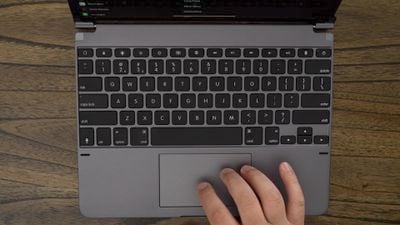
brydgeprotopdownkeyboard
The software available from Brydge adds native multi-touch capabilities and should much improve the trackpad experience of the Pro+ keyboard. We reviewed the keyboard back in March and found the trackpad to be inferior as it wasn't initially designed with Apple's integrations in mind.

According to Brydge, the firmware will bring a "natural" multi-touch experience, with the update available through the Brydge Connect app. Using the new beta firmware requires customers to have the iPadOS 14.5 update installed.

Brydge Pro+ keyboard users who want to try out the new firmware update can sign up on the Brydge website. The first 500 who sign up for the public beta will be able to access the firmware on February 24, while others will get access on March 3. For a limited time, Brydge is also offering up to 25% off on Pro+ keyboards.

Brydge today also announced the launch of the 10.2 MAX+ wireless keyboard case with trackpad, which is designed to work with the 7th and 8th-generation iPad models.

brydge max 10 2 keyboard
Priced at $130, the 10.2 MAX+ has a built-in native multi-touch trackpad and an integrated backlit keyboard, plus it offers full device protection. Brydge says that it is designed to combine the functionality of a Brydge keyboard with the protection of OtterBox. The 10.2 MAX+ can be pre-ordered from the Brydge website.


Tag: Brydge

Popular Stories

apple pro tell logo

Apple Launching Five New Products Today

Thursday November 5, 2026 12:59 am PST by
Apple is launching five new products on Friday, November 6, following pre-orders that opened last week, including its first touchscreen MacBook Pro models. The following new products will be available from today: iPad mini with OLED display and A20 Pro chip iMac with M6 chip 14-inch MacBook Pro with M6 chip 14-inch MacBook Pro with OLED touchscreen 16-inch MacBook Pro with OLED...
duo aquarium

More Fun iPhone Duo Apps: 30 New Picks to Try

Friday November 6, 2026 3:27 pm PST by
When the iPhone Duo launched, we shared a list of some of the fun apps developers created for the new form factor. Two weeks out, developers are continuing to come up with fresh ideas, so we thought we'd share some of our favorites. Games Marbles Unhinged ($2.99) - Marbles Unhinged is a marble maze designed for the Duo. When you fold it, the floor turns into a ramp. If you stand the top...
silver iphone 18 pro

Apple Rumored to Drop the iPhone's Action Button Next Year

Friday November 6, 2026 6:07 am PST by
Apple plans to merge the iPhone's Action button with the Camera Control starting next year, according to the leaker known as "Instant Digital." In a new post on Weibo, the leaker claimed that a single press of the combined button would open the camera, while a long press would trigger the function assigned to the Action button. They explicitly clarified that the dedicated Action button would ...

Top Rated Comments

Apple_Robert Avatar
75 months ago
That keyboard appears to add a lot of bulk to the iPad. If one doesn't really need to be portable, that may not be an issue. I like my Magic Keyboard profile better, even though it is a lot more expensive.


Score: 4 Votes (Like | Disagree)
75 months ago

That's great for existing customers, but surely the Magic Keyboard has killed the product? I'm surprised its taken this long to get the update to be honest as I remember us chatting about this when the Magic Keyboard was first announced.
Price. Also extremely useful function keys. It’s a great alternative.
Score: 3 Votes (Like | Disagree)
75 months ago
Touch screen with handwriting/drawing support... yes there is a reason....
Score: 3 Votes (Like | Disagree)
75 months ago
I bought the iPad magic keyboard during the recent $200 sale, and I've had it for almost a month now. Not sure why the Magic Keyboard is getting so much love. I could understand the preference when the Brydge keyboard didn't have as good of a touchpad. But if that's been fixed, the Brydge keyboard is definitely a more compelling option.

To be fair to the magic keyboard, the build quality is nice, and the touchpad is very good. But it's had some annoying drawbacks. For one, I keep on wishing that the keyboard allowed for more tilt. I instinctively keep on trying to tilt it further back, only to realize I'm not a laptop. It's not a problem when using it on a desk, but when I have it on my lap, it always seems like I'm looking down on the iPad at an angle; the screen is not perpendicular to my face. Also, though I knew going in that the Magic keyboard didn't have a row of function keys, I didn't realize how much I'll miss them (I had the Brydge keyboard for my iPad Pro 9.7", and it was always convenient having those keys there). It wouldn't have been a major problem if the OS had a bit more of universal keyboard shortcuts. For example, there is no shortcut for Siri, and it's annoying to always speak out 'Hey Siri'. You never know whether it'll pick it up, or your phone will. On the Brydge keyboard there is a dedicated Siri button (which was always useful on my previous Brydge keyboard). For basic functionality like volume control, you either have to extend your hand, or go to the control center, which obfuscates any video you are seeing. It's not the same has having dedicated keys on the keyboard.

The only reason I bought the magic keyboard is because I had read that it had the best trackpad experience, and that the brydge version wasn't as good. That seemed like a deal-breaker, so I didn't opt for the Brydge this time. Also, I had known that swiping from the bottom is not convenient on the Brydge (a problem, I had found irksome even with my previous Brydge keyboard). But after using the magic keyboard, I realized that this will never be a problem when you have a trackpad. On the magic keyboard, not once did I use to use the bottom-up swipe gesture cause you can just move the cursor down beyond the screen for it to mimic the swipe-up gesture. It's just more natural to use the touchpad than to extend your hand.

So, if in fact the touchpad on the Brydge keyboard has been improved to match the Magic Keyboard, I'm going to be returning the Magic Keyboard and will be buying the Brydge instead. Another potential benefit might be that (not sure yet), that I might be able to use it with a TPU cover that I have on my iPad Pro. Currently I have to take it out to use it with the magic keyboard.

To summarize the advantages of the Brydge keyboard -
1. Can tilt more than the magic keyboard
2. Has function keys
3. $40 cheaper at current sale price
4. Might be compatible with protective cover in place

Advantage of the Magic keyboard -
1. Back-side protection
2. Don't have to ever charge it
3. Attaching it magnetically is better than swiping the iPad into rubber holders

The magic keyboard advantages seem meager at best. The Brydge is not perfect either, but I'm willing to bet it's day to day use might be better than the magic keyboard.

Edit - from reviews it seems Brydge can't be used with an external cover.
Score: 1 Votes (Like | Disagree)
75 months ago

Erm....can a mac be used like a tablet?
Nope for those tasks I have an iPad Pro. Which even with a keyboard is a poor replacement for a laptop with its full file system and ability to run more powerful applications and a full shell. Two different devices for two different sets of tasks
Score: 1 Votes (Like | Disagree)
75 months ago
New Intel ad in 3... 2... 1...
Score: 1 Votes (Like | Disagree)
Latest Stories
Early Apple Black Friday Deals on Apple Watch, MacBook Air, and More
10 hours ago
'Backglow' Lets You Customize New MacBook Pro's Glowing Apple Logo
10 hours ago
Top Stories: Apple Product Launches, iOS 27.3 Beta, and More
17 hours ago
More Fun iPhone Duo Apps: 30 New Picks to Try
1 day ago
Hands-On With Apple's New OLED Touchscreen MacBook Pro
1 day ago
Apple Store With All-New Design Opening Soon in Southern California
1 day ago
Control the Glowing Apple Logo on Your New MacBook Pro
1 day ago
Apple Shares New 'Apple Card: Apply and Use in Minutes' Ad
2 days ago
Apple Says More Than 100,000 Apps Optimized for iPhone Duo, Here's What's Still Missing
2 days ago
Early Black Friday Deals Kickoff With Steep Discounts on Apple Watch Ultras and More
2 days ago
The MacRumors Show: iOS 27.3 Looks Like a Huge Update
2 days ago
Best Buy's Black Friday Event Begins With Sitewide Savings on Apple, TVs, More
2 days ago
Apple Releasing Yet Another Two New Products Next Week
2 days ago
MacBook Air Drops to Lowest Price in Months With Amazon's $250 Discount
2 days ago
Apple Rumored to Drop the iPhone's Action Button Next Year
2 days ago
Apple's Extended Return Policy Now in Effect for 2026 Holiday Season
2 days ago
Apple Music Classical Updated With New Icon and Refreshed Design
2 days ago
OLED iPad Mini, M6 iMac, and New MacBook Pros Available From Today
2 days ago
Apple Surveys iPhone Duo Buyers About Crease and Camera
2 days ago
Apple's First Touchscreen Mac is Now Arriving to Customers
2 days ago
Claude Gets Personal Finance Feature With Bank Account Linking
2 days ago
Apple Arcade Adds Crossy Road Rush and NBA 2K27
2 days ago
Apple's New HomeView Smart Home Hub: Here's How Much RAM It Has
2 days ago
iPad Mini vs. iPad Air Buyer's Guide: Now Just $50 Apart
2 days ago
First iOS 27.3 and macOS Golden Gate 27.3 Public Betas Now Available
3 days ago
Apple Announces a New Mac Sales Record
3 days ago
Paid $200 for Logic Pro? Apple Says You Won't Get This New Feature
3 days ago
Instagram's Edits Video Editor is Now Available on Mac
3 days ago
Prevent Siri and Search From Accessing Specific iPhone Apps
3 days ago
Best Early Black Friday Deals on iPhone 18 Pro and iPhone Duo
3 days ago








































