M1 Mac Mini Won't Wake Connected Displays, Some Owners Complain - MacRumorsOpen MenuShow RoundupsShow Forums menuVisit ForumsOpen Sidebar
Skip to Content

M1 Mac Mini Won't Wake Connected Displays, Some Owners Complain

Some customers who have purchased an M1 Mac mini have been experiencing an issue that causes the machine not to wake a connected third-party display from sleep.
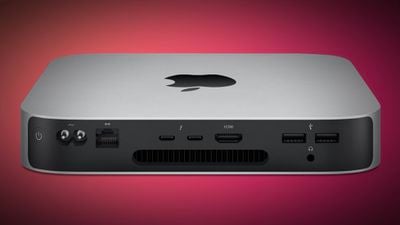
m1 mac mini vignette
This is not an issue that's affecting all ‌M1‌ ‌Mac mini‌ owners, but there are numerous complaints on the MacRumors forums and the Apple Support Communities dating back to November when the ‌Mac mini‌ was first released. MacRumors reader gooimac explains:

My M1 (8gb/256) Mac mini doesn't seem to want to wake my displays after its been sleeping. I have tried with 2 different displays with 2 different HDMI cables with the same thing occurring on each one. I am currently only using one at a time. I also noticed some pink squares/graphics glitches on the Big Sur boot/log in screen (with the coloured background, not the black and white boot up)

MacRumors reader Mike, who emailed us about the issue, has seen the same problems.

I have a new Mac Mini M1 with 16 GB of RAM running Big Sur 11.2.3 and every time the computer and screen go to sleep, the computer will not be able to wake the screen up.

Actually, I get "No Signal" displayed on the screen after the Mini wakes so technically the computer wakes the monitor but it fails to send a video signal. The screen is a 34" LG Ultrawide 4K Thunderbolt. It wakes fine with my 2018 MacBook Pro so there's nothing wrong with the display itself.

The only way I can get the Mini to send a signal to the display is to unplug and replug in the Thunderbolt cable. Sometimes repeatedly. Obviously, this is not an ideal solution.

This issue appears to be affecting a wide range of displays that connect over Thunderbolt, HDMI, and DisplayPort adapters, but there are also plenty of people who are having no issues at all.

It's not clear what the problem is, but Apple has been looking into one ‌M1‌ ‌Mac mini‌ display issue that causes strange pink squares to appear on displays connected to one of the machines.

Apple is aware of the issue, and there could be a fix in the works that's coming in a future update. One solution for now may be to disable the feature that puts the ‌Mac mini‌ to sleep, but that's not ideal. The other solution is to unplug and replug in a display that's not responding after a ‌Mac mini‌ wakes from sleep, but that too is an inelegant solution. There appears to be no other fix available at this time.
Related Roundup: Mac mini
Buyer's Guide: Mac Mini (Buy Now)
Related Forum: Mac mini

Popular Stories

iPad mini 7 Review Thumb 1 sans text

Apple Raises iPad and Mac Trade-In Values

Monday October 26, 2026 8:17 am PDT by
Apple today updated its U.S. trade-in estimates, raising maximum values across the iPad lineup and for most Macs following today's announcement of the new iPad mini. Every iPad category has gained value, although the increases are relatively modest. The iPad mini and standard iPad both rise by $20, while the iPad Air gains $15 and the iPad Pro increases by $10. The revised maximum estimates...
iPhone 18 Pro Pre Orders Feature Sans Text

Apple Now Sells DIY Repair Parts for iPhone 18 Pro and Two New Macs

Tuesday October 20, 2026 7:00 am PDT by
As reported by 9to5Mac, Apple is now selling parts for the iPhone 18 Pro, iPhone 18 Pro Max, new Mac mini with M6 and M5 Pro chips, and new Mac Studio with M5 Max and M5 Ultra chips on its self-service repair store in the U.S., Canada, and Europe. After ordering parts and tools, customers with the know-how can follow the steps in Apple's repair manuals for each of these devices, allowing them...


mac mini power button

Apple Says Mac Mini Assembly in U.S. to Begin Later This Year

Tuesday October 20, 2026 6:15 am PDT by
In a press release focused on its latest American Manufacturing Program commitments today, Apple reiterated that Mac mini assembly in the U.S. will begin later this year, with Foxconn expected to build the computer at a facility in Houston, Texas. In an interview earlier this year, Apple's operations chief Sabih Khan said that Mac mini units assembled in the U.S. would primarily serve the U.S. ...

Top Rated Comments

brdeveloper Avatar
73 months ago
The same happens with my 2018 Mini with Catalina. It's not a M1-only issue!
Score: 43 Votes (Like | Disagree)
anshuvorty Avatar
73 months ago
This isn't just a M1 Mac Mini issue, this also affects the M1 MBA, which I have. I have to disconnect my Thunderbolt dock connection and reconnect it and then the display works perfectly again.
Score: 19 Votes (Like | Disagree)
djc6 Avatar
73 months ago
I've had this problem for years with my 2018 mac mini, on anything connected to the HDMI port. Both the 2018 and M1 mac mini use the same MegaChips MCDP2920A4 DisplayPort 1.4 to HDMI 2.0 converter chip inside.
Score: 17 Votes (Like | Disagree)
CC77 Avatar
73 months ago
If it doesn't wake a third party display, and Apple no longer produces any first-party consumer displays (I'm not counting a $5K Pro Display XDR as "consumer") doesn't that mean....it doesn't wake any displays?
Score: 15 Votes (Like | Disagree)
!!! Avatar
73 months ago

My Intel based Mini, just today, would not show video on the TV hooked to the HDMI port. The TV kept saying 'No Connection'.

I had to hold the power button in to shut it down, then hit it again, and then I finally got video. Weird...
My 2018 Mini does this all the time, if I'm gone for 15-30 mins it won't reconnect to the display after I wake it. That's why I no longer turn the display off unless I'll be gone for more than an hour. Thanks Apple.
Score: 11 Votes (Like | Disagree)
PinkyMacGodess Avatar
73 months ago

The same happens with my 2018 Mini with Catalina. It's not a M1-only issue!
Mine too this afternoon. It's done it a couple times in the past month that I've had it. I've never had issues with earlier Minis I've had. I wonder if it's Big Sur?
Score: 8 Votes (Like | Disagree)
Latest Stories
Early Apple Black Friday Deals on Apple Watch, MacBook Air, and More
10 hours ago
'Backglow' Lets You Customize New MacBook Pro's Glowing Apple Logo
10 hours ago
Top Stories: Apple Product Launches, iOS 27.3 Beta, and More
17 hours ago
More Fun iPhone Duo Apps: 30 New Picks to Try
1 day ago
Hands-On With Apple's New OLED Touchscreen MacBook Pro
1 day ago
Apple Store With All-New Design Opening Soon in Southern California
1 day ago
Control the Glowing Apple Logo on Your New MacBook Pro
1 day ago
Apple Shares New 'Apple Card: Apply and Use in Minutes' Ad
2 days ago
Apple Says More Than 100,000 Apps Optimized for iPhone Duo, Here's What's Still Missing
2 days ago
Early Black Friday Deals Kickoff With Steep Discounts on Apple Watch Ultras and More
2 days ago
The MacRumors Show: iOS 27.3 Looks Like a Huge Update
2 days ago
Best Buy's Black Friday Event Begins With Sitewide Savings on Apple, TVs, More
2 days ago
Apple Releasing Yet Another Two New Products Next Week
2 days ago
MacBook Air Drops to Lowest Price in Months With Amazon's $250 Discount
2 days ago
Apple Rumored to Drop the iPhone's Action Button Next Year
2 days ago
Apple's Extended Return Policy Now in Effect for 2026 Holiday Season
2 days ago
Apple Music Classical Updated With New Icon and Refreshed Design
2 days ago
OLED iPad Mini, M6 iMac, and New MacBook Pros Available From Today
2 days ago
Apple Surveys iPhone Duo Buyers About Crease and Camera
2 days ago
Apple's First Touchscreen Mac is Now Arriving to Customers
2 days ago
Claude Gets Personal Finance Feature With Bank Account Linking
2 days ago
Apple Arcade Adds Crossy Road Rush and NBA 2K27
2 days ago
Apple's New HomeView Smart Home Hub: Here's How Much RAM It Has
2 days ago
iPad Mini vs. iPad Air Buyer's Guide: Now Just $50 Apart
2 days ago
First iOS 27.3 and macOS Golden Gate 27.3 Public Betas Now Available
3 days ago
Apple Announces a New Mac Sales Record
3 days ago
Paid $200 for Logic Pro? Apple Says You Won't Get This New Feature
3 days ago
Instagram's Edits Video Editor is Now Available on Mac
3 days ago
Prevent Siri and Search From Accessing Specific iPhone Apps
3 days ago
Best Early Black Friday Deals on iPhone 18 Pro and iPhone Duo
3 days ago