

Parallels 16.5 Can Virtualize ARM Windows Natively on M1 Macs With Up to 30% Faster Performance - MacRumorsOpen MenuShow RoundupsShow Forums menuVisit ForumsOpen Sidebar
Skip to Content

Parallels 16.5 Can Virtualize ARM Windows Natively on M1 Macs With Up to 30% Faster Performance

Parallels today announced the release of Parallels Desktop 16.5 for Mac with full support for M1 Macs, allowing for the Windows 10 ARM Insider Preview and ARM-based Linux distributions to be run in a virtual machine at native speeds on M1 Macs.
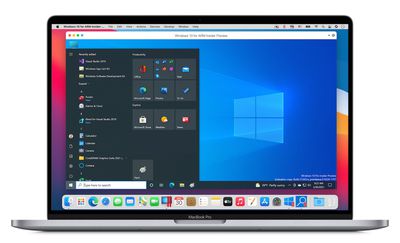
parallels windows 10 arm mac
Parallels says running a Windows 10 ARM Insider Preview virtual machine natively on an M1 Mac results in up to 30 percent better performance compared to a 2019 model 15-inch MacBook Pro with an Intel Core i9 processor, 32GB of RAM, and Radeon Pro Vega 20 graphics. Parallels also indicates that on an M1 Mac, Parallels Desktop 16.5 uses 2.5x less energy than on the latest Intel-based MacBook Air.

Microsoft does not yet offer a retail version of ARM-based Windows, with the Windows 10 ARM Insider Preview available on Microsoft's website for Windows Insider program members. The ability to run macOS Big Sur in a virtual machine is a feature that Parallels hopes to add support for in Parallels Desktop later this year as well.

Anyone with a Parallels Desktop 16 for Mac license can get an automatic update to Parallels Desktop 16.5 at no additional cost. Otherwise, one-time or subscription-based pricing options are listed on the Parallels Desktop product page, with Parallels currently offering 10% off most license configurations with code 2KQ-PTG-DYZ.

Note: MacRumors is an affiliate partner with Paralles. When you click a link and make a purchase, we may receive a small payment, which helps us keep the site running.


Popular Stories

iCloud iPhone 17 Pro

iPhone Users Who Pay for iCloud Storage Get Two New Perks on iOS 27

Thursday July 2, 2026 6:10 am PDT by
If you pay for certain iCloud+ storage plans beyond the 5GB that Apple offers for free, you will receive two more perks on iOS 27 at no additional cost. A summary of the two new iCloud+ perks on iOS 27:Increased daily usage limits for some new Apple Intelligence features, including image generation in the revamped Image Playground app. HomeKit Secure Video cameras receive generated video...
Apple Event Logo

Apple Just Released a New Product

Thursday July 2, 2026 8:04 am PDT by
Apple's first product release of summer 2026 occurred this week, but do not get too excited, as it is merely the Beats Solo Buds in a new color. Beats Solo Buds are now offered in orange through Best Buy in the U.S., with availability set to expand to 7-Eleven stores in Japan on July 4. Apple already offered orange Solo Buds in India for free with the purchase of an iPhone 15 or iPhone 15 ...
iPhone 4 on Black Feature

Apple Facing One of Its Worst Leaks Since the iPhone 4

Thursday July 2, 2026 9:53 am PDT by
Apple supplier Tata Electronics recently suffered a cyberattack that resulted in thousands of confidential files being published on the dark web, and this reportedly included some photos and documents related to the upcoming iPhone 18 Pro. We have elected not to share any of the leaked photos in this story due to the illegal nature in which they were obtained, but they can easily be found...

Top Rated Comments

68 months ago

I don't get the appeal.
If you need to run virtualized Windows, it's most likely you have a x86 application dependability. Windows 10 ARM will only execute x86 apps from the Windows store.
Here's my M1 MacBook Air, using Parallels to virtualize the ARM version of Windows 10, which is emulating an x86 version of an app that’s further emulating a PlayStation 2.

Attachment Image
Score: 50 Votes (Like | Disagree)
Phil A. Avatar
68 months ago

Can you not run windows 10 x86 normal iso under this on m1
No - it's virtualisation, not emulation
Score: 18 Votes (Like | Disagree)
Mr. Dee Avatar
68 months ago
I wrote an article on Microsoft Community about how setup the Windows 10 ARM Insider Preview in the Parallels Desktop Preview on M1; the article got over 15k in views and Microsoft promptly deleted it. So, I suspect they don’t condone this.
Score: 17 Votes (Like | Disagree)
cmaier Avatar
68 months ago

Can someone explain why it's impossible to emulate x86 on an M1 processor? VirtualPC was able to do it on a PowerPC processor.
Nobody said it’s impossible.
Score: 15 Votes (Like | Disagree)
Analog Kid Avatar
68 months ago


Here's my M1 MacBook Air, using Parallels to virtualize the ARM version of Windows 10, which is emulating an x86 version of an app that’s further emulating a PlayStation 2.
Otherwise known as the matryoshka rig.
Score: 14 Votes (Like | Disagree)
GubbyMan Avatar
68 months ago
Now I wanna see a comparison between the M1 Macbook Air and a Windows laptop running x86 applications.
Score: 14 Votes (Like | Disagree)














