

Bartender 4 Now Supports macOS Big Sur, Gains Menu Bar Spacing Options, Quick Reveal, and More - MacRumorsOpen MenuShow RoundupsShow Forums menuVisit ForumsOpen Sidebar
Skip to Content

Bartender 4 Now Supports macOS Big Sur, Gains Menu Bar Spacing Options, Quick Reveal, and More

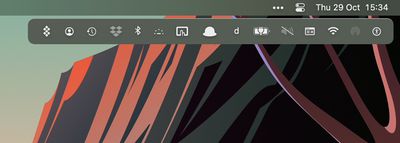
Surtees Studios has released Bartender 4 for macOS Big Sur, following extended testing in public beta. As well as macOS 11 support, the popular tool for rearranging or hiding Mac menu bar items now runs native on M1 Macs and comes with several new features and core abilities.
BartenderBar%402x
With Big Sur, Apple increased the space between menu bar items, which reduces the space available for icons. To alleviate this problem, Bartender 4 now allows users to revert to pre-Big Sur spacing or even use no spacing so to fit in more menu bar apps.

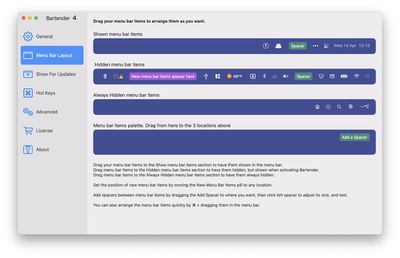
Bartender 4 also introduces menu bar spacers, which allow users to add spacers between groups of menu bar items that can either be just a configurable space, text, or even emoji, for grouping menu bar items into similar groups.
bartender 4 spacing
Meanwhile, there are new triggers for showing menu bar items, including image comparisons that show a menu bar item when it matches a particular state, and the ability to use scripts to show items, such as when VPNs or AirPods connect, for example. Other built-in triggers include showing the battery icon when on battery power and showing Time Machine during a backup.

With the new Quick Reveal feature, users can now also get instant access to hidden menu bar items by moving their mouse to the menu bar, or alternately by clicking the menu bar.

bartender 4 quick reveal
Elsewhere, there are improvements to Bartender's search function, which now sports a Spotlight-like interface with fuzzy search to very quickly find, show and activate menu bar items from your keyboard. It's also now possible to assign hotkeys to menu bar items to display them.

In addition, Bartender 4 introduces a new preferences screen to organize and order menu bar items, and choose where new menu bar items are placed.

Bartender 4 costs $15 after a free four-week trial, while upgrading users get a 50% discount. Bartender 4 is also featured in MacPaw's Setapp app store.


Popular Stories

macOS 27 on MacBook Pro

Apple Says macOS 27 Won't Be Compatible With These Macs

Wednesday June 3, 2026 8:29 am PDT by
During WWDC 2025, Apple revealed that macOS 26 Tahoe would be the final major macOS version for Intel-based Macs. macOS 27 will be compatible with Apple silicon Macs only, meaning that you will need a Mac with an M-series chip or a MacBook Neo with an A18 Pro chip in order to install the software update. Apple will unveil macOS 27 during its WWDC 2026 keynote this Monday, June 8, and the...
MacBook Neo on Yellow Feature

MacBook Neo is So Popular That Apple Reportedly Doubled Production

Wednesday June 3, 2026 9:24 am PDT by
On an earnings call in late April, Apple's CEO Tim Cook said that customer response to the MacBook Neo was "off the charts," and the popularity of the laptop has reportedly led the company to significantly boost production. Apple supply chain analyst Ming-Chi Kuo this week said he believes that MacBook Neo shipments to Apple were doubled from an initial target of 5 million units to 10...
iphone 18 pro blue%402x

iPhone 18 Pro: Dark Cherry, Light Blue, and Dark Gray Chassis Leaked [Update]

Thursday June 4, 2026 5:18 am PDT by
Update: Since publication, new information has come to light suggesting the images have been AI-manipulated and are not in fact iPhone 18 Pro chassis parts. The original article follows. The color options Apple is reportedly planning for the upcoming iPhone 18 Pro and ‌iPhone 18 Pro‌ Max have appeared online today in the form of images of chassis parts of unknown authenticity....

Top Rated Comments

Allards Avatar
67 months ago
i prefer hidden bar free and open source
https://apps.apple.com/us/app/hidden-bar/id1452453066?mt=12
Score: 15 Votes (Like | Disagree)
MrGimper Avatar
67 months ago
BT is in my bag of essential apps.
Score: 10 Votes (Like | Disagree)
67 months ago
I have tried other apps but none work as well as Bartender. And honestly, $15 is really affordable too. It's very disappointing though that Apple thinks users have no need for menubar management.
Score: 6 Votes (Like | Disagree)
67 months ago
I use Vanilla which is compatible with macOS Big Sur!

https://matthewpalmer.net/vanilla/
Score: 5 Votes (Like | Disagree)
67 months ago

What permissions do you have to grant this application in order for it to make adjustments to your menu bar?

I'm lacking any of the features of my Logitech MX Master mouse and G915 Keyboard because I refuse to give Logitech Software access to Keyboard input (all keystrokes), Accessibility controls (essentially everything) and Bluetooth (the only understandable request) which it incredible claims to be required for me to so much as use the side mouse button to go forward and back in my browser.
That’s like saying you refuse to give a browser internet access.

Just how do you expect it to do it’s job otherwise?

They need these because Apple have made that so.
Score: 3 Votes (Like | Disagree)
macsplusmacs Avatar
67 months ago
Worth every penny. No other options offer as much flexibilty.
Score: 3 Votes (Like | Disagree)














