Apple Adds New 'Hello' Screen Saver in macOS Big Sur 11.3 - MacRumorsOpen MenuShow RoundupsShow Forums menuVisit ForumsOpen Sidebar
Skip to Content

Apple Adds New 'Hello' Screen Saver in macOS Big Sur 11.3

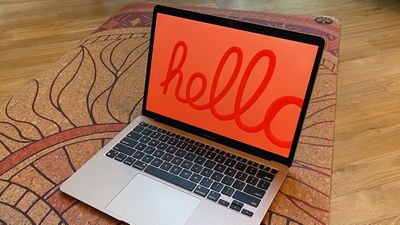
macOS Big Sur 11.3 includes a hidden "Hello" screen saver that appears to be designed for the new iMac models, but which can also be installed on any Mac that's running the 11.3 update.
hello screen saver 1
As outlined by 9to5Mac, the new screen saver is not available by default, but with a simple set of instructions, can be accessed on even non-M1 ‌iMac‌ machines.

hello 2
On a Mac running macOS Big Sur 11.3, follow these instructions:

  1. Open the System folder.
  2. Click on Library.
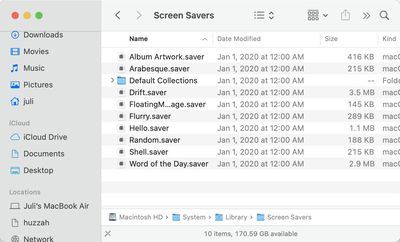
  3. Click on Screen Savers. screen savers system library
  4. Drag the "Hello.saver" file to the desktop.
  5. Rename the "Hello" file to something else.
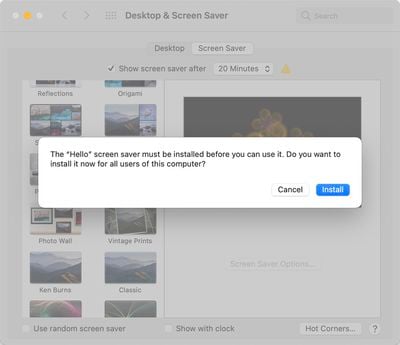
  6. Double click the file. hello screen saver
  7. Follow the instructions to install it.
From there, you should see the "Hello" screen saver added as an option in the list of Mac screen savers available in System Preferences > Desktop > Screen Saver > Screen Saver.
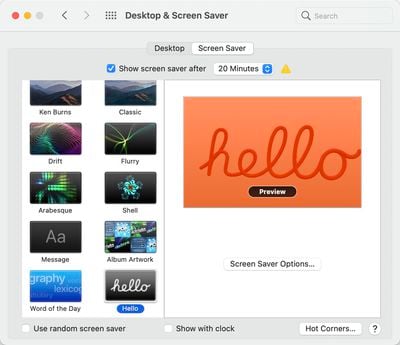
hello screen saver installed
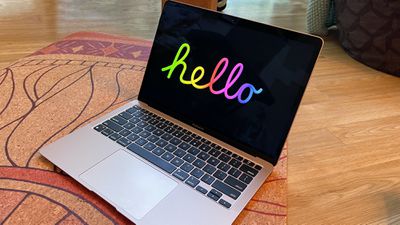
The Hello screen saver cycles through various colors, and there are several themes to choose from including "Soft Tones," "Spectrum," and "Minimal." Soft Tones uses the pastel colors introduced with the new iMacs and matching colored text, while Spectrum uses more saturated shades with lighter text. "Minimal" shows the "Hello" wording in black, white, and gray.
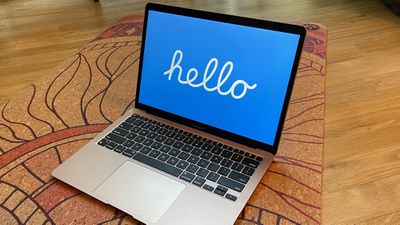
hello 3
By default, the screen saver will display "Hello" in multiple languages, but you can force it to use only your native language by toggling off "Show 'hello' in all languages in the Screen Saver Options.
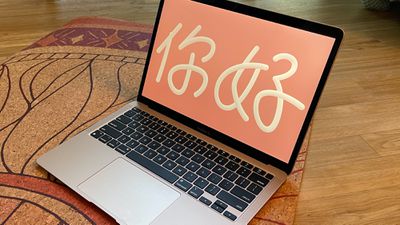
hello 4
A "match system appearance" toggle is also available for use to match light and dark mode preferences.


Related Forum: macOS Big Sur

Popular Stories

macOS 27 on MacBook Pro

Apple Says macOS 27 Won't Be Compatible With These Macs

Wednesday June 3, 2026 8:29 am PDT by
During WWDC 2025, Apple revealed that macOS 26 Tahoe would be the final major macOS version for Intel-based Macs. macOS 27 will be compatible with Apple silicon Macs only, meaning that you will need a Mac with an M-series chip or a MacBook Neo with an A18 Pro chip in order to install the software update. Apple will unveil macOS 27 during its WWDC 2026 keynote this Monday, June 8, and the...
MacBook Neo on Yellow Feature

MacBook Neo is So Popular That Apple Reportedly Doubled Production

Wednesday June 3, 2026 9:24 am PDT by
On an earnings call in late April, Apple's CEO Tim Cook said that customer response to the MacBook Neo was "off the charts," and the popularity of the laptop has reportedly led the company to significantly boost production. Apple supply chain analyst Ming-Chi Kuo this week said he believes that MacBook Neo shipments to Apple were doubled from an initial target of 5 million units to 10...
iphone 18 pro blue%402x

iPhone 18 Pro: Dark Cherry, Light Blue, and Dark Gray Chassis Leaked [Update]

Thursday June 4, 2026 5:18 am PDT by
Update: Since publication, new information has come to light suggesting the images have been AI-manipulated and are not in fact iPhone 18 Pro chassis parts. The original article follows. The color options Apple is reportedly planning for the upcoming iPhone 18 Pro and ‌iPhone 18 Pro‌ Max have appeared online today in the form of images of chassis parts of unknown authenticity....

Top Rated Comments

beanbaguk Avatar
67 months ago
The comments on here are hilarious! What a bunch of miserable people you are sometimes!!!

* Uses too much energy
* Not needed with modern VESA standards
* Too hard to find
* Too much disk space (1.1MB ROFL)
* Screensavers should be removed

Honestly people....lighten up. I thought it was pretty cool and what's more, I enjoy my aerial screen saver that probably uses up several GB's in videos but it brightens my day.

Also, in the hope that it makes you quiver, I have it running across 3 displays on my M1 MBP and it's glorious!

Eventually, however, after about 30 minutes, my system will go to sleep but I'm a big screensaver fan.

Have a lovely day!
Score: 20 Votes (Like | Disagree)
ErikGrim Avatar
67 months ago
Cheers. We haven't had a new screen saver in a while so this is a nice addition.
Score: 15 Votes (Like | Disagree)
adib Avatar
67 months ago
Nice. Too bad people will have to go through unnecessary complexities to activate this screen saver (which is already taking disk space anyway).

In any case, "screen savers" are really "screen killers" now ever since the CPU has the ability to turn off the monitor (VESA Energy Star standard). Ever since then, the best screen saver is "Put Display to Sleep".
Score: 13 Votes (Like | Disagree)
67 months ago
Now THIS is the kind of innovation we want from Apple! ;)
Score: 7 Votes (Like | Disagree)
diego.caraballo Avatar
67 months ago

In any case, "screen savers" are really "screen killers" now ever since the CPU has the ability to turn off the monitor (VESA Energy Star standard). Ever since then, the best screen saver is "Put Display to Sleep".

This! And let’s not talk about the huge waste of energy...
Score: 5 Votes (Like | Disagree)
sw1tcher Avatar
67 months ago
Apple should buy the rights to the After Dark screen savers from Infinisys. 😎
Score: 5 Votes (Like | Disagree)