Apple Releases tvOS 14.5 With New Color Balance Feature, Expanded Controller Support - MacRumorsOpen MenuShow RoundupsShow Forums menuVisit ForumsOpen Sidebar
Skip to Content

Apple Releases tvOS 14.5 With New Color Balance Feature, Expanded Controller Support

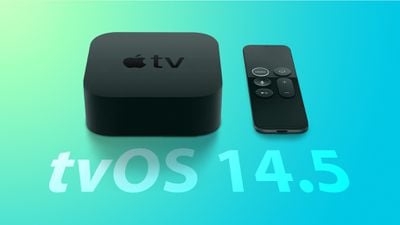
Apple today released tvOS 14.5, the fifth update to the tvOS 14 operating system that was released in September 2020. tvOS 14.5 comes three months after the release of tvOS 14.4.
tvOS 14
tvOS 14.5, which is a free update, can be downloaded over the air through the Settings app on the Apple TV by going to System > Software Update. ‌Apple TV‌ owners who have automatic software updates enabled will be upgraded to tvOS 14.5 automatically.

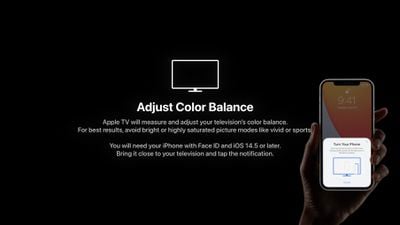
With the introduction of the second-generation ‌Apple TV‌ 4K, Apple announced a new Color Balance feature, which also happens to be available for existing ‌Apple TV‌ 4K and ‌Apple TV‌ HD models. Available by opening up the Settings app on ‌Apple TV‌, selecting Video and Audio, and clicking on "Color Balance" in the Calibration section, the new feature uses the iPhone's front facing camera to match the color shown on the ‌Apple TV‌ with industry standard specifications used by cinematographers.
apple tv color balance 1
With this data, ‌Apple TV‌ tailors video output to deliver more accurate colors and improved contrast with no need to adjust television settings. Color balance is available on all ‌Apple TV‌ models that run tvOS, and it can be used with tvOS 14.5 and iOS 14.5. Note that it does not work when Dolby Vision is enabled, and an iPhone with Face ID is required.

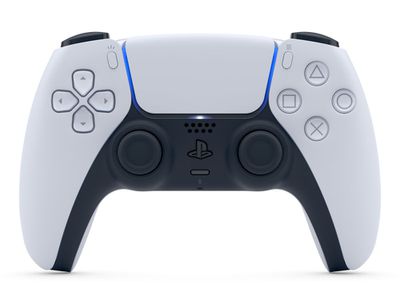
The tvOS 14.5 update adds support for the latest PlayStation 5 DualSense and Xbox Series X controllers, which can be used to play games from the tvOS App Store and Apple Arcade.
play station dualsense controller
Other new features include frame rate options of 29.97Hz and 59.94Hz instead of 30Hz/60Hz, an optional "Type to Siri" Accessibility feature that can be enabled, which mirrors the Type to ‌Siri‌ feature on iOS devices, a new option for choosing "Other Wireless Speakers" as the Default Audio Output, and tweaks to the Podcasts app to bring it in line with the changes introduced in iOS 14.5.

The release of tvOS will see Apple begin enforcing its new App Tracking Transparency rules, with developers now required to ask for and receive a user's permission to access their random advertising identifier (known as the IDFA) to track user activity across apps and websites for ad customization purposes.

Going forward, when an app wants to access a person's advertising identifier on tvOS, users will have a prompt with options to "Allow Tracking" or "Ask App Not to Track." Selecting "Ask App Not to Track" will prevent the app's developer from accessing the user's IDFA, and developers will also have to respect the user's tracking preference and refrain from using other invasive cross-app tracking methods.

With the update, customers in Austria, Ireland and New Zealand will also be able to use the ‌Siri‌ remote with their voice thanks to expanded access.

The main tvOS 14 update released in September brought expanded Picture in Picture support, new HomeKit integration with HomeKit Secure Video cameras, support for multiple ‌Apple Arcade‌ profiles, and more, with details available in our tvOS 14 roundup.

Related Roundup: Apple TV
Buyer's Guide: Apple TV (Don't Buy)

Popular Stories

General visionOS watchOS and tvOS Betas Feature Redux

Apple Releases Second watchOS 26.6, tvOS 26.6 and visionOS 26.6 Betas

Monday June 15, 2026 10:06 am PDT by
Apple today provided developers with the second betas of upcoming watchOS 26.6, tvOS 26.6, and visionOS 26.6 betas for testing purposes. The software comes three weeks after Apple seeded the first betas. The software updates are available through the Settings app on each device, and because these are developer betas, a free developer account is required. There's no word on what's in the...
f 5d631a2d7714517b0b0137e38aadf744d175cb3e

Apple Releases First iOS 27, iPadOS 27, and macOS 27 Betas to Developers

Monday June 8, 2026 11:40 am PDT by
Following the WWDC 2026 keynote event, Apple has seeded the first betas of iOS 27, iPadOS 27, macOS 27, watchOS 27, tvOS 27, and visionOS 27 to developers for testing purposes. Registered developers can opt in to betas and download the software through the Settings app on each device. The software includes many of the new features that were shown off earlier today, though some of what...
Apple TV 2025 Thumb 2 Sans Text

Apple Announces tvOS 27 With These New Features

Monday June 8, 2026 2:00 pm PDT by
Apple barely touched on tvOS 27 during its WWDC 2026 keynote today, but the update exists, and it adds some new features to the Apple TV. In a slide that was shown very briefly during the keynote, Apple revealed some of tvOS 27's new features and enhancements: A redesigned Podcasts app Smoother app launches and animations Faster AirPlay connectivity with other Apple devices Smart ...

Top Rated Comments

breather Avatar
68 months ago
I’m excited to try the Color Balance feature.

Update.
I tried it and it made the colors a bit warmer.
Score: 9 Votes (Like | Disagree)
TheYayAreaLiving 🎗️ Avatar
68 months ago
Happy iOs update day :)
Score: 4 Votes (Like | Disagree)
68 months ago

I've got 4k Doby Vision, so it's not needed (nor is it an option).
This is only true if you run the home screen in 4k dolby and if you do just stop.
Score: 3 Votes (Like | Disagree)
btrach144 Avatar
68 months ago

0-3 with this feature, said it couldn’t be done. 11 Pro & 2017 LG OLED. Not great!
That's because it already has a color graded Dolby Vision profile.

This feature really only works for non-DV televisions (basically only Samsung) or older 4k TVs (first 3-4 generations of 4k TVs).
Score: 3 Votes (Like | Disagree)
w5jck Avatar
68 months ago

Really? I have 4K dolby vision as well, but not the best tv, and was hoping this might be like getting a professional color calibration.
You cannot calibrate with the Dolby Vision option selected, but you can switch to another option and calibrate using it. The calibration won’t have any effect on Dolby Vision, but it does have an effect on the other options when you select them.
Score: 2 Votes (Like | Disagree)
vipergts2207 Avatar
68 months ago

I'm going to trust Doby and Sony and their ability to properly work with the software on the Apple TV to calibrate, rather than a nice parlor trick Apple created. I've tried the Apple solution and it's not great. Better than nothing but that's about it.
You should only be running DV when you’re watching content that is actually DV. Anything else is just the ATV doing it’s own conversion to DV with likely inaccurate results. That’s why you set the ATV to “match content” so it’s not doing fake HDR and allow it to set the appropriate dynamic range for the source material. Folks with DV on all the time should stop doing that (if they want a good, accurate picture) and run the new color balance feature in an SDR mode.
Score: 2 Votes (Like | Disagree)