Apple Explains Why 'Allow Apps to Request to Track' May Be Grayed Out on iOS 14.5 - MacRumorsOpen MenuShow RoundupsShow Forums menuVisit ForumsOpen Sidebar
Skip to Content

Apple Explains Why 'Allow Apps to Request to Track' May Be Grayed Out on iOS 14.5

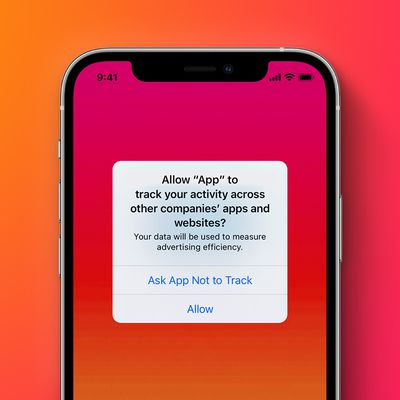
Starting with the iOS 14.5, iPadOS 14.5, and tvOS 14.5 software updates released this week, apps must ask for permission before tracking your activity across other companies' apps and websites for targeted advertising purposes.
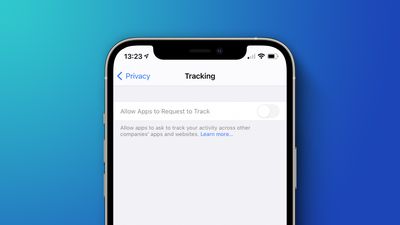
Allow Apps Request Track Feature
On an iPhone or iPad, users can manage tracking permissions on an app-by-app basis in the Settings app under Privacy > Tracking, and there is also an "Allow Apps to Request to Track" setting that applies to all apps. Each app that asks for permission to track while this setting is toggled off will be treated as if you tapped "Ask App Not to Track."

In a new support document, Apple said there are a few circumstances where the "Allow Apps to Request to Track" setting is grayed out, however, including:

  • For users with child accounts or under age 18 by birth year, signed in with their Apple ID
  • If your Apple ID is managed by an educational institution or uses a configuration profile that limits tracking
  • If your Apple ID was created in the last three days

9to5Mac previously reported that some users are still seeing the toggle grayed out even when the first two circumstances listed above do not apply to them, suggesting that there could be a bug or other issue going on. Apple has yet to respond to requests for comment.

Some users suspect there might be a correlation between the "Personalized Ads" setting and whether "Allow Apps to Request to Track" is grayed out.


On devices with the "Allow Apps to Request to Track" setting grayed out, all apps that request to track are denied permission by default and cannot access the device's random advertising identifier, known as the IDFA, according to Apple. Apps are also not permitted to track your activity using other information that identifies you or your device, such as your email address, although this policy is not enforced at a technical level.

Apple recently shared a video with more details about its new App Tracking Transparency requirement for those interested in learning more.

Related Forum: iOS 14

Popular Stories

generic tracking prompt orange

Apple Hit With $2.7 Billion Lawsuit Over App Tracking Rules

Thursday September 3, 2026 7:46 am PDT by
Apple is facing a £2 billion ($2.7 billion) lawsuit in London accusing it of imposing stricter App Tracking Transparency rules on third party developers than on its own advertising services (via Reuters). The case, filed at London's Competition Appeal Tribunal, follows a similar suit in which the tribunal ordered Apple to pay around £1.5 billion over App Store commissions last October, a...
iOS 27 Next to iPhone

Here's When iOS 27 Rolls Out Today in Every Time Zone [Update: It's Out]

Sunday September 13, 2026 3:00 am PDT by
Update 10:04 a.m.: iOS 27 is rolling out now, though it may take a bit for all users to see it, so keep checking! Apple is about to release iOS 27, which will finally deliver more advanced Siri AI capabilities as well as a variety of other refinements, improvements, and new features to iPhones. It's Apple's biggest software update of the year, and Apple announced at Wednesday's iPhone event...
iOS 27 Icon iPhone

iOS 27 Available Now With These 8 New Features

Monday September 14, 2026 9:00 am PDT by
Update — 10 a.m. Pacific Time: Apple has released iOS 27. During its iPhone 18 Pro and iPhone Duo event last week, Apple announced that iOS 27 will be released widely on Monday, September 14. iOS 27 should be available around 10 a.m. Pacific Time / 1 p.m. Eastern Time today via the Settings app, under General → Software Update. Below, we have highlighted eight new features and...

Top Rated Comments

AngerDanger Avatar
70 months ago

Who remembers the days pre ios7 when ios was so simple and intelligently designed nothing needed an explanation?
I too remember when iOS was so lacking in features that it didn't need as many explanations for those features.

One way to look at it is that if you want to use iOS 14.5 like you used iOS 6 and below, none of these preferences matter anyway because they're for features that didn't exist at the time.

Technically, iOS is just as simple but has added complexity for those who want it. :)
Score: 21 Votes (Like | Disagree)
cableguy84 Avatar
70 months ago
Who remembers the days pre ios7 when ios was so simple and intelligently designed nothing needed an explanation?
Score: 15 Votes (Like | Disagree)
70 months ago
none of the 3 points apply but it is still grayed out ;)

However personalized adds it turned off grayed out too
Score: 14 Votes (Like | Disagree)
70 months ago
As a developer, I've never liked disabling or graying out an option without explaining in the UI why it is disabled.
Otherwise you end up with issues like this that require press release, lol. Much easier to add text describing why it's disabled or not have the option appear at all.
Apple used to be good about this.
Score: 8 Votes (Like | Disagree)
NPC Compliant Avatar
70 months ago
Perfectly reasonable safeguards
Score: 7 Votes (Like | Disagree)
BvizioN Avatar
70 months ago

Who remembers the days pre ios7 when ios was so simple and intelligently designed nothing needed an explanation?
You most be referring to the dull/boring stitched-leather all over iOS versions! How much I do not miss these.
Score: 4 Votes (Like | Disagree)