

Apple Merging 'iCloud Documents and Data' Service With iCloud Drive in May 2022 - MacRumorsOpen MenuShow RoundupsShow Forums menuVisit ForumsOpen Sidebar
Skip to Content

Apple Merging 'iCloud Documents and Data' Service With iCloud Drive in May 2022

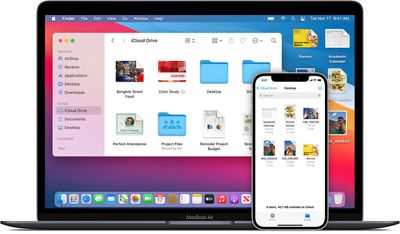
Apple plans to merge its iCloud Documents and Data service with iCloud Drive starting in May of 2022, according to a support document published late last week (via MacGeneration).
Mac-iphone-icloud
‌iCloud Drive‌ and ‌iCloud‌ Documents and Data share the fundamental ability to backup data from apps. However, ‌iCloud‌ Documents and Data was often a cumbersome, confusing experience. In contrast, ‌iCloud Drive‌ is more unified, with users able to access their files and content through the Files app across all their devices.

As Apple explains, starting in May of next year, users who are using ‌iCloud‌ Documents and Data will have their accounts automatically migrated to ‌iCloud Drive‌. However, users must manually enable ‌iCloud Drive‌ to view their files once the merger occurs.

In May 2022, the iCloud Documents and Data service, our former document synchronization service, will be interrupted and completely replaced by iCloud Drive. Therefore, if you use iCloud Documents and Data, your account will be migrated to iCloud Drive after that date.

If you use the iCloud Documents and Data service, you must activate iCloud Drive by following the steps below to view your files. Upgrading to iCloud Drive does not change the storage space used by your files saved in iCloud.

‌iCloud Drive‌ launched in 2014 as a unified, seamless way for Apple users to keep all their files, documents, and more synchronized across all their devices. To activate it, users on iOS or iPadOS devices can go to Settings -> ‌iCloud‌ and enable ‌iCloud Drive‌, or through System Preference -> ‌iCloud‌, and select ‌iCloud Drive‌ on macOS.

Popular Stories

Apple Card iPhone 16 Pro Feature

Apple Card Promo to Offer Free AirPods Pro 3

Friday May 15, 2026 8:59 am PDT by
Starting as early as next week, customers who sign up for an Apple Card at Apple's retail stores in the U.S. will receive $249 cash back when they purchase AirPods Pro 3, according to Bloomberg's Mark Gurman. The promotion has yet to be officially announced by Apple, so exact terms and conditions are not available at this time. AirPods Pro 3 are priced at $249 in the U.S., so customers who...
Apple WWDC25 iOS 26 CarPlay Light mode 250609

Six Popular iPhone Apps Now Available on CarPlay

Thursday May 14, 2026 9:10 am PDT by
Apple's CarPlay system for accessing iPhone apps on a vehicle's dashboard screen has received six popular apps in recent weeks: ChatGPT, Perplexity, Grok, Google Meet, WhatsApp, and the indie artist streaming platform Audiomack. Make sure you have the latest version of each app and they will automatically appear on CarPlay. ChatGPT Starting with iOS 26.4, CarPlay supports voice-based...
ipad mini 7 blue

OLED iPad Mini: Release Date, Pricing, and What to Expect

Thursday May 14, 2026 5:08 am PDT by
According to the latest rumors, Apple is close to launching its next-generation iPad mini. So what should we expect from the successor to the iPad mini 7 that Apple released over a year ago? Read on to find out. Processor and Performance Apple is working on a next-generation version of the iPad mini (codename J510/J511) that features the A19 Pro chip, according to information found in code...

Top Rated Comments

Aetles Avatar
66 months ago
In 2043 Apple will consider merging Apple ID accounts.
Score: 59 Votes (Like | Disagree)
66 months ago

In 2043 Apple will consider merging Apple ID accounts.
Honestly. Being stuck with two Apple IDs is the WORST user experience possible. Ironically, it's Apple's longest customers who are likely to have the 2 Apple ID Problem, and thus the most loyal have the worst experience.
Score: 35 Votes (Like | Disagree)
tomtad Avatar
66 months ago

I'm confused. I don't even know what "iCloud Documents and Data" is. Anyone can enlighten me?
It pre-dates iCloud Drive and is essentially cloud storage limited to individual apps.

As there was no Files app on iOS, lets say you created a new document in Pages on your iPad it would auto save in the app. iCloud Documents and Data then put the document in the cloud so if you opened Pages on your Mac you were given a list of documents saved and could continue editing, your changes are then auto saved back into the app.

It was intended to make things simple and fit the new apps paradigm of iOS. I want to play Music, I go to the Music app. I want to edit a document, I go to the Pages app.

The problem is it's very limiting, you can't create folders that have files from two apps etc, and it didn't interface with the file system on Mac making the whole thing confusing. Finally Apple gave in with this approach and allowed a file system on iOS along with iCloud Drive which lets create your own file system that can be accessed across all devices.

It still hangs around though. Create a Pages document and you get the option to save in the Pages app or in Files. You also get app folders that sit in iCloud Drive cluttering it up. Glad it's finally going away.
Score: 20 Votes (Like | Disagree)
chris4565 Avatar
66 months ago
I'm confused. I don't even know what "iCloud Documents and Data" is. Anyone can enlighten me?
Score: 18 Votes (Like | Disagree)
66 months ago
I’m confused. Is this about the weird mess where apps have their own folders in iCloud, separate from the Documents folders?

This was invented before file structures were accessible on iOS and I would be very happy if they went away. Saving files “inside” the apps was a horrible idea by Steve Jobs.
Score: 10 Votes (Like | Disagree)
videosoul Avatar
66 months ago
FINALLY!

The amount of times I've had to attempt to explain how iCloud works to people who are not tech-savvy has been unbearable. It was, in my opinion, always such n illogical system. Trying too hard to be clever and simplifying things, and as a result making it more confusing.
Score: 9 Votes (Like | Disagree)
















